Rating 4.3 out of 5 stars with 378 reviews
4.3- Print Quality (166)
- Ease of use (68)
- Paper Trays (25)
- Setup (14)
- Noise Level (11)
- Reliability (4)
Customer Images
The vast majority of our reviews come from verified purchases. Reviews from customers may include My Best Buy members, employees, and Tech Insider Network members (as tagged). Select reviewers may receive discounted products, promotional considerations or entries into drawings for honest, helpful reviews.
- Rated 5 out of 5 stars
Nice Printer
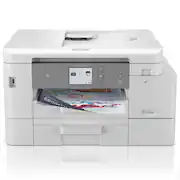
We usually purchase the cheapest printer, but since we don't use it every day the ink usually dried up. This time we opted to spend a little bit more for this Brother Inkvention model, which is supposed to have sealed ink tanks and keep from drying out. We haven't had it long enough to know if that feature was worth it yet, but the printing we've done so far has been excellent quality, both color and black. The printer is a nice compact size yet holds a lot of paper. It fits nicely on top of a small filing cabinet. The control panel angles out to make for easier reading. The printer was delivered in a timely manner, and Best Buy alerted us to a brief shipping delay. The set up was fairly easy for two "seasoned citizens"! The only confusion came with pairing the printer to our smartphone for wireless printing and we needed a password for our phone. After a search we learned how to find it and the wireless printing works well! We anticipate keeping this printer for the rest of our lives. If it continues to perform as well as so far, that should become a reality.
Posted by Kruss
- Rated 5 out of 5 stars
Great Brother Ink Jet
Purchased to augment my Canon Pixma and Brother laser printers. Probably the Best Buy and will use this printer as my primary. Excellent print quality and easy to setup. It has a large ink reservoir with individual tanks for each CMBY color, plus two paper trays large capacity. The touch screen menu is easy to use and understand. This printer is an excellent choice.
Posted by LarryC
- Rated 4 out of 5 stars
Great printer
I had the printer a month. So far I am very pleased with its performance. It’s easy to operate. Prints fast and only time will tell how long the ink cartridges last. I bought it for the longer life of a print cartridge.
Posted by Ringcamera
- Rated 3 out of 5 stars
Unhappy
I wouldn’t buy this again. It’s okay but I don’t feel like it’s worth the money. The printer doesn’t have a high quality print and it’s average to me. I make greeting cards and I wanted to get a good quality printer to back up my HP one. I only use the HP and every now and then the Brother. Also it has a message about some new software and I gave up trying to get it to install.
Posted by Bluecollar
- Rated 5 out of 5 stars
Excellent printer with 1YR of Ink included
I have owned several printers from popular manufacturers but have had two that stopped working recently after a fairly short period of time so I am looking forward to trying something new with expanded features. This is the Best Brother Printer I have used yet. With the trends of having Ink programs this comes with it which is better than some subscription models out there with other manufacturers. Unboxing & Physical Features: The printer comes extremely well packaged with thick boxing and Styrofoam inserts. Whether you are picking this up from the store or having it shipped, I don’t think you’ll have any concerns! The printer is solid and the perfect size for my use and space. I am a moderate user. I use the different features of an all-in-one printer but since I’m not utilizing if for anything particularly professional with high-volume, I don’t want it to take up a ton of space. So, I especially love that all the features that matter to me are packed into reasonable dimensions and the printer is not extremely tall. It fits perfectly in my desk credenza cabinet with only 11.25 inches of vertical space. I can get to the top document feeder and/or lift the top lid just enough to use it for scanning and copying. Also, everything can be accessed from the front! Most importantly, the ink loads right from the front so I wouldn’t need to take the printer out to load the ink! Also, the power cable is in the back, but extends from the left side. PERFECT for me because you can slide the printer back into the shelf without losing space or concern of smashing the cord. Setting up: This was a piece of cake. There are simple printed instructions but you can honestly just follow the prompts. Plug it in, load the paper, pop in the ink cartridges, check the alignment and you’re set! The ink cartridges are the simplest that I have ever had on a printer. With my previous printers, I had to pull them out of the shelf and open the whole unit to access the ink on the inside. With this one, you just flip down the front port and pop them in. They click in perfectly and extremely fast. BRILLIANT. It takes just a few minutes for the new ink to load and to do the recommended alignment. This is a standard process that my other printers had. If you’ve never done this before, it prints a test page that you place back on the scanner for it to check and self-adjust. I do not use a hardwired Ethernet cable or phone/fax line. So for me it was just finding the wifi, entering the password and it was on the network in seconds and ready to go. General Use: The printer has a small LCD full color touch screen on a panel that can be tilted for a better viewing angle. For me it is perfect because my printer cabinet is near the floor and I can tilt the panel up to see without having to get on the floor. The screen leads you to all the functions like scans/copying/sending to web apps/etc. and to adjust settings. The menus are intuitive and the layout is simple. It is not complicated or overwhelming. You can also download the app on your mobile device to check ink levels, adjust settings or print/scan/copy through the app. Pretty cool! This printer has 2 trays which combined should hold about 400 sheets (a whole pack is 500). This is an upgrade over my previous printer. Printer/Copier: Printing from from a laptop and mobile device is simple. Very short lag for warm up time and printing is fast and the printer is not too loud. The text comes out crisp and clear on standard settings. I have not tried photo printing but I did print a presentation including graphics and a photo and the colors turn out very clear and accurately reflect what I see on my computer/device screen. I’ve printed different documents from different applications and all have the same great results. My disclaimer is that I don’t have much experience in photo printing or extensive printing of significant color documents so I’m not able to comment on that. Copying is easy and the top document feeder is really nice to have. Since the overall form factor of this machine is modest, I don’t think the document feeder is intended for a huge stack of pages to copy but I believe it will work for most of my needs. Scanner: I tend to use this feature frequently on my printers. To scan and email, it was just a matter of entering my email addresses and it saves those for you for ongoing use. I’ve always relied on the scan to pdf approach and email and this worked without a hitch. However, there are other features like sending straight to your google drive, dropbox, Evernote, etc or even scanning to other file formats like word or power point. I will be experimenting with these features over time. Conclusion: I’m not sure how long the ink will last or the cost of the replacement cartridges and it seems that is always the unknown component of printers. However, for me this printer is excellent. You can set it up and use it right away, the size is right, the features are right and the quality meets all my applications.
Posted by KKCNIck