Outlet EventEnds Oct. 26. Limited quantities. No rainchecks.Shop now

Main Content
product image

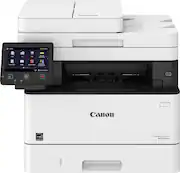
Canon - imageCLASS MF455dw Wireless Black-and- All-In-One Laser Printer with Fax - White

Model: 5161C005
SKU: 6516363
This item is no longer available in new condition. See similar items below
  • Key Specs
    • Networking: Wireless, Wired
    • ENERGY STAR Certified: true (Devices carrying the ENERGY STAR service mark, such as computer products and peripherals, kitchen appliances, and other products, generally use 20% to 30% less energy than required by federal standards.)
    • Printer Type: All In One, Fax
    • Duty Cycle: Up to 4,000 (The maximum number of pages per month that the device can produce without failing, as specified by the manufacturer.)
    • ISO Mono Print Speed: 40 pages per minute (The number of black ink (grayscale) pages able to be printed per minute in the device's default single-side mode, as tested by the International Standards Organization (ISO).)
    • Monochromatic/Color: Monochromatic
  • General
    • Brand: Canon
    • Model Number: 5161C005
    • Product Name: imageCLASS MF455dw Wireless Black-and-White All-In-One Laser Printer with Fax
    • Color: White
    • Display Screen: true
    • Display Screen Size: 5 inches
  • Dimensions
    • Product Height: 15.4 inches (The out of box height of the item. Height is measured as the vertical distance from the bottom of the item to the top as it would be primarily used or placed.)
    • Product Width: 17.8 inches (The out of box width of the item. Width is measured as the horizontal distance from one side of the item to the other as it would be primarily used or placed.)
    • Product Depth: 18.3 inches (The out of box depth of the item. Depth is measured as the distance from the front of the item to the back as it would be primarily used or placed.)
    • Product Weight: 35.8 pounds (The out of box weight of the item.)
  • Features
    • Automatic Document Feeder: true
    • Photo Printing: false
    • Automatic Reduction/Enlargement: true
    • Touch Screen: true (Touch-screen devices make navigating more intuitive. Using a touch-screen display, you can do things such as tap to select, hold and drag to move items, swipe to scroll, and pinch to zoom.)
    • Automatic Two-Sided Printing: true
    • Wide Format Printing: false (Machines with this function support printing on media with widths between 18 and 100 inches, such as posters, banners, canvases, and more.)
    • Wide Format Scanning: false
  • Connectivity
    • Wired Connectivity: USB-A
    • Wireless Connectivity: Wi-Fi (The manner in which a device sends data to another device over a short distance without the use of wires or cables.)
    • Minimum System Requirements: UFR II/PCL/PS: Windows® 7/Windows 8.1/Windows 10/Windows Server 2008/Windows Server 2008 R2/ Windows Server 2012/Windows Server 2012 R2/Windows Server 2016/Mac OS X v10.8.5 (or later)
  • Certifications Listings & Approvals
    • EPEAT Qualified: true (The Electronic Product Environmental Assessment Tool (EPEAT) was designed to provide an environmental assessment tool for purchasers. In order to qualify for EPEAT, a product must meet all 23 required criteria.)
    • EPEAT Level: Silver (The Electronic Product Environmental Assessment Tool (EPEAT) was designed to provide an environmental assessment tool for purchasers. In order to qualify for EPEAT, a product must meet all 23 required criteria. Products are rated Bronze, Silver or Gold based on how many of 28 optional criteria they meet (below 50%, 50%, 75%).)
    • TWAIN Compliant: true (Products with this label are compliant with standards set by the TWAIN Working Group for regulating communication between software and digital imaging devices. Devices that are TWAIN compliant are compatible for use with each other without requiring additional software, even if they have different capabilities.)
  • Paper Info
    • Automatic Document Feeder Capacity: 50 sheets
    • Maximum Document Length: 14 inches
    • Maximum Document Width: 8.5 inches
    • Supported Paper Sizes: Cassettes: Letter, Legal, Statement, Executive Custom (Min. 4.1" x 5.8" to Max. 8.5" x 14") Multipurpose Tray: Letter, Legal, Statement, Executive Envelope: COM10, Monarch, C5, DL Custom (Min. 3" x 5" to Max. 8.5" x 14")
    • Tray Capacity: 250
    • Media Weight (Minimum): 60 grams per square meter
    • Media Weight (Maximum): 120 grams per square meter
  • Ink
    • Compatible Cartridges: Canon 057
    • Ink Subscription Service Available: false (The printer monitors ink usage and alerts the subscription provider when levels are low. A purchased subscription provides refills of ink based on usage.)
    • Ink Cartridges Required: 1 x Black (The quantity and color of ink cartridges required for the printer to operate.)
    • Ink Cartridges Included: 1 x Black (The quantity and color of ink cartridges included.)
  • Copier Info
    • Copier Resolution (Black): Up to 600 x 600 (Refers to the number of pixels/dots, both horizontally and vertically, of the image produced by the copier in black ink. Generally, the higher the resolution, the sharper and cleaner the produced image.)
    • Maximum Number Of Copies: 999
  • Scanner Info
    • Duplex Scan Function: true
    • Scanner Resolution: Up to 600 x 600 (Refers to the number of pixels/dots, both horizontally and vertically, of the image produced by the scanner. Generally, the higher the resolution, the sharper and cleaner the produced image.)
    • Scanner Type: Flatbed, Sheetfed
  • Fax Info
    • Integrated Fax: true
  • Performance
    • Approximate Page Yield (Black): 3100
    • Printer Resolution (Black): Up to 600 x 600 (Refers to the number of pixels/dots, both horizontally and vertically, of the image produced by the printer in black ink. Generally, the higher the resolution, the sharper and cleaner the produced image.)
    • Recommended Monthly Volume: 750-4000 (The maximum number of pages that can be printed per month, as recommended by the manufacturer. Printing in excess of this number may reduce the machine's overall lifespan or print quality over time.)
    • First Page Out Time: 5 seconds (The time it takes the printer to print and deliver the first page in the output tray. May depend on the complexity of the copy being printed.)
  • Other
    • UPC: 013803341195

Designed for small and medium-size businesses, the imageCLASS MF455dw model balances speedy performance and minimal maintenance. The MF455dw is easy to set up and offers media versatility to print on a variety of media types and sizes, including envelopes, posters and more. The customizable, 5" color touchscreen delivers an intuitive user experience using Application Library. Produce crisp, bold documents with fast print speeds of up to 40 pages per minute1 using high quality Canon Genuine Toner 057 / 057 H. Use Poster Artist Online to create black-and-white professional-posters, banners and signage. The MF455dw offers an expandable paper capacity of up to 900 sheets, with a plain paper capacity of up to 250 sheets, 100-sheet multipurpose tray, and optional cassette AH1 which holds up to 550 sheets. The MF455dw has a 50-sheet duplex (one pass, 2-sided) automatic document feeder. Easily connect and print through high-speed USB, Ethernet, or wirelessly from computers or mobile devices. Print using a variety of mobile apps, including the Canon PRINT Business app2 using your compatible mobile device. The MF455dw comes with a 3-year limited warranty3and is backed by Canon's Service and Support network.

  • Prints up to 40 ISO ppm* in black: Produces documents quickly.
  • Ideal for high-volume printing: This laser printer handles large volumes fast and at a low cost per page. Toner (powder) is used instead of ink, so you get smudge-free images and text.
  • Wireless and mobile printing capability: Connect this printer to your home or office network with built-in Ethernet or wireless LAN. Plus, print from your mobile device with free Canon PRINT Business or Apple AirPrint.
  • Tablet and smartphone printing: Print and scan from your compatible mobile device through the free Canon Print Business app.
  • 600 dpi (dots per inch) for good print quality: The sufficient resolution allows producing high-quality documents and photos.
  • Customizable 5" color touchscreen: Easily access the features you use the most with Application Library. Application Library's Cloud App feature also supports cloud storage directly from an external webpage.
  • imageCLASS 057 toner: Provides up to 3,100-page yield in black. An optional imageCLASS 057 high-capacity toner yields up to 10,000 pages.
  • Prints up to 40 ISO ppm* in black: Produces documents quickly.
  • Ideal for high-volume printing: This laser printer handles large volumes fast and at a low cost per page. Toner (powder) is used instead of ink, so you get smudge-free images and text.
  • Wireless and mobile printing capability: Connect this printer to your home or office network with built-in Ethernet or wireless LAN. Plus, print from your mobile device with free Canon PRINT Business or Apple AirPrint.
  • Tablet and smartphone printing: Print and scan from your compatible mobile device through the free Canon Print Business app.
  • 600 dpi (dots per inch) for good print quality: The sufficient resolution allows producing high-quality documents and photos.
  • Customizable 5" color touchscreen: Easily access the features you use the most with Application Library. Application Library's Cloud App feature also supports cloud storage directly from an external webpage.
  • imageCLASS 057 toner: Provides up to 3,100-page yield in black. An optional imageCLASS 057 high-capacity toner yields up to 10,000 pages.
Whats Included
  • MF455dw Product
  • Canon Genuine Toner 057 Standard
  • Power Cord
  • Telephone Cable
  • User Software DVD-ROM
  • MF455dw Product
  • Canon Genuine Toner 057 Standard
  • Power Cord
  • Telephone Cable
  • User Software DVD-ROM

Q: Does this printer use Apple Air Print? (And does Air Print still work on it with ioS 17?)

A: This printer does NOT wake from sleep for any Apple device. You have to physically walk over and hit the screen to make it wake up. I've tested on iPad, Iphone, Sonoma, and Sierra. Same thing. Also does it with Windows 10. Very annoying and I tried all the fixes I could find online to no avail. Do not buy this printer if you expect it to just work like most every other printer in the world. This seems to be well documented by several people calling Canon (do some searching online) and they act like they are clueless. What a waste of time. I'm getting rid of the one I bought a year ago that only has 200 copies on it, I can't abide this nonsense any longer.

Q: Does it scan in color?

A: collor images converted to greyscale

Q: Does it work with Apple laptop

A: Yes. I have a MacBook Air and it works great through Wi-Fi.

Q: Some fax machines need a POTS line to work, while others will work over an Ethernet connection. Which is this?

A: Either setup will FAX perfectly! Canon Support is great and will send you a Test Fax back from your Test FAX!

Q: How many copies does the starter toner cartridge deliver, or is it a full cartridge? Thank you in advance for your kind reply.

A: This printer came with Standard Canon original printer good for almost one year or more printing needs this is all based on the individual preferences or their business needs. The Canon included many items already to go (Canon Genuine Toner 057 Standard (3,100 Yield, ISO / IEC Standard) but prior to check out Best Buy customers have options to upgrade for advance more printing usage on Canon Genuine Toner to save money, times and energy it's highly recommended as well. Prior to purchasing, I spent good amount of time researching for the best model with the best affordable pricing hoping to experience overall best experiences with new Canon printer since a family who owned similar Canon model MF424 running and working in excellent conditions makes me so proud and owned my own Canon printer all the way,,, Many years ago, these Canon printer was selling over $799- $900 which it's too expensive to buy it even when it's on sale or at discounted prices. They also highly recommended to me to experience overall best performances plus possibly keeping this Canon printer for a longer usage life, it's best only to buy genuine Canon products, and toner cartridges was the suggestion it was noted... I'm very much looking forward to keeping this Canon printers, using with joy and fun way to experience with easy access, affordable pricings, plus to have best shopping experiences with Best Buy. 10/10 ratings w/two thumb up. ha ha Have fun & enjoy your life/Canon printer.