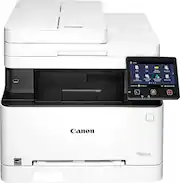
Rating 4.3 out of 5 stars with 1845 reviews
4.3- Print Quality (819)
- Ease of use (326)
- Price (72)
- Setup (60)
- Size (73)
- Connectivity (64)
- Noise Level (60)
- Scanning (30)
- Weight (28)
Customer Images
The vast majority of our reviews come from verified purchases. Reviews from customers may include My Best Buy members, employees, and Tech Insider Network members (as tagged). Select reviewers may receive discounted products, promotional considerations or entries into drawings for honest, helpful reviews.
- Rated 3 out of 5 stars
Broke down in less than 3 years
Our household doesn’t print stuff regularly. We usually go for weeks or months without printing anything, then go for bursts of 100-200 pages. We don’t print photos but printing colored is a must. I had an old Brother B&W printer (bought used) and it had served me well for 3 years so I decided to skip those Ink printers and just splurge for a colored laser printer. Luckily these went on sale so I was able to get it for almost half the price, otherwise I wouldn’t buy one. Toners - well they always cost a lot (usually around $50 per color), but they print a lot of stuff. High yield would get you around 1000+ pages so it’s worth the price. Make sure you don’t get remanufactured ones because it can damage your expensive printer. Printing is fast and smooth. Has duplex printing as well. Printing images are not as on point as inkjet but it prints them really fast. Not something you’ll frame but it’s perfect for like PowerPoint slides and some notes. Scanning is a godsend on this printer. I never knew I needed one until I had this. Has a document feeder so it makes scanning a breeze. No back to back scanning though but there’s a software for that. Printer’s touchscreen is kinda meh, wish they used a more responsive panel or just went with actual buttons instead. Kinda makes copying through the printer a chore. Reason it got 3 stars from me is it started making weird noises and black streaks that no amount of cleaning will fix on the 2nd year of ownership. Started happening when we moved the printer due to rearranging our office room. It was still under warranty but it’s not easy to claim with Canon. You have to bring the printer to a service center, they’ll check it, and give a verdict if they will cover it. Luckily I had a GeekSquad replacement plan. I got it replaced and got another replacement plan for the new one, and so far it hasn’t failed me….yet.
Posted by Randall
- Rated 4 out of 5 stars
Great quality printing, features not clear
This printer was easy to set up. My Mac identified it instantly and could print right away. I needed to download the driver for my PC. Prints straight from email files on my iphone or from a jump drive easily. Really nice functionality. I printed address labels effortlessly. 2 things I don’t like: 1) you can’t use a wireless and wired connection at the same time. So if you want to print from a wireless connection, you have to unplug the USB. It is either/or. Just an annoying extra step. 2) it does not duplex copy. So if you want to make two-sided copies, you have to scan them and then print them manually. The duplex printing feature is nice though, I just assumed that it would duplex copy as well, but I understand that’s only available the next model series up. Overall, I really like the printer and am happy I bought it.
Posted by LadyBoone
- Rated 4 out of 5 stars
Works well, good value
Bought this printer because for the price point (especially on black friday) and feature-set, other options simply didn't compare for value. We use it for making simple color product labels and miscellaneous infrequent printing and scanning. It was fairly easy to setup and works well. The duplex printing is nice. Wireless/Airprint support out of the box made connecting to it in my house a simple affair. There are ample administrative options in the printer's web UI, to make the most of its features (ldap, user management, smb destinations, email, etc...), though not all options are intuitive. I have printed a color photo just to see how it would do. It's no photo inkjet, but it did better than I expected.
Posted by AlexK
- Rated 5 out of 5 stars
Love the sound of a laser printer in the morning.
There's a reason I stopped buying inkjets years ago, they all eventually fail, the ink runs if wet and the print heads constantly clog. Sure enough my 2 year old Epson inkjet workstation started to fail and was burning through ink like it was going out of style. I should have known better, I've always bought lasers. Welcome the Canon imageCLASS Color Laser All in One. This thing is a beast! Easy out of the box, it's not light in weight, takes up average size amount of space. I setup mine up on our WiFi network through my Macbook Pro. It comes with a CD to install your drivers, amazing anyone still ships CDs, thank goodness I have a drive. After that it was just about connecting the printer to the wireless network and it was done. Easy, took about 5 minutes. When this thing fires up you know you're in business, none of that wimpy inkjet stuff, no more runny inks. For a laser this one is pretty quiet, you hear it, but it's nothing out of the ordinary and is kind of pleasant because you know you're getting things done. I've been sending signage wirelessly to print with no problems, quality is crisp and clean and as vivid as any pro color laser, no breaks or pattern lines in solid color fills. There's only one main tray for paper, it holds a pretty thick stack. For printing on thicker paper it's a single sheet feeder right above the main tray on the front. So you send something to print, choose multi-drive tray and insert your thick stock, label sheet or whatever. It works pretty well, I did get a couple paper jams using thick stock, fairly easy to remedy and the onboard screen tells you how to fix it. Otherwise the jams have been pretty rare utilizing different thick stocks. It powers down fairly quickly after printing and goes into sleep mode. No problems sending prints while it's sleeping, wakes up shortly after processing. This printer is pretty awesome for the price, better get yourself one.
Posted by SamPham
- Rated 4 out of 5 stars
Great printer but should scan 2 sided
Great Printer, Works well with my network, easy to setup, toner is not 'too' expensive compared to other models. Only bummer is that the doc feeder only scans one sided.
Posted by Andrew