Rating 4.5 out of 5 stars with 31 reviews
4.5- Scan Quality (16)
- Ease of use (10)
- Size (6)
- Speed (5)
- OCR (3)
- Software (3)
Customer Images
The vast majority of our reviews come from verified purchases. Reviews from customers may include My Best Buy members, employees, and Tech Insider Network members (as tagged). Select reviewers may receive discounted products, promotional considerations or entries into drawings for honest, helpful reviews.
- Rated 5 out of 5 stars
Finally what I needed.
Got this workhorse just in time for tax season. It is compact and easy to use. It was very well packaged and arrived in excellent condition. It is my first stand alone scanner. I have an all in one printer-scanner-fax that is super cumbersome to scan documents with. This is dream. The Pros: Easy set up Direct connect Handles different paper sizes in same scan pile Single or double sided scans Necessary cables provided Reliable Cons: No wifi (for me this was not a con, but possibly for some) Pricy Set up was a breeze. Intuitively you will be tempted to plug it into your computer first. Don't. You must access the website and download the software first. After that, you are all set to plug and go. There are options for single or double-sided scans, correcting the orientation of the document, and where to save it, etc. The price would easily be worth it for a business setting. You can scan driver's licenses, do double sided scans, no problem. For home use, this is expensive but is super fast in its feed and dependable, so you get what you pay for. I did scan several things together and one page had a sticky note on it (intentionally). This made the scanner send me an error message thinking it did a double feed. The pages froze and I canceled the scan. Next, I popped open the scanner to easily remove the pages. This showed me jam would be easy to correct, not that I see this thing jamming, it's very intuitive.
Posted by PickyPants
- Rated 5 out of 5 stars
The best home scanner I’ve ever used
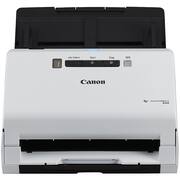
I’ve used several scanners for my home office. I’ve had portable ones for my laptop, and some good sized all-in-one’s for my desktop. I was very happy for this Canon image FORMULA R40 Office Document Scanner as I needed one with the features that are built in. After a few weeks of using it, here are my thoughts to why I feel this is the best home scanner I’ve ever used: Set-up: Once you open the box, you are met with a really small device compared to the box. Before powering it on, you are required to download the software from the website. You will have to unzip them so you do need a unzip program on your computer to open these files once downloaded. Attaching the paper tray to the back and plugging it to your computer was too easy. Speed: The R40 easily scanned 22 pages in seconds and with high quality. These were both B&W and colored pages and saved them in one document. I was thrilled to see how fast it did this project. According to Canon, it can scan 40 pages in a minute and can hold up to 60 pages in the drop tray. My 22 page document had mixed paper weights of 20lb and 24 lb, and it easily fed and scanned them in under 30 seconds. Image Quality: This is where the R40 really shines. You have several features that really help set up your documents in an orderly and same fashion. As former military, I appreciate things to be dress-right-dress. The R40 allows you to scan all documents in the same upright position. Meaning, if you are scanning several documents, and some of those documents are either upside down or side-ways, when scanned they will all face the same direction. Even documents that are different sizes (i.e. ID cards or credit cards), this will scan them and adjust the direction. Also, it has a feature called “DESKEW” where if a document was fed crooked or if the print was already crooked, then it will correct it when scanned to be straight. Amazing feature! Also it can easily scan double-sided documents at the same time where you don’t have to feed it twice to scan both sides. Also, if scanning a large document that contains blank pages, it will scan and remove the blank pages from the final scan. I think that is absolutely brilliant! Design: the R40 is an off-white shell with very minimal buttons on the top. You are met at the very top with the power button that glows blue. Directly below that, are the primary buttons you need to scan: Job Select, Start, Stop and DFW. Overall, this is a great device and easy to use, scans amazing quality and can seamlessly adjust all your scans to face the same direction. Although it does not have wireless ability, it is still a highly able device that just takes seconds to connect to your computer. Again, this is the best home scanner that I’ve used. Highly recommend for any home office.
Posted by APFLORES413
- Rated 5 out of 5 stars
Fast double-sided scanning
With this Canon R40, you can do more scanning in less time and organize all your documents into digital format, resulting in less stress finding documents. This device makes it extremely easy to convert a lot of documents into high-quality digital format. I removed all protective shipping packaging/tape from the machine and connected the power cord. Next, I went online to download the software from Canon’s website for this specific scanner. I followed the installation wizard, connected the machine to my laptop using the included USB cable, and completed the setup. It took me about 12 minutes. What makes this efficient is the capability of doing double-sided document scans at the same time. It handles very well, mixed-size documents properly without getting paper jammed. All documents get saved to the appropriate digital size; if it is a receipt, it gets saved as a small document size. It rarely happens, but when the document gets scanned twisted, the software programs align it correctly. For personal and businesses, I use an expense management system software to help manage finances, so scanning receipts is my primary use of this scanner. It does an excellent job at different scanning sizes of receipts, and I haven’t experience paper jamming. It does very well handling even thin and light receipts. The receipts get filed as JPG in the appropriate destination. Compared to multi-purpose printers with scanners, the speed of this scanner is impressive even with double-sided scanning. Note that this is not a wireless device and it uses an USB cable (included) to connect to a computer. Overall, the scanning quality is excellent; it is straightforward to use and makes document filing less stressful.
Posted by SimpleLiving
- Rated 4 out of 5 stars
Nice way to get rid of clutter
I am a saver. I have files going back years that I am reluctant to get rid of "just in case". This is a great way to clear out much of that clutter and save things digitally. The scanner is easy to set up and with the proper program installation, it was up and running quickly. It scanned double-sided easily but the second side was upside down. I thought the description said that it would correct upside-down pages but this did not. I might be incorrect about that ability. I have been able to clear out an entire file drawer. Many items just needed one page scanned to give me account information. It handles a combination of different sizes easily as well. You do need to distinguish between files- if you put a big stack of different papers, it will see it as one file unless you tell it otherwise. I am getting used to all these aspects of the unit. I do plan to scan and store things I need to save as I receive them now and no longer hang on to paper copies of all my documents.
Posted by CTmom
- Rated 5 out of 5 stars
A Great Help With Paperwork and Keeping Records
Canon - imageFORMULA R40 Office Document Scanner I always wanted a personal scanner for bills, receipts, business cards among other things that can digitally store on my computer. The scanner only takes up a square foot of space on my desk. The setup was very easy. I downloaded the driver onto the computer and then connected the scanner to the computer. The document rolled through the feed with ease and I scanned several different sizes of documents. You can scan one or multiple documents at a time. Once finished scanning the program allows you to choose where it saves them on the computer. The images were sharp and clean. It scans in black and white or color. I scanned pictures and they were very close is sharpness to the original. The time it saves and the assurance of important documents on record makes this a great addition to our home office.
Posted by ERN52