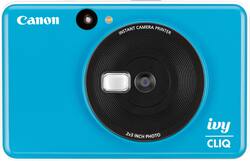
Canon - IVY Cliq Instant Film Camera - Seaside Blue
- Key Specs
- Instant Film Compatibility: Zink print paper
- Autofocus: true (Allows the camera to automatically focus through the lens, rather than by adjusting the lens manually.)
- General
- Brand: Canon
- Model Number: 3884C003
- Product Name: IVY Cliq Instant Film Camera
- Color: Seaside Blue
- Compatibility
- Instant Film Compatibility: Zink print paper
- Dimensions
- Product Width: 4.8 inches (The out of box width of the item. Width is measured as the horizontal distance from one side of the item to the other as it would be primarily used or placed.)
- Product Height: 3.2 inches (The out of box height of the item. Height is measured as the vertical distance from the bottom of the item to the top as it would be primarily used or placed.)
- Product Depth: 0.9 inches (The out of box depth of the item. Depth is measured as the distance from the front of the item to the back as it would be primarily used or placed.)
- Product Weight: 0.4 pounds (The out of box weight of the item.)
- Included
- Batteries Included: true (Indicates whether the product comes with the required batteries for its operation.)
- Film Included: true
- Exposure Control
- Flash Range: Not Available (The greatest distance or range of distances at which light from the flash can illuminate a subject.)
- Autofocus: true (Allows the camera to automatically focus through the lens, rather than by adjusting the lens manually.)
- Performance
- Instant Print: true
- Self Timer: false
- Shutter Speeds: Not Available (The length of time the shutter remains open when the shutter release is activated, expressed in fractions of seconds. The longer the shutter is open, the more light that is able to be captured by the camera sensor.)
- Power
- Battery Size: Battery pack (The battery size required for operation.)
- Features
- Automatic Flash: true
- Other
- UPC: 013803321579
Take and print digital photographs with this Canon IVY Cliq instant camera printer. The 5MP camera captures high-resolution images, while the built-in flash brightens low-light subjects. The microSD slot provides up to 256GB of extra storage space. This Canon IVY Cliq instant camera printer produces photos in less than 50 seconds, letting you share shots quickly.
- Instant 5.0MP photos: Canon IVY Cliq is a small and fun instant camera and mini photo printer that can fit in your pocket so you can take it anywhere.
- Small selfie mirror with LED flash: Lets you take great-looking selfies.
- 2" x 3" format photos: Water- and tear-resistant, smudge-free ZINK photo paper with sticker back allows you to take fun photos and then stick them everywhere.
- ZINK photo paper: ZINK stands for Zero Ink printing technology. Instead of ink, it uses colorful dye-based crystals embedded inside the paper. The ZINK-enabled device uses heat to activate and colorize these crystals.
- MicroSD card slot: You can save your photos to a microSD card (sold separately) for later use.
- Instant 5.0MP photos: Canon IVY Cliq is a small and fun instant camera and mini photo printer that can fit in your pocket so you can take it anywhere.
- Small selfie mirror with LED flash: Lets you take great-looking selfies.
- 2" x 3" format photos: Water- and tear-resistant, smudge-free ZINK photo paper with sticker back allows you to take fun photos and then stick them everywhere.
- ZINK photo paper: ZINK stands for Zero Ink printing technology. Instead of ink, it uses colorful dye-based crystals embedded inside the paper. The ZINK-enabled device uses heat to activate and colorize these crystals.
- MicroSD card slot: You can save your photos to a microSD card (sold separately) for later use.
Whats Included
- Canon IVY Cliq Instant Film Camera
- ZINK photo paper pack (10 sheets and one Smart Sheet)
- Micro-USB cable
- Wrist strap
- Quick start guide
- Warranty sheet
- Canon IVY Cliq Instant Film Camera
- ZINK photo paper pack (10 sheets and one Smart Sheet)
- Micro-USB cable
- Wrist strap
- Quick start guide
- Warranty sheet
Product Manuals
A: No, it doesn't have video capability.
A: No but you can put one in yes pictures can be taken with out a sd card you need a micro sd card
Q: How much film is in the pack that it comes with
A: It comes with 10 and for $25 extra you can get another 50 compared to actual Polaroid where its $24 for 8 fill. This camera is honestly the way to go
Q: Can you choose which pictures to print? Or does every picture you take print?
A: No, you cannot choose which pictures to print, it prints every photo you take.
Q: can you transfer the pictures you took to your laptop?
A: Yes, you can transfer the pictures you took to your laptop.
Q: Do you have to buy film for this?
A: The camera comes with a small pack of film, Yes you will need to purchase more film later.