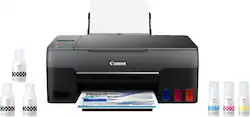
Canon - PIXMA MegaTank G3260 Wireless All-In-One Inkjet Printer - Black
- Key Specs
- Networking: Wireless
- ENERGY STAR Certified: true (Devices carrying the ENERGY STAR service mark, such as computer products and peripherals, kitchen appliances, and other products, generally use 20% to 30% less energy than required by federal standards.)
- Printer Type: Printer, Copier, Scanner, All In One
- ISO Color Print Speed: 6 pages per minute (The number of color pages able to be printed per minute in the device's default single-side mode, as tested by the International Standards Organization (ISO).)
- ISO Mono Print Speed: 10.8 pages per minute (The number of black ink (grayscale) pages able to be printed per minute in the device's default single-side mode, as tested by the International Standards Organization (ISO).)
- Touch Screen: false (Touch-screen devices make navigating more intuitive. Using a touch-screen display, you can do things such as tap to select, hold and drag to move items, swipe to scroll, and pinch to zoom.)
- General
- Brand: Canon
- Model Number: 4468C002
- Product Name: PIXMA MegaTank G3260 Wireless All-In-One Inkjet Printer
- Color: Black
- Display Screen: true
- Display Screen Size: 1.3 inches
- Dimensions
- Product Height: 6.6 inches (The out of box height of the item. Height is measured as the vertical distance from the bottom of the item to the top as it would be primarily used or placed.)
- Product Width: 17.6 inches (The out of box width of the item. Width is measured as the horizontal distance from one side of the item to the other as it would be primarily used or placed.)
- Product Depth: 13 inches (The out of box depth of the item. Depth is measured as the distance from the front of the item to the back as it would be primarily used or placed.)
- Product Weight: 14.1 pounds (The out of box weight of the item.)
- Features
- Automatic Document Feeder: false
- Photo Printing: true
- Wide Format Printing: false (Machines with this function support printing on media with widths between 18 and 100 inches, such as posters, banners, canvases, and more.)
- Wide Format Scanning: false
- Monochromatic/Color: Color
- Automatic Two-Sided Printing: false
- Tray Capacity: 100
- Duty Cycle: Unknown (The maximum number of pages per month that the device can produce without failing, as specified by the manufacturer.)
- Connectivity
- Wired Connectivity: None
- Wireless Connectivity: Wi-Fi (The manner in which a device sends data to another device over a short distance without the use of wires or cables.)
- Certifications Listings & Approvals
- EPEAT Qualified: false (The Electronic Product Environmental Assessment Tool (EPEAT) was designed to provide an environmental assessment tool for purchasers. In order to qualify for EPEAT, a product must meet all 23 required criteria.)
- Scanner Info
- Scanner Type: Flatbed
- Duplex Scan Function: false
- Scanner Resolution: Up to 600 x 1200 (Refers to the number of pixels/dots, both horizontally and vertically, of the image produced by the scanner. Generally, the higher the resolution, the sharper and cleaner the produced image.)
- Fax Info
- Integrated Fax: false
- Ink
- Compatible Cartridges: Canon GI-21
- Ink Subscription Service Available: false (The printer monitors ink usage and alerts the subscription provider when levels are low. A purchased subscription provides refills of ink based on usage.)
- Ink Cartridges Required: None (The quantity and color of ink cartridges required for the printer to operate.)
- Ink Cartridges Included: None (The quantity and color of ink cartridges included.)
- Ink Bags/Bottles Required: 1 x Black, 1 x Cyan, 1 x Magenta, 1 x Yellow (The quantity and color of ink bags/bottles required for the printer to operate.)
- Ink Bags/Bottles Included: 1 x Black, 1 x Cyan, 1 x Magenta, 1 x Yellow (The quantity and color of ink bags/bottles included.)
- Memory
- Memory Card Slot: false
- Paper Info
- Maximum Document Length: 47 inches
- Maximum Document Width: 8.5 inches
- Paper Feeder: Tray loader
- Paper Handling: Rear Input Tray: 100 sheets of plain paper or 20 sheets of 4 x 6
- Performance
- Printer Resolution (Black): Up to 4800 x 1200 (Refers to the number of pixels/dots, both horizontally and vertically, of the image produced by the printer in black ink. Generally, the higher the resolution, the sharper and cleaner the produced image.)
- Printer Resolution (Color): Up to 4800 x 1200 (Refers to the number of pixels/dots, both horizontally and vertically, of the image produced by the printer in colored ink. Generally, the higher the resolution, the sharper and cleaner the produced image.)
- Warranty
- Warranty - Parts: 1 year limited
- Warranty - Labor: 1 year limited
- Compatibility
- Works With: Amazon Alexa, Google Home (Compatible with or able to be connected to other smart devices or applications.)
- Other
- UPC: 013803330618
The Canon PIXMA G3260 Wireless MegaTank All-In-One Printer is designed for productivity— delivering high-volume, low-cost printing. Its refillable MegaTank ink system prints up to 6,000 black / 7,700 color pages from one set of ink bottles1— that’s 30 times1 what you can print with a conventional ink cartridge set! Print, copy, and scan with ease and enjoy great versatility. Print documents, borderless3 photos, and more on a variety of media types and sizes with hybrid inks for crisp blacks and vivid colors. Plus, you can print on the go wirelessly from your favorite mobile devices2. Print more for less with the Canon PIXMA G3260 Wireless MegaTank All-In-One Printer.
- Rear paper tray: With rear paper feeding print on a variety of media types and paper.
- 2-Line mono LCD: For an easy user interface experience.
- Up to 4800 x 1200 dpi (dots per inch) color resolution: High resolution for producing incredible quality and detail in documents and photos.
- Prints up to 10.8 ISO ipm* in black and up to 6.0 ISO ipm* in color: Print beautiful borderless photos up to 8.5" X 11" letter.2
- High page yield: Print up to 6,000 black and 7,700 color pages per ink bottle set.
- Wireless and mobile printing capability: Connect computers or devices easily with built-in WiFi. Plus, print from your mobile device and from select online cloud services with AirPrint® OR MOPRIA®! 6.7
- High volume, low cost printing: Enjoy an ink savings of $1,175 with a single set of color bottles. Plus, your printer comes with 2 bonus black ink bottles.1
Whats Included
- PIXMA MegaTank G3260 Wireless All-in-One Printer
- Set of Ink Bottles (GI-21: PGBK, C, M, Y)
- 2 Bonus Black Ink Bottles
- Documentation
- Power Cord
Disclaimers
- Requires a high-speed Internet connection.
Q: Can I use sublimation ink with this printer?
A: While I cannot speak authoritatively on this, I doubt Canon printers can use sublimation ink. Canon bubblejets print by momentarily heating the ink which creates a bubble at that location, propelling a droplet of ink from the print head. This is why cheaper inks (non-gel based) end up ruining the printer. All inkjets, in contrast, use a piezo diaphragm to push ink from the print head. It is less accurate and the droplets are larger and less controlled, but because it is a physical process, ink formulation isn’t very relevant. Hence, sublimation ink works in inkjets but might be problematic in bubblejets. Sorry for the book but I hope the information is useful.
Q: Will this "duplex print (print on both sides automatically)"?
A: No the device is advertised as its capable of printing both sides but it does not do it automatically
Q: Hi Can i load paper bottom front to print from my computer
A: The only load I am aware of is top, back.
Q: How many ink bottles does it take to fill the tank on this printer?
A: It takes one 67ml ink bottle per color to fill the colored tanks. The black takes one 132ml bottle to fill that tank.
A: I just printed on it last night and it printed fine. I had not printed anything in about 3 weeks
Q: Can you use only one ink color in all tanks?
A: Each ink port has a distinct shape that matches the intended colors bottle top. I have bought only the canon brand ink bottles. They seem to have the bottle neck and top molded to the bottle itself, so not impossible, but difficult to interchange. Maybe a 3D printer or probably some way to press the port open and pour ink rather than the fitted top? Great little printer and they are not lying about the 2000+ pages per ink refill!
Q: Will this printer be able to print heavy cardstock(110lb)?
A: Yes mine did
A: 3 colors, 1 black. They give you enough tank to fill each tank one time. I am not sure of the exact cost of the ink colors. But they are reasonable, much better option than cartridges. I am not impressed with the printer, it’s very lightweight and very noisy. We’ll see how long it lasts
People also viewed
 $249.00The price was $323.00
 $248.99The price was $253.99
 $229.99The price was $317.55
 $544.81The price was $550.57
 $159.99The price was $189.99
 $229.99The price was $379.99
 $299.99The price was $419.99



Today's top picks
 $449.99The price was $829.99
 $2,449.99The price was $3,199.99
 $999.98The price was $1,639.98
 $199.99The price was $249.99
 $1,099.99The price was $1,499.99
 $549.99The price was $749.99








