Rating 4.8 out of 5 stars with 2545 reviews
4.8- Battery Life (608)
- Performance (270)
- Ease of use (193)
- Surge Protection (141)
- Price (89)
- Noise (18)
- Weight (14)
- Software (7)
Customer Images
The vast majority of our reviews come from verified purchases. Reviews from customers may include My Best Buy members, employees, and Tech Insider Network members (as tagged). Select reviewers may receive discounted products, promotional considerations or entries into drawings for honest, helpful reviews.
- Rated 5 out of 5 stars
Great backup power, buy 2, and turn BEEP off.
I purchased a few of these for my personal Ultimate Laptop setup as after doing the equation (167% of Wattage used = Min Volt-Amperes (VA), and based on my system I needed 2500 VA (so at 1500 VA which is 900 watts each I would need 2 units), which would give me about 15 to 20 minutes of use off UPS battery alone at full load. Put your modem, router, and accessories to run off one unit, while the other runs monitors, PC or Laptop. I do not recommend to daisy chain these together as it would drain the battery of the unit being at the end and you will risk dead cell'ing the unit. However, you simply split the load across both units. Don't be cheap and buy just one battery backup if you are running more than 1k watts. It is recommended not to plug surge protectors into the battery/surge outlets, but that's only if you are plugging in surge pro's with more than 3 devices plugged into them or have a load of over 300 watts total. Otherwise, you should use a surge protector to plug in some of the more ridiculously sized power adapters (cell chargers, speaker systems, monitors- as you can see the white irregular power adapters from the LG monitors in the pic) and then plug the single plug of the surge pro (I used a few Insignia 8 outlet surge pro's, but only 3 outlets from each) into the UPS for a clean install. Bang for the buck Cyberpower is a better choice than APC and with a 3 year warranty you can't go wrong. This unit is quiet and low heat. I would make sure to turn BEEP OFF, otherwise when the unit goes into UPS mode it will beep and become annoying and people will start goose-necking around the office to track down the sound. To do that: hold down the power button to access the menu, then tap until you see BEEP ON, and tap to set to OFF.
Posted by MinotaurGlobal
- Rated 5 out of 5 stars
Feature Packed!
Bought this for my gaming PC as my existing 1000va model wasn't enough...the one I had was beeping and would just die if it swapped to battery power when I was gaming so I did some research (search for "killa watt" on your favorite shopping platform to find a good watt meter and make sure your PC under load doesn't go higher than the rated 900 Watts for this product) and found that this model would give me 5 minutes to shut down during a power failure with my PC at full-tilt...this is especially impressive since my system uses a LOT of power when it's running a game. With a 5950x (Unlocked PBO, Maxed Power Targets), RTX 3080 FTW3 Ultra @ 450W XOC BIOS, 4 HDD's, 4 SSD's, 8 Fans, and some tasteful lighting...I have my 34" widescreen monitor plugged into its own 900va model but even alone my PC's wattage hits 800+ watts at times (and that's with a Titanium rated 1000W PSU) and this thing still keeps it on long enough to get shut down which is a lifesaver considering I run 2 different RAIDs that don't like unexpected shutdowns. Love this thing...now, the software... The Software: This deserves its own section, frankly I've used software like this in the past in data centers and in businesses but I've NEVER seen this much functionality in a consumer-grade product...it blew my mind! You can get live readings of power usage (1st Image Below) along with time remaining, detailed logs of power events (2nd Image Below), power cost over time (3rd Image Below), and you can setup scheduling and notifications for your UPS in the software (4th Image Below) so it can shut down automatically on power loss at 1am when you're asleep or wait for you to do it during the day and can send you an e-mail when the power drops or when it's restored. This is amazing, I had considered getting a true enterprise UPS at one point and am SO glad I did now...this thing has everything you could possibly need in a home or small business! I had an APC model previously that literally only offered USB connectivity and the ability for Windows to see the battery and manage your power state and nothing else...note that these 2 were in the same price class but there's nothing else in the same class as this thing anywhere near the price that's being asked for here given the features. Definitely a great product at a great price!
Posted by DanielNS84
- Rated 5 out of 5 stars
Great UPS running strong for the past couple years
I picked this up a couple years ago and it's still running strong. I have a PC, Monitor, 3 printers, and a couple external hard drives plugged into it. I like the USB charging on the front. All good and hopefully will continue for several more years.
Posted by Mattito
- Rated 5 out of 5 stars
Power through brief outages and brownouts!
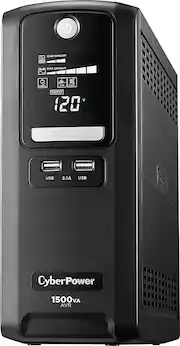
Since joining the work-from-home movement, I realized just how handy this device is. I’ve got this one discreetly mounted under my desk that can run a MacBook Pro, 36” LG ultra wide, 27” Dell, gaming PC and HomePod mini. I also have another in my networking closet that powers the modem, switch, router, and NAS. With this combination, I powered through several outages with no downtime. Now my son wants one so his gaming rig doesn’t shut down “at the worst time.” The display on the front is extremely helpful in letting you know how much juice you have based on the connected devices. Go ahead and buy this so you don’t have to worry about downtime. Even if you want to work offline, this is fantastic.
Posted by Techy2138
- Rated 4 out of 5 stars
Works great. Protect ur stuff :)
Has definitely saved my computer a few times now with the storms in my area. Only thing is the beeping. If you didn't read the manual like I didn't then the first time it goes off it is LOUD. Check the manual I honestly forget how I turned it off it's been in use for a few months now with no issues and no noise :)
Posted by Dave