DoorBOOsters are hereExclusions apply. Ends 11/2/25.Shop now

Main Content
product image

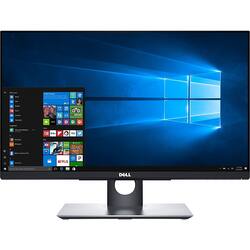
Dell - 24" IPS LED FHD Touch-Screen Monitor - Black

Model: P2418HT
SKU: 5756022
This item is no longer available in new condition. See similar items below
  • Key Specs
    • Refresh Rate: 60Hz (The number of frames per second the device can produce natively without enhancement. Higher rates help produce smooth, seamless pictures.)
    • Maximum Resolution: 1920 x 1080 (Maximum resolution refers to the highest number of pixels that a screen can process and display. Higher resolution signals produce more detailed images.)
    • Response Time: 6 milliseconds (The speed at which pixels can change colors is called response time. It is measured in milliseconds (ms).)
    • Panel Type: IPS (Technology that affects response time and image quality.)
    • Synchronization Technology: Not Applicable (Generally, these technologies allow syncing between a computer/console game's frame rate and the device's refresh rate for a smoother display without tearing.)
    • Screen Size: 24 inches (Size of the screen, measured diagonally from corner to corner.)
    • Display Connector(s): 1 x VGA (The number and type of connectors used to connect to an external display.)
  • General
    • Brand: Dell
    • Model Number: P2418HT
    • Product Name: 24" IPS LED FHD Touch-Screen Monitor
    • Color: Black
    • Operating System Compatibility: Windows
  • Display
    • Refresh Rate: 60Hz (The number of frames per second the device can produce natively without enhancement. Higher rates help produce smooth, seamless pictures.)
    • Maximum Resolution: 1920 x 1080 (Maximum resolution refers to the highest number of pixels that a screen can process and display. Higher resolution signals produce more detailed images.)
    • Native Resolution: 1920 x 1080 (Native resolution of a screen refers to its single, fixed resolution. Sometimes screens must scale an image up or down in order to fit the native resolution. This can cause a loss of resolution or detail.)
    • Contrast Ratio: 8,000,000:1 (Measured difference between a displayed image's brightest whites and darkest blacks. The larger the first number, the more detail and color that can be displayed.)
    • Response Time: 6 milliseconds (The speed at which pixels can change colors is called response time. It is measured in milliseconds (ms).)
    • Display Type: LED
    • Panel Type: IPS (Technology that affects response time and image quality.)
    • Synchronization Technology: Not Applicable (Generally, these technologies allow syncing between a computer/console game's frame rate and the device's refresh rate for a smoother display without tearing.)
    • Aspect Ratio: 16:9 (The measurement of the width of a screen compared to the height of a screen, expressed as a ratio.)
    • Curved Screen: true
    • Pixel Density: 93 pixels per inch (The number of pixels present per inch on the device's display. Higher pixel density improves the clarity and sharpness of the displayed image.)
    • Brightness: 250 candela per square meter (A measure of the total light output.)
    • Screen Size: 24 inches (Size of the screen, measured diagonally from corner to corner.)
    • High Dynamic Range (HDR): false (An HDR-compatible 4K TV or other HDR-compatible product displays HDR video content when it's available from sources like 4K Ultra HD Blu-ray Discs and 4K streaming services.)
    • Horizontal Frequency: 83 kilohertz (Also known as "horizontal scan rate," this measurement describes the number of horizontal lines displayed per second and is used to calculate a screen's refresh rate.)
    • Horizontal Viewing Angle: 178 degrees (The maximum angle at which the display can be viewed with acceptable visual performance from either side.)
    • Vertical Viewing Angle: 178 degrees (The maximum angle at which the display can be viewed with acceptable visual performance from above or below.)
  • Connectivity
    • Number of DisplayPort Inputs (Total): 1
    • Number of HDMI Inputs (Total): 1
    • Display Connector(s): 1 x VGA (The number and type of connectors used to connect to an external display.)
    • USB Ports: 1 x USB-C 3.1, 1 x USB-C 3.0 (The number and type of USB ports the product has.)
  • Compatibility
    • Wall Mountable: true (The product is able to be secured to a wall. Some products are designed ready to mount, while others may require additional hardware/accessories for installation.)
    • VESA Wall Mount Standard: 100mm x 100mm (VESA wall mount standards refer to the spacing of screw holes built into a TV in order to fit with standard TV wall mounts. These standards are implemented into most TVs and monitors.)
  • Features
    • Tiltable: true
    • Adjustable Stand Height: true
    • Anti-Glare: true (Product has features, such as a matte finish, that reduce the likelihood for screen glare.)
    • Built-In Webcam: false
    • Integrated Speaker(s): false
  • Dimensions
    • Product Height Without Stand: 12.7 inches
    • Product Width: 21.2 inches (The out of box width of the item. Width is measured as the horizontal distance from one side of the item to the other as it would be primarily used or placed.)
    • Product Depth (With Stand): 9.2 inches
    • Product Depth Without Stand: 2.1 inches
    • Product Weight: 16.4 pounds (The out of box weight of the item.)
    • Stand Included: true
  • Power
    • Power Consumption: 18 watts
  • Certifications Listings & Approvals
    • ENERGY STAR Certified: false (Devices carrying the ENERGY STAR service mark, such as computer products and peripherals, kitchen appliances, and other products, generally use 20% to 30% less energy than required by federal standards.)
    • EPEAT Qualified: false (The Electronic Product Environmental Assessment Tool (EPEAT) was designed to provide an environmental assessment tool for purchasers. In order to qualify for EPEAT, a product must meet all 23 required criteria.)
  • Warranty
    • Warranty - Parts: 3 years
    • Warranty - Labor: 3 years
  • Other
    • UPC: 884116250289

Diversify your work space with this 24-inch Dell touch monitor. Its 10-point touch feature supports multiple gestures for easy navigation and app use. The antiglare Full HD screen and articulating stand of this Dell touch monitor adapt to several work orientations without loss of visibility or annoying reflections, and the ultrathin bezel design provides a seamless view.

Monitor Buying Guide

  • Full HD 1920 x 1080 resolution: High resolutions that deliver a solid gaming or video experience without undue strain on your graphics card.
  • 6 ms response time: Delivers solid performance for precise gaming and video work.
  • 60 Hz refresh rate: Provides smooth video and good refresh rates for everyday use.
  • 24" antiglare LED monitor: Efficient screen type uses LEDs to provide precise backlighting to pixels.
  • HDMI, VGA and DisplayPort inputs: Let you connect both digital and analog devices.
  • 2 USB 3.0 and 2 USB 2.0 ports: Allow you to connect devices to the monitor, which then transfers the data to the computer.
  • 178° horizontal and vertical viewing angles: Allow you to view the screen from a wide range of angles.
  • 8,000,000:1 dynamic contrast ratio (1,000:1 typical): Ensures images are crisp and clear with deep blacks and bright highlights.
  • 250 cd/m² brightness: Ensures images are clear and can be seen across the room.
  • Touchscreen display: Enables simple navigation of menus and more.
  • ENERGY STAR certified: Designed to use less energy and meets strict energy efficiency guidelines set by the Environmental Protection Agency and U.S. Department of Energy.
  • Full HD 1920 x 1080 resolution: High resolutions that deliver a solid gaming or video experience without undue strain on your graphics card.
  • 6 ms response time: Delivers solid performance for precise gaming and video work.
  • 60 Hz refresh rate: Provides smooth video and good refresh rates for everyday use.
  • 24" antiglare LED monitor: Efficient screen type uses LEDs to provide precise backlighting to pixels.
  • HDMI, VGA and DisplayPort inputs: Let you connect both digital and analog devices.
  • 2 USB 3.0 and 2 USB 2.0 ports: Allow you to connect devices to the monitor, which then transfers the data to the computer.
  • 178° horizontal and vertical viewing angles: Allow you to view the screen from a wide range of angles.
  • 8,000,000:1 dynamic contrast ratio (1,000:1 typical): Ensures images are crisp and clear with deep blacks and bright highlights.
  • 250 cd/m² brightness: Ensures images are clear and can be seen across the room.
  • Touchscreen display: Enables simple navigation of menus and more.
  • ENERGY STAR certified: Designed to use less energy and meets strict energy efficiency guidelines set by the Environmental Protection Agency and U.S. Department of Energy.
Whats Included
  • Dell P2418HT
  • VGA cable
  • DisplayPort cable
  • USB cable
  • Dell P2418HT
  • VGA cable
  • DisplayPort cable
  • USB cable

Q: Can this be used with a Mac Computer?

A: Ummm, no it can't .... just received it and yes, it displays but the touch screen doesn't work with Macs.

Q: Does this have speakers built in also does it have a mic and what are all of its connection types

A: No speakers and no audio out. But there are 4 usb ports I'm sure could play external usb speakers. Also: One hdmi, one dvi, one component, one power, and the usb type B.

Q: can this monitor be rotated to display in portrait mode?

A: No, You would need to buy a bracket

Q: Will it be compatible with "Dell - Inspiron 2-in-1 17.3" Touch-Screen Laptop Intel Core i7 16GB Memory 512GB" Solid State Drive? What docking station and cables I will need to make them work together ? What is the actual width and height? Thanks

A: It's compatible. Just installed to that unit. No docking station required. You'll need an HDMI cable. Everything else is in the box. Screen quality is far less than the laptop's built-in screen...

Q: Is the brightness on this monitor bright enough for gaming

A: There is a Game setting for the display. I can't say for sure if it's bright enough for your personal gaming standards. I usually work with it on the Warm setting, which is dimmer with a red contrast. It happens to be right next to the Game setting and when you switch the selection back and forth, it automatically changes to the new setting. The Game setting is definitely too bright for me to work on and I'm sure it's adequate for anyone's gaming needs. But there are more Gaming-centric monitors out there for this same price point or less so I can't say I would recommend this particular monitor to a "Gamer". Although in my experience I hooked my Famicom Classic up to it and it plays that great. So, just depending on what kind of gaming you're into. I am also currently waiting on a new TV adapter for my Switch to hook up to it. Doubt the touch controls will work though. Will update on that later.