FREE shipping to
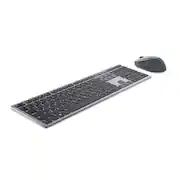
The Dell Premier Multi-Device Wireless Keyboard and Mouse – KM7321W. Seamlessly connect up to three devices with this premium keyboard and mouse combo. The dual mode RF 2.4 GHz and Bluetooth 5.0 connectivity lets you effortlessly switch across devices with the connection-mode key or button on your keyboard and mouse.
Q: What is the warranty period for this keyboard and mouse combo?
A: This Dell keyboard and mouse combo comes with a 3-year Advanced Exchange Service warranty.
Q: Does the mouse have adjustable DPI?
A: Yes, you can adjust the mouse's DPI to 1000, 1600, 2400, or 4000 using the Dell Peripheral Manager software.
Q: How many devices can connect to the keyboard and mouse simultaneously?
A: The keyboard and mouse combo can connect to up to three devices simultaneously.
Q: Can I program the keys on the keyboard and mouse?
A: Yes, the keyboard has 12 programmable keys and the mouse has 5 programmable buttons. You can assign shortcuts through the Dell Peripheral Manager.
Q: What type of connectivity does the keyboard and mouse combo use?
A: This keyboard and mouse combo offers both RF 2.4 GHz and Bluetooth 5.0 connectivity.
A: Yes you can as it has the USB connection plus 2 Bluetooth connections which you can toggle to use on 3 separate devices. I use my keyboard with my work computer using the USB, and 1 Bluetooth for my personal computer and the second for my Iphone which makes it easier to type and send long Text Messages.
A: The device can auto detect if the item is in use for power
A: This laptop has limited key rollover.

The Dell Premier Multi-Device Wireless Keyboard and Mouse – KM7321W. Seamlessly connect up to three devices with this premium keyboard and mouse combo. The dual mode RF 2.4 GHz and Bluetooth 5.0 connectivity lets you effortlessly switch across devices with the connection-mode key or button on your keyboard and mouse.

Enhance your all-day productivity with this RF 2.4GHz wireless keyboard and mouse combo. With 12 programmable keys and 1 programmable scroll wheel click, you can gain quick access to your frequently used applications, folders and functions. The full-sized wireless keyboard comes with a dedicated numeric pad, function keys, and programmed pre-sets that can enhance your efficiency.

Dell Multi-Device Wireless Keyboard and Mouse Combo enhance daily performance and productivity with this keyboard mouse combo that fits into virtually any workspace. Easily switch between 2.4GHz wireless or Bluetooth connectivity.Multi-OS compatibility. Tested and certified to work seamlessly with Dell systems.Programmable shortcut keys/buttons with customizable keyboard tilt.

Type and click across computers effortlessly with the Logitech MK955 Signature Slim Wireless Keyboard and Mouse Combo made out of recycled plastic. Make work-life magic with customization and shortcuts that keep you in control of your wireless mouse and keyboard. Enjoy fast, precise scrolling and a familiar laptop-style keyboard feel that allows you to work even smarter with the Logi Options+ App’s custom shortcuts. Quiet keyboard typing and mouse clicking give you more focus and less disturbance to others. Connect wirelessly with Bluetooth or the included Logi Bolt USB receiver, and stay concentrated for longer with up to 36 months of battery life for the wireless keyboard and 24 months for the wireless mouse for larger hands.
| Pros for Dell - Premier KM7321W Ergonomic Full-size Wireless Scissor Keyboard and Mouse Bundle with Multi-Device Connectivity - Titan Gray | |||
|---|---|---|---|
| Keyboard Quality, Ease of use, Multi-Device Connectivity | There were no pros for this product— | There were no pros for this product— | There were no pros for this product— |
Customers value the Premier KM7321W Ergonomic Keyboard and Mouse Bundle for its high-quality keyboard, which users find to be very quiet. The product is also praised for its ease of use and multi-device connectivity.
The vast majority of our reviews come from verified purchases. Reviews from customers may include My Best Buy members, employees, and Tech Insider Network members (as tagged). Select reviewers may receive discounted products, promotional considerations or entries into drawings for honest, helpful reviews.
From riding around in a padded laptop bag, 2 keys have popped off with no way to reattach. The keyboard constantly disconnects for no reason. I thought for the price I was getting a premium product. The action on the keys is nice. I like the look and feel, but all of that is meaningless if it can be relied on and is now looking ragged and broken. Go for a different brand. Not great..
This review is from Dell - Premier KM7321W Ergonomic Full-size Wireless Scissor Keyboard and Mouse Bundle with Multi-Device Connectivity - Titan Gray
DougP Posted
This is a great mouse/keyboard combo. The keyboard is solidly built and has some weight to it so it doesn't slide around or get pushed with harder typing. The keys are quiet when typing, not silent but quieter than most boards I've used. It has a lower profile and looks sleek on the desktop. The mouse is also well built and feels great in use. Best feature is the multi device switching. Competitors have switching buttons on the bottom of the mouse. I switch between two computers throughout the day, occasionally a 3rd device as well, and switching is quick and easy with a push of the button on the top of the mouse. Both the keyboard and the mouse are easy to switch between the machines.
This review is from Dell - Premier KM7321W Ergonomic Full-size Wireless Scissor Keyboard and Mouse Bundle with Multi-Device Connectivity - Titan Gray
MatthewM Posted
This was a little difficult at first to get the Bluetooth on one of my computers to continually recognize the mouse when switching between computers. I don’t know why this was the case, but now it works just fine. The keyboard always worked and is very comfortable to type on.
This review is from Dell - Premier KM7321W Ergonomic Full-size Wireless Scissor Keyboard and Mouse Bundle with Multi-Device Connectivity - Titan Gray
SusanB Posted