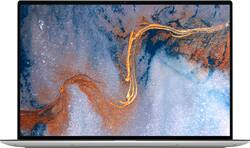
Dell - XPS 13" Touch-Screen Laptop - Intel Core i7 - 8GB Memory - 512GB Solid State Drive - Platinum Silver
- Key Specs
- Screen Type: TFT
- Screen Size: 13.4 inches (Size of the screen, measured diagonally from corner to corner.)
- Screen Resolution: 1920 x 1200 (WUXGA) (Screens come in a range of resolutions (measured in pixels, horizontal x vertical). The higher the resolution, the greater the picture quality.)
- Touch Screen: true (Touch-screen devices make navigating more intuitive. Using a touch-screen display, you can do things such as tap to select, hold and drag to move items, swipe to scroll, and pinch to zoom.)
- Processor Model: Intel 11th Generation Core i7 Evo Platform (Your computer's processor is like its brain. Working in combination with system memory, the power of the processor determines the complexity of software you can run, how many programs you can have open at the same time, and how fast those programs will run. Most computers feature an AMD, Intel or Snapdragon processor.)
- CPU Base Clock Frequency: 2.8 gigahertz (Actual central processing unit (CPU) speed may vary by device configuration and design. The average rate at which the processor is able to execute tasks under normal operating conditions as asserted by the manufacturer.)
- Storage Type: SSD
- Total Storage Capacity: 512 gigabytes
- System Memory (RAM): 8 gigabytes (Random-access memory (RAM) is a computing device's short-term data storage, which allows active information to be accessed quickly. The size and type of RAM determines how efficiently the device can handle large amounts of information at one time. For example, gaming or video editing requires more RAM for optimal performance.)
- Graphics: Intel Iris Xe Graphics (Often referred to as a "graphics processing unit" (GPU), this device is responsible for displaying image content and decoding/encoding video content in programs and games.)
- Display Connector(s): 2 x Thunderbolt 4 (The number and type of connectors used to connect to an external display.)
- Battery Chemistry: Lithium-ion
- 2-in-1 Design: false (A laptop and a tablet combined in one lightweight, portable device. Sometimes referred to as "convertible" or "hybrid" laptops, these devices deliver the processing power and keyboard of a laptop. When you're ready to play, either detach the screen or fold your 2-in-1 into tablet mode to comfortably watch movies, play games, read an e-book and more.)
- Backlit Keyboard: true (Integrated lights allow for visibility of the keys in low-light conditions.)
- General
- Brand: Dell
- Model Number: XPS9310-7392SLV-PUS
- Product Name: XPS 13" Touch-Screen Laptop - Intel Core i7 - 8GB Memory - 512GB Solid State Drive
- Color: Platinum Silver
- Year of Release: 2020
- Display
- Display Type: LED
- Screen Type: TFT
- Screen Size: 13.4 inches (Size of the screen, measured diagonally from corner to corner.)
- Screen Resolution: 1920 x 1200 (WUXGA) (Screens come in a range of resolutions (measured in pixels, horizontal x vertical). The higher the resolution, the greater the picture quality.)
- Touch Screen: true (Touch-screen devices make navigating more intuitive. Using a touch-screen display, you can do things such as tap to select, hold and drag to move items, swipe to scroll, and pinch to zoom.)
- Processor
- Processor Brand: Intel
- Processor Model: Intel 11th Generation Core i7 Evo Platform (Your computer's processor is like its brain. Working in combination with system memory, the power of the processor determines the complexity of software you can run, how many programs you can have open at the same time, and how fast those programs will run. Most computers feature an AMD, Intel or Snapdragon processor.)
- Processor Model Number: 1165G7
- CPU Base Clock Frequency: 2.8 gigahertz (Actual central processing unit (CPU) speed may vary by device configuration and design. The average rate at which the processor is able to execute tasks under normal operating conditions as asserted by the manufacturer.)
- Number of CPU Cores: 4-core (quad-core) (A core, or "brain" of a CPU, allows it to receive and execute instructions. Each core can work independently or together to perform parallel operations.)
- Storage
- Storage Type: SSD
- Total Storage Capacity: 512 gigabytes
- Solid State Drive Capacity: 512 gigabytes (The amount of data that can be stored on the device's solid state drive (SSD). SSD is a flash-based storage with faster speeds than a hard disk drive (HDD).)
- Solid State Drive Interface: PCIe (Connects the solid state drive to the host system. PCI and SATA interfaces are the most common; PCI interfaces are typically faster, but SATA interfaces are compatible with a wider range of systems.)
- Memory
- System Memory (RAM): 8 gigabytes (Random-access memory (RAM) is a computing device's short-term data storage, which allows active information to be accessed quickly. The size and type of RAM determines how efficiently the device can handle large amounts of information at one time. For example, gaming or video editing requires more RAM for optimal performance.)
- Type of Memory (RAM): LPDDR4 (Each type of RAM delivers a different level of speed, bandwidth, energy efficiency and performance.)
- System Memory RAM Speed: 4267 megahertz (How fast the information-storing hardware operates. The faster the RAM, the faster memory can be transferred to other system components. Ultimately, faster RAM improves operational efficiency.)
- Graphics
- Graphics Type: Integrated (Dedicated graphics uses a separate graphics card for processing video images. Because it does not use memory from the system's RAM, there is no extra burden on the CPU and graphics are processed more efficiently. Integrated graphics shares system RAM to process video images.)
- GPU Brand: Intel
- Graphics: Intel Iris Xe Graphics (Often referred to as a "graphics processing unit" (GPU), this device is responsible for displaying image content and decoding/encoding video content in programs and games.)
- Compatibility
- Operating System: Windows 11 Home (The operating system manages all software and hardware, including files, memory and connected devices. Most importantly, it lets you interact with your device and your programs in a visual way; otherwise, you'd be typing computer code to get anything done.)
- Operating System Architecture: 64-bit (An operating system (OS) manages computer hardware, software resources, and programs in conjunction with the system's processor. 64-bit operating systems can handle more data at once than 32-bit systems, resulting in faster speeds, more effiency, and overall improved performance.)
- Connectivity
- Display Connector(s): 2 x Thunderbolt 4 (The number and type of connectors used to connect to an external display.)
- Number of HDMI Outputs (Total): 0
- Number of DisplayPort Outputs (Total): 0
- Number of Thunderbolt Ports (Total): 2
- Headphone Jack: true (The device features an interface that allows for the connection of headphones.)
- Wireless Connectivity: Bluetooth, Wi-Fi (The manner in which a device sends data to another device over a short distance without the use of wires or cables.)
- Wireless Standard: AX (The wireless networking protocol used by the device. Each iteration of the protocol is based on the 802.11 standard developed by the Institute of Electrical and Electronics Engineers (IEEE) Standards Association. Denoted by letters following 802.11 (802.11a, 802.11ac, etc.), each version, published in alphabetical order, encompasses all previous versions.)
- Number Of Ethernet Ports: 0
- Cooling
- CPU Cooling System: Air
- Power
- Power Supply Input: USB-C
- Power Supply Maximum Wattage: 45 watts
- Battery Cells: 4-cell
- Battery Capacity: 6842 milliampere hours (The amount of energy stored in the battery.)
- Battery Chemistry: Lithium-ion
- Camera
- Front-Facing Camera: true
- Front Facing Camera Megapixels: 0.92 megapixels (The more megapixels, the more detail that the camera facing the user can capture.)
- Front Facing Camera Video Resolution: 720p (Refers to the number of pixels, both horizontally and vertically, used by the camera facing the user to capture video. The higher the resolution the finer the video detail that can be seen.)
- Built-In Microphone: true
- Features
- 2-in-1 Design: false (A laptop and a tablet combined in one lightweight, portable device. Sometimes referred to as "convertible" or "hybrid" laptops, these devices deliver the processing power and keyboard of a laptop. When you're ready to play, either detach the screen or fold your 2-in-1 into tablet mode to comfortably watch movies, play games, read an e-book and more.)
- Backlit Keyboard: true (Integrated lights allow for visibility of the keys in low-light conditions.)
- Touchpad Type: Precision
- Media Card Reader: true (A hardware device that allows for access to data on a memory card and enables the transfer of its files to a computer. These devices may have one or multiple slots for various types of memory cards, and may be integrated into the computer or available as an external device.)
- Customizable Case Lighting: false
- Audio Technology: Waves MaxxAudio
- Speaker Type: Stereo speakers
- Security Features: Fingerprint reader
- Stylus Dock: None
- Dimensions
- Product Height: 0.58 inches (The out of box height of the item. Height is measured as the vertical distance from the bottom of the item to the top as it would be primarily used or placed.)
- Product Width: 11.64 inches (The out of box width of the item. Width is measured as the horizontal distance from one side of the item to the other as it would be primarily used or placed.)
- Product Depth: 7.82 inches (The out of box depth of the item. Depth is measured as the distance from the front of the item to the back as it would be primarily used or placed.)
- Product Weight: 2.64 pounds (The out of box weight of the item.)
- Certifications Listings & Approvals
- ENERGY STAR Certified: true (Devices carrying the ENERGY STAR service mark, such as computer products and peripherals, kitchen appliances, and other products, generally use 20% to 30% less energy than required by federal standards.)
- EPEAT Qualified: true (The Electronic Product Environmental Assessment Tool (EPEAT) was designed to provide an environmental assessment tool for purchasers. In order to qualify for EPEAT, a product must meet all 23 required criteria.)
- EPEAT Level: Silver (The Electronic Product Environmental Assessment Tool (EPEAT) was designed to provide an environmental assessment tool for purchasers. In order to qualify for EPEAT, a product must meet all 23 required criteria. Products are rated Bronze, Silver or Gold based on how many of 28 optional criteria they meet (below 50%, 50%, 75%).)
- Included
- Included Software: McAfee® LiveSafe™ 12 Month Subscription, Microsoft Office 30-Day Trial
- Optical Drive Type: None (An optical disk drive (ODD) uses a laser light to read data from or write data to an optical disc. These discs include CDs, DVDs, and Blu-ray Discs. This allows you to play music or watch movies using prerecorded discs.)
- Numeric Keypad: false
- Stylus Included: false
- Warranty
- Warranty - Parts: 1 Year Premium Support
- Warranty - Labor: 1 Year Premium Support
- Other
- UPC: 884116392392
The all new XPS 13 featuring 11th Gen InteI Core mobile processors, it’s now possible to enjoy incredibly immersive entertainment on a remarkably thin and light laptop. The stunning 4-sided InfinityEdge display enables us to bring a 6.8% larger 16:10 display to the 13-inch, all in a 2% smaller size than before, delivering a 91.5% screen to body ratio. 100% of the enclosure is sculpted by a CNC (computer numerical control) machining process. A high precision, machine-milled aluminum chassis creates an elegant design with high build quality that’s stronger and stiffer than magnesium or plastic.
- Windows 11 Operating System: Windows 11 has all the power and security of Windows 10 with a redesigned and refreshed look. It also comes with new tools, sounds, and apps. Every detail has been considered. All of it comes together to bring you a refreshing experience on your PC
- 512GB M.2 PCIe NVMe Solid State Drive: Save files fast and store more data. With massive amounts of storage and advanced communication power, PCI-e SSDs are great for major gaming applications, multiple servers, daily backups, and more.
- 13.4" Touchscreen: 1920 x 1200 native resolution. Natural finger-touch navigation makes the most of Windows 10. Antireflective finish reduces eyestrain.
- Intel® Evo™ Platform - Core™ i7: The perfect combination of performance and responsiveness. Enjoy boundary-breaking performance with the 11th Gen Intel® Core™ i7 processor. Experience vivid colors with Intel® Iris® Xe graphics. Stay productive with fast-charging, long-lasting battery.
- 8GB system memory for advanced multitasking: Substantial high-bandwidth RAM to smoothly run your games and photo- and video-editing applications, as well as multiple programs and browser tabs all at once.
- Integrated Widescreen HD 720P Webcam with Dual Digital Microphone Array: A new 4-element lens delivers sharp video in all areas of the frame, especially in dim lighting conditions. The top-mounted mic provides for a better audio experience
- Elevated Design: The new XPS 13 is an evolved, modern design for XPS. By maximizing experiential elements – such as a bigger display, an edge-to-edge keyboard, a larger touchpad – the design puts a focus on elevating the essential
- Better on the Eyes: The Eyesafe® display intelligently manages light energy at the source – selectively reducing harmful blue light and dispersing it across the light spectrum.
- Diamond Cut Sidewalls: Gleaming, double-anodized side edges depict the pinnacle of attention to detail. The design allows for the very narrow display border, but is beautiful and resists scratches better as you plug in peripherals. Flawless, polished finish
- Backlit keyboard: Allows you to enjoy comfortable and accurate typing, even in dim lighting.
- Waves MaxxAudio: Built-in stereo speakers.Waves MaxxAudio is tuned to give you great sound across music, movies, voice and games
- Far-field Cortana capable: The XPS 13 responds to your voice from up to 14 feet away, thanks to four built-in mics, Microsoft Cortana and Waves-enabled speech technology. Control playlists and access schedules regardless of background noise.
- Thunderbolt 4 Port: Thunderbolt™ 4 multi-use Type-C ports allow you to charge your laptop, connect to multiple devices (including support for up to two 4K displays) and enjoy data transfers up to 40Gbps -- 8 times that of a USB 3.
- Basic software package included: Microsoft Office 30 Day Trial, McAfee® LiveSafe™ 12 Month Subscription
- Built-in fingerprint reader: Streamlines security settings for quick, typo-free access.
- Wireless Connectivity (Wi-Fi 6 AX1650): Connect to a Wi-Fi 6 (160 MHz) router to experience Gigabit Wi-Fi speeds nearly 3X faster vs. standard Wi-Fi 5 with improved responsiveness for even more devices.
- Additional Ports: 2 Thunderbolt™ 4 (USB Type-C™) with DisplayPort and Power Delivery - 1 microSD card reader - 1 3.5mm headphone/microphone combo jack
- Optical Drive: Note: This laptop does not include a DVD drive.
Whats Included
- XPS 13 (9310)
- US Power Cord
- 45 Watt USB-C AC Adapter
- Documentation
Product Manuals
Q: Does it come with Microsoft Word, Excel and PowerPoint?
A: This system includes only a Microsoft Office 30 days trial pack. To use it continuously, you need to purchase the licensed version.
Q: Can this laptop be downgraded to Windows 10?
A: Yes, the operating system in this laptop could be downgraded to Windows 10.
Q: Does it have a place to insert sd cards
A: Yes but only the micro SD. Full size SD will require an adapter.
Q: Can Alexa be eliminated (as opposed to just being turned off)?
A: Yes, the Alexa in this system could be turned off or disabled, if not required.
Q: Is the RAM upgradable? Also, is the SSD upgradeable?
A: The memory module is integrated on the system board and could not be upgraded. The storage could be upgraded up to 2 TB by replacing the current one.
A: Yes, this system can support games like Microsoft flight sim 2020, Call of Duty, modern warfare, FarCry series ...etc
Q: Why is it written Iris Plus Graphics? Isn't it supposed to be Intel Xe Graphics?
A: Yes, this system comes with Intel Iris Xe Graphics.
A: No, this laptop does not have a 4K display.
People also viewed
 $1,749.99The price was $1,799.99
 $749.99The price was $849.99
 $623.11The price was $749.99
 $644.68The price was $799.99
 $897.99The price was $1,049.99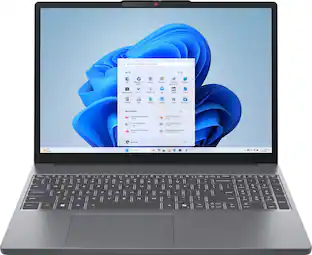
Lenovo - IdeaPad Slim 3 15.3" 2K Touchscreen Laptop - AMD Ryzen 7 170 2025 - 16GB Memory - 512GB SSD
$785.99The price was $849.99 Clearance$547.99The price was $729.99
 $649.99The price was $999.99
 $436.00The price was $599.99
 $640.00The price was $799.99
 Clearance$377.99The price was $629.99
 $687.99The price was $698.00
 $1,929.00The price was $1,949.99
Today's top picks
 $449.99The price was $829.99
 $2,449.99The price was $3,199.99
 $999.98The price was $1,639.98
 $199.99The price was $249.99
 $1,099.99The price was $1,499.99