Rating 4.7 out of 5 stars with 1045 reviews
4.7- Price (133)
- Easy to use (69)
- Works (68)
- Compatibility (43)
- No issues (18)
- Resolution (7)
- Connection (5)
- Expensive (4)
- Refresh rate (4)
- Audio (2)
Customer Images
The vast majority of our reviews come from verified purchases. Reviews from customers may include My Best Buy members, employees, and Tech Insider Network members (as tagged). Select reviewers may receive discounted products, promotional considerations or entries into drawings for honest, helpful reviews.
- Rated 5 out of 5 stars
Adapter for laptop to tv
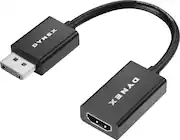
My son needed to connect his HP laptop to tv for larger screen but his laptop only had one hdmi port so I connected this adapter to laptop in the vodeo display port and to it I connected hdmi to tv.
Posted by Rubialoca
- Rated 5 out of 5 stars
Fast and easy!
Great adapter, easy to connect to. I recommend this for converting from hdmi. Never had any problems with this adapter it’s easy and accessible!
Posted by MZImperial
- Rated 5 out of 5 stars
Does the Job Just Fine
It does the job. A nice, reliable cord, exactly what I needed.
Posted by GarrettC
- Rated 1 out of 5 stars
Low quality Cheaply made product
I bought this so i could use my VR headset for the HDMI port and use my monitor with this DisplayPort adapter. However not even 2 months in and the quality started degrading immediately. The adapter would cause my screen to go black and would only fix once i plugged it out and plugged it back in. Today is 6/25/2020 and it finally broke on me. The black plastic piece on the DisplayPort side slides off and you can see the inside of the wire. Very cheap product and you get your money's worth with $10. I'd advise you guys to get another adapter that costs more.
Posted by BudzZz
- Rated 5 out of 5 stars
Make sure you know your purpose for purchasing
I purchased this as I have a computer that has one HDMI output and one DisplayPort output. I already have another computer hooked up to both of my monitors through DisplayPort, so I could only have my personal computer plugged into one monitor. By purchasing this, I can then plug the DisplayPort part of the adapter into the computer and then run a standard HDMI into my monitor, therefore having both my computers have access to the monitors without having to move wires around. I don't believe this is bi-directional, meaning I don't believe you can have a video source plugged into the HDMI input and then hooked up to a monitor via the DisplayPort plug on the adapter. It can only be set up with the HDMI being the wire going into the monitor/TV and the DisplayPort portion going into the video source.
Posted by Dave