Rating 4.6 out of 5 stars with 1583 reviews
4.6- Ease of use (436)
- Streaming (183)
- Quality (112)
- Compatibility (57)
- Capture Card (48)
- Lag (35)
- Connection (6)
Customer Images
The vast majority of our reviews come from verified purchases. Reviews from customers may include My Best Buy members, employees, and Tech Insider Network members (as tagged). Select reviewers may receive discounted products, promotional considerations or entries into drawings for honest, helpful reviews.
- Rated 5 out of 5 stars
A Really Great Capture Card!
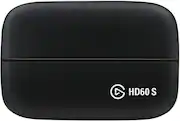
The Elgato HD 60 S is an awesome capture card! I bought this to stream my Nintendo Switch gameplay. It was very easy to set up and had no problems at all detecting it on my PC. I was able to capture and stream right away. It streams with high quality and hardly any input lag. You can either use the software Elgato provides on their website, or use it to stream on OBS. Just make sure you’re using “Video Capture Device” as the source of you are using OBS and you will see the HD 60 S to use. That took me a minute to figure out. Overall, this is a wonderful capture card and I would highly recommend if you are looking to stream or record console gameplay.
Posted by RayC
- Rated 5 out of 5 stars
This is an Awesome Capture Card!
The Elgato Hd60s is a great capture card to stream and record your favorite games in excellent quality. However, the ease of use can be difficult if you are a mac user. If you are mac user you would have to download OBS Link which will allow you to deliver your gameplay to a OBS (Open Broadcasting Software) such as Streamlabs OBS. Nonetheless, it’s an awesome capture card!
Posted by Boliber
- Rated 5 out of 5 stars
Works as intended
Works perfectly with my ASUS Laptop! Follow the instructions and watch plenty of YouTube videos to set up. I perfer OBS to stream my games. This device needs a chat link if you plan on streaming console gaming systems with the HD60 S in order for your audience to hear your party.
Posted by TwitchSwiftStreamsPS4
- Rated 5 out of 5 stars
Great for YouTube
This is the best game capture that I know. Sadly my computer does not allow 1080 then my quality and video would be AWESOME! I could not have done this without you BestBuy.
Posted by DavidDobrik
- Rated 5 out of 5 stars
Best capture card 1080p
Works so much better then HD60S+ especially if your streaming 1080P. Easier to setup and sound capture download that comes with game capture download saves you so much time if your running a dual PC setup.
Posted by Ching684