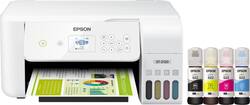
Epson - EcoTank ET-2720 Wireless All-In-One Inkjet Printer - White
- Key Specs
- Networking: Wireless
- ENERGY STAR Certified: true (Devices carrying the ENERGY STAR service mark, such as computer products and peripherals, kitchen appliances, and other products, generally use 20% to 30% less energy than required by federal standards.)
- Printer Type: Copier, Printer, Scanner
- ISO Color Print Speed: 5 pages per minute (The number of color pages able to be printed per minute in the device's default single-side mode, as tested by the International Standards Organization (ISO).)
- ISO Mono Print Speed: 10 pages per minute (The number of black ink (grayscale) pages able to be printed per minute in the device's default single-side mode, as tested by the International Standards Organization (ISO).)
- Output Tray Capacity: 30
- Touch Screen: true (Touch-screen devices make navigating more intuitive. Using a touch-screen display, you can do things such as tap to select, hold and drag to move items, swipe to scroll, and pinch to zoom.)
- General
- Brand: Epson
- Model Number: ECOTANK ET-2720 PRINTER C11CH4
- Product Name: EcoTank ET-2720 Wireless All-In-One Inkjet Printer
- Color: White
- Display Screen: true
- Display Screen Size: 1.44 inches
- Dimensions
- Product Height: 10 inches (The out of box height of the item. Height is measured as the vertical distance from the bottom of the item to the top as it would be primarily used or placed.)
- Product Width: 14.8 inches (The out of box width of the item. Width is measured as the horizontal distance from one side of the item to the other as it would be primarily used or placed.)
- Product Weight: 8.8 pounds (The out of box weight of the item.)
- Features
- Automatic Document Feeder: false
- Photo Printing: true
- Wide Format Printing: false (Machines with this function support printing on media with widths between 18 and 100 inches, such as posters, banners, canvases, and more.)
- Wide Format Scanning: false
- Monochromatic/Color: Color
- Automatic Two-Sided Printing: false
- Tray Capacity: 100
- Scanner Info
- Scanner Type: Flatbed
- Scanner Resolution: Up to 1200 x 2400 (Refers to the number of pixels/dots, both horizontally and vertically, of the image produced by the scanner. Generally, the higher the resolution, the sharper and cleaner the produced image.)
- Ink
- Compatible Cartridges: Epson 522 Black ink bottle (65 mL), Epson 522 color Cyan ink bottle (65 mL), Epson 522 color Magenta ink bottle (65 mL), Epson 522 color Yellow ink bottle (65 mL)
- Paper Info
- Maximum Document Length: 47.2 inches
- Maximum Document Width: 8.5 inches
- Supported Paper Sizes: 3.5" x 5", 4" x 6", 5" x 7", 8" x 10",8.5" x 11", 8.5" x 14", A4, A6, half letter, executive, legal, user definable (from 2.2" x 3.4" to 8.5" x 47.2")
- Paper Handling: Input: 100 sheets plain paper, 20 sheets photo paper; output: 30 sheets plain paper
- Compatible Media Types: Multipurpose Plus Paper, Bright White Premium Paper, Bright White Pro Paper, Photo Paper Glossy, Premium Photo Paper Glossy
- Copier Info
- Maximum Number Of Copies: 99
- Copier Resolution (Black): Up to 300 x 600 (Refers to the number of pixels/dots, both horizontally and vertically, of the image produced by the copier in black ink. Generally, the higher the resolution, the sharper and cleaner the produced image.)
- Copier Resolution (Color): Up to 300 x 600 (Refers to the number of pixels/dots, both horizontally and vertically, of the image produced by the copier in colored ink. Generally, the higher the resolution, the sharper and cleaner the produced image.)
- Certifications Listings & Approvals
- TWAIN Compliant: true (Products with this label are compliant with standards set by the TWAIN Working Group for regulating communication between software and digital imaging devices. Devices that are TWAIN compliant are compatible for use with each other without requiring additional software, even if they have different capabilities.)
- Performance
- Printer Resolution (Black): Up to 5760 x 1440 (Refers to the number of pixels/dots, both horizontally and vertically, of the image produced by the printer in black ink. Generally, the higher the resolution, the sharper and cleaner the produced image.)
- Printer Resolution (Color): Up to 5760 x 1440 (Refers to the number of pixels/dots, both horizontally and vertically, of the image produced by the printer in colored ink. Generally, the higher the resolution, the sharper and cleaner the produced image.)
- Other
- UPC: 010343948501
Print smudge-free text and rich, vibrant images with this Epson EcoTank all-in-one color printer. Wi-Fi Direct connectivity lets you print remotely without a router, and voice-activated printing capabilities let you schedule jobs using voice commands. This Epson EcoTank all-in-one color printer produces gorgeous photos and graphics with a maximum resolution of 5760 x 1440 dpi.
Prints up to 10 ISO ppm* in black, up to 5 ISO ppm* in color.
- Prints up to 10 ISO ppm* in black and up to 5 ISO ppm* in color: Generates documents quickly.
- Ideal for home or small business use: This inkjet printer offers excellent print quality for photos and documents and accepts a variety of paper types and sizes.
- Wireless and mobile printing capability: Connect this printer to your home or office network with built-in Wi-Fi. You can also print from your mobile device with the free Epson iPrint app, Apple® AirPrint, or Google Cloud Print.**
- Tablet and smartphone printing: Epson Connect enables simple wireless printing from most smartphones, tablets and more.
- Apple® AirPrint enabled: You can use it for Apple iPad® and iPhone® printing.**
- Up to 5760 x 1440 dpi (dots per inch) color resolution: High resolution allows producing incredible quality and detail in documents and photos.
- Four individual ink tanks: Refill the ink tank when color runs out. Three dye-based inks produce vivid color in photos, and the pigment-based black ink ensures crisp text.
- Standard paper handling: 100-sheet input and 30-sheet output capacity.
- 1.44" color touch-screen LCD: Ensures easy setup and navigation.
- USB port for simple connectivity: The high-speed USB 2.0 port offers a standard connection to your PC or a simple way to plug in and print from a USB drive, camera, or other devices.
Whats Included
- Epson EcoTank ET-2720 Wireless All-In-One Inkjet Printer
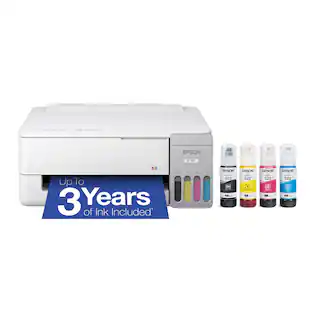
- Four ink bottles (Black, Cyan, Magenta, Yellow)
- Owner's manual
- Power cord
Product Manuals
Q: How does the echo tank differ from ink jet?
A: The difference is the ink delivery system. The ink jet uses cartridges. With the eco tank, the ink comes in bottles, with a special nozzle that fits the top of the reservoir on the printer. You just fit it on and it stops automatically when the reservoir is filled. The ink level is visible on the front of the ink reservoir, so you know how much ink you have. Each bottle costs around $14, so a full set of 4 bottles is around $56, and you get around 4500 copies, or roughly 80 times the number you get with cartridges.
Q: using epson ET-2720 Do I have to use different ink to do sublimation?
A: Yes. The ink that comes with it is inkjet ink that is made for printing on paper. For sublimation you would need sublimation ink, a special type of ink that reacts to heat and imprints into the material.
A: According to the salesperson at Staples, it will clog... his answer was to print one or two pages at least 1 to 2X's a month to prevent this from happening. Apparently, this will happen even with ink cartridges; it certainly happened to me. Of course you can print from the following: Easily print from iPad®, iPhone®, Android™ tablets and smartphones5; includes Wi-Fi Direct®7
Q: What is the difference between the white Epson ET2720 and the black Epson ET2720?
A: One is black, the other is white.
Q: does the 2720 print double sided?
A: No, it doesn't print double-sided.
Q: does the Epsom 2720 come with ink?
A: Yes, enough to completely fill the tanks. When you fill it initially there will be some left over. Then after setup you can top the tanks up.
Q: Is this printer for sublimation printing for t-shirts and more
A: That's what I'm using it for. Just never fill it with the ink it comes with. Instead use your dye sub ink.
Q: Will this printer accept card stock and other thicknesses of paper.
A: I have been using the 110 lb cardstock (from Wal-Mart) it works fine. The only thing I don't like is the printer WILL NOT print borderless.
People also viewed
 $89.99The price was $112.37




Today's top picks
 $89.99The price was $179.98
 $1,399.00The price was $1,499.00