Rating 4.8 out of 5 stars with 98 reviews
4.8- Print Quality (63)
- Ease of use (19)
- Paper Tray (6)
- Overall Performance (3)
- Setup (3)
- Size (11)
- Scanner Noise (3)
Customer Images
The vast majority of our reviews come from verified purchases. Reviews from customers may include My Best Buy members, employees, and Tech Insider Network members (as tagged). Select reviewers may receive discounted products, promotional considerations or entries into drawings for honest, helpful reviews.
- Rated 5 out of 5 stars
Impressive All-in-One with High End Feature Set
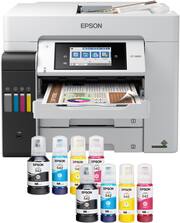
The EcoTank Pro ET-5800 All-in-One is a serious business level all in one printer for high duty home and small office users that are looking for enterprise level features, quick print speeds, and the convenience of Eco Tank inks. I was surprised when first picking up the box at how heavy and relatively large this printer is, it certainly looks and feels like a premium product. Unboxing the unit and initial setup was quick and easy, the included Start Here guide does a very good job of walking you through the basic setup and filling of inks and easily getting it connected to your network and computer, it took less than half an hour start to finish. The new white color has a very professional look to it and I’m sure will make it easier to avoid scratches and fingerprints over time compared to the gloss black of my old printer. Where this all in one really stands out from the crowd is the impressive list of features beyond printing. In addition to scan, copy, fax, auto duplexing, AirPrint, USB direct print, large paper trays and Epson Connect it has some very cool high-level features such as confidential printing, preset configuration for commonly used functions, voice enabled printing, user account creation and control and many other functions typically reserved for high end enterprise systems. Finally, while not officially a photo printer, I am very impressed with the image quality of photos, all prints come out sharp and crisp and it has worked great for my PowerPoint printouts. Overall, I would recommend this printer to anyone looking for a full featured SOHO all in one. This is a review for the Epson EcoTank Pro ET-5800 Supertank Printer that I received free of charge to do a beta test and review.
Posted by DavidKRock
- Rated 5 out of 5 stars
Pricey but feature laden with low ink cost
I had to go to this model to get 2 sided to 2 sided copying in an Epson Eco tank. Pricey BUT I think after a couple of years, the ink cost will balance things out. It is large but has some features I really like such as a tray to catch the prints which extends itself automatically as well as the three choices of paper trays which eliminates the need to change settings if one wants to go from letter to legal, etc. Because the ink is so economical, I find myself doing more color printing.
Posted by Babs
- Rated 5 out of 5 stars
great power horse of a printer and scanner
Love this product. It wasn't as big as I thought it was from the measurements as the measurements included the pull out try and the third way of adding media at the back to print. Putting the ink in was fun. I had a little issue getting this started and running with my network but got it figured out without too much issue. It does take a bit to charge the ink and I am in love with the tray printed documents come out on because it automatically extends itself to hold the sheets of media. I have printed, scanned on both the flatbed and auto feeder, used both trays and the media access tray at the back. I am very impressed with the quality of the printing. I printed a picture and it looked really nice. I am still getting pics printed professionally since they are so cheap but wanted to explore what the quality of a picture being printed looks like. The whole experience with purchase has been great. I love this printer and highly recommend it.
Posted by JThomas
- Rated 5 out of 5 stars
Epson EcoTank Pro Quality Office Printer
I replaced an Epson Workforce printer that was several years old. I looked into several EcoTank Pro models and the ET-5800 seemed like the best option for my home office needs. It has really fast printing and easy to set up. Normally I have to call Geek Squad but the set up was completed without much trouble. The printing is fast and feels more like a larger office printer that a bunch of colleagues can share. It's larger than the Workforce but still fit on my desk corner. Box also comes with 2 sets of ink which is helpful because the charging process eats up almost 45% of the ink from the tanks. The scanner function also works really well and saves onto a thumb drive or onto your computer through the Epson App scanner. Menu commands from the touch screen is extensive so it will likely take some getting used to change settings. Also the center tray can be pushed inside but automatically extends whenever you start to print. Overall a great printer that feels like money well spent.
Posted by JHLee
- Rated 5 out of 5 stars
I was so wonderfully surprised.
Love this printer. I ordered online and had it delivered and was a bit taken aback that i missed how large it was. But once i had it set up and ready to print it was amazing. Easy to set up, i love the liquid ink, and it prints beautifully. Highly recommend. Probably the last printer ill ever own.
Posted by MicheleM