Rating 4.5 out of 5 stars with 41 reviews
4.5- Print Quality (26)
- Ease of use (10)
- Size (7)
- Touchscreen (5)
- Setup (3)
Customer Images
The vast majority of our reviews come from verified purchases. Reviews from customers may include My Best Buy members, employees, and Tech Insider Network members (as tagged). Select reviewers may receive discounted products, promotional considerations or entries into drawings for honest, helpful reviews.
- Rated 5 out of 5 stars
Pretty Good Compact Printer With Neat Features.
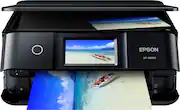
My experience with the Epson Expression Photo XP-8600 Printer has been mixed. While the printer is very nice looking and it is easy to use, I found that the set-up process was very time consuming, for me at least. Setting up the printer took around an hour at minimum. Installing the 6 ink cartridges was fairly easy. I found that calibrating the Printer Head alignment and making those adjustments was a bit overly complicated due to it being very difficult to see when needing to pick the best results on the test pages. Regardless of the above issue, the Epson Expression Photo XP-8600 Printer does to an excellent job at printing. I love that I am able to print photos or other items such as paper documents wirelessly over Wi-Fi from my laptop or even my Smartphone! No more having to hook up a USB Cable from my Printer to my Computer! Using a USB Cable is an option, but it may not always be convenient if your computer set up isn't stationary. The Epson Expression Photo XP-8600 Printer allows you to print photos directly from a Memory Card which I believe is a great feature since you can start printing photoswithout having to upload themto your computer first if they do not need to be edited. The printer is also voice activated. The printer also features the ability to print onto CDs and DVDs. A perfect addition for saving photos or video memories, making keepsake party favors or for any photography business. I love the adjustable 4.3 inch touchscreen control panel. It is easy to use. There is no issues being able to see the on-screen options because you can tilt the control panel to better suit your view. I like that I could view step-by-step instructions via the colored touchscreen control panel when installing the ink cartridges and performing other maintenance tasks. I do wish that the printer offered the ability to be used as a Fax, for those times when you may unexpectedly need to send a fax, but this printer does have a lot of nice features even if having a fax isn't a requirement for you. I do have to wonder how much this printer will cost over time when needing to replace the 6 ink cartridges.. It could possibly get very expensive.. I feel like this could be one of the major Cons regarding this printer. Another small Con is that the power cord seems to get knocked loose from the printer and fall out easily even though I try to make sure that is is plugged in all the way. Overall, I think the Epson Expression Photo XP-8600 Printer is a very nice, compact printer if you do not have a lot of space on your desk. It prints very well and has a lot of neat and useful features. This is a review for the Epson Expression Photo XP-8600 Printer that I received free of charge to do a beta test and review.
Posted by wishuponastar
- Rated 5 out of 5 stars
Great photo printer and scanner (All-In-One)
The Epson XP-8600 is a small photo printer that can also scan and copy items. It does lack an automatic document feeder, but that is not a major drawback. The XP-8600 is a fairly compact unit for what it does. It is quiet with better speeds than my older printers (Canon and Kodak). Its size enables it to be located almost anywhere in your workroom/office. It has a 4.3-inch color touchscreen display for you to use to control its settings and features, which are very easy to use. The panel containing the display tilts upward for ease of use and visibility. The setup was quick and easy, although I did have a little issue with connecting wirelessly to my iMac. I had to connect with a USB cable first to get the wireless to connect. I didn't have to do this on my Windows 10 PCs. This printer uses 6-color inkjet technology. The colors came out fairly bright and clear for photos. Black is clear and sharp, too. I printed a couple of images from my Android phone easily and quickly. (There was no setup required for this at all. I just clicked on the print option on the photo and selected the Epson printer.) The prints looked like the photo, although printing on plain paper does not produce as good a photo image as photo paper does. (Prints on photo paper did look a bit pixellated in places. That could be due to using older HP photo paper, which is all I had at the time.) It does print borderless prints in various sizes (and prints on CD/DVDs). 8.5 X 11 documents can be scanned easily on the scanner on top, and scans can be sent to a variety of destinations. (This is a review for the Epson Expression Photo XP-8600 Printer that I received free of charge to do a beta test and review.)
Posted by Scott
- Rated 5 out of 5 stars
Great printer
I usually don’t post reviews but this printer is fantastic the setup was easy, following prompts with no problems. The Epson printer is so much smaller and compact than my old cannon printer The wireless feature is a big time saver it allows me to use the printer with all my devices. The setup is good, it prints good, it’s a space-saver, and it’s touch-screen is really nice too. I’m look forward to using this printer for many years
Posted by Pinkstar1988
- Rated 5 out of 5 stars
Awesome compact printer
I've had this printer for a few weeks now and it's an amazing compact printer. The set up from opening the box to finish was easy I didn't even need instructions. I currently already had a wire for my old printer that worked just fine with this new printer. It's small and sleek looking a little heavier than I thought it would be that really isn't an issue. This Epson Expression photo XP- 8600 has so many features. It has auto 2 sided print ,multi paper input, mobile printing, memory card slot. It prints, scans and copies. It has cd/DVD print this thing has everything compared to my old printer. It does take 6 ink cartridges but it's not that bad cause it's not more costly than the average printer. The prints are so clear and bright my phone wouldn't do it justice. It works with Mac or windows so it can be connected to just about any device including your mobile devices which is great since I have so many different devices. Overall this is a great printer for the value. This is a review for the Epson Expression Photo XP-8600 Printer that I received free of charge to do a beta test and review
Posted by Lilblueidevil
- Rated 5 out of 5 stars
Fast printer and higher quality
I have receive this couple days ago and tried to use it. The installing process may take a while when you connect it to a laptop that dont have CD desk (my laptop dont have it so I need to download the epson app). To connect the product in wifi is very fast and the whole installing will be quick and easy just reading the instruction. What I like about this printer is really fast in printing in any kind of documents you want to print. I tried to compare my printer now and my old one it has a big different especially in the quality of photo printing. This printer has more quality of photo. I also like that it has a soft touchscreen because my old one is just the basic one. This also has strong mobile connectivity which is really nice to have. I also like the idea that I can use usb drive or SD memory card if ever i want quick and easy of printing. The cons of having this product may cost of using the ink because it has 6 different colors so this may be the issue but if you better quality photos when printer this is worth buying for. This is not a bias review even if that I received free of charge to do a beta test and review.” I have some photos that I did when using the product. “This is a review for the Epson Expression Photo XP-8600 Printer that I received free of charge to do a beta test and review.”
Posted by ShielaM23