Rating 4.3 out of 5 stars with 36 reviews
4.3- Print Quality (16)
- Ease of use (6)
- Size (3)
Customer Images
The vast majority of our reviews come from verified purchases. Reviews from customers may include My Best Buy members, employees, and Tech Insider Network members (as tagged). Select reviewers may receive discounted products, promotional considerations or entries into drawings for honest, helpful reviews.
- Rated 4 out of 5 stars
Great quality printer..
Prints excellent quality photos as well as all other documents. Price was relatively reasonable. Comparable or even better than my prior Epson Artisan 850. Much smaller too.
Posted by RXFMB
- Rated 5 out of 5 stars
So Far So Good
After doing an extensive search for a printer, I decided to go with this one. So far I have no complaints. It was quick and easy to set up and is super compact (actually smaller than the Epson Artisan 835 that it's replacing). Trying to find something of this size with a fax was tough, because I wasn't only looking for a small printer with a fax but I was also looking for a printer that I could add an external ink system (CISS) to. This printer fit the bill even though it was a little pricey. So far it prints and scans nice. Was super easy to get the mobile printing up and running with my LG G6. I haven't printed a cd/dvd or photo yet so I can't say how that is. Yes, some reviews say that the cd tray is very flimsy in which it is but hey, you are just putting a cd/dvd on it to print what more do you want! Pull it out put your cd/dvd on it push it in print how hard can that be and why does it need to be bullet proof? The display automatically flips out when you print and the printed paper tray automatically comes out to catch your printed document, photo or whatever. It's a sorta cool feature but only time will tell how long it will last. The display is sorta flimsy too but really, how hard to you need to press on it? As with anything made these days the the price is high and the quality is half of what it used to be. But hey, we wouldn't want Corporate America to go broke! All in all I rate this printer right up there for printer size, quality printing, and ease of use. This printer is not sold in stores (online only) but should be as I think it could be a pretty big seller. Hope this review helps in you printer decision making.
Posted by MADDMATT
- Rated 5 out of 5 stars
Very good Home / photo printer
Flawless software install. I was amazed at how easy it was. The printer gives great document printing and excellent photo printing with the multi color inks. I really wanted a printer with separate multiple ink cartridges and this one is it. Great paper handling of all types. Wireless and remote printing work great. The only slight minus is that the printing is slightly louder than I desired, but it is a very minor issue. The ink cartridges are a fairly new model T277, so unless you buy from Epson direct it may be difficult to find the XL ink easily.
Posted by Russell1234
- Rated 4 out of 5 stars
Nice quality printer
I've only used this printer for a short time but so far the printer is what I wanted. The wifi functionality is good but the Epson printer app seems unnecessary. Haven't pushed the limits of printer yet but basic print quality and speed are good. The motorized tray was surprising to see and the touch screen is decent. It would be nice to be able to turn the printer on/off wireless too. Overall this is a decent printer so far that I look forward to using for years to come.
Posted by Iphoneuser2815
- Rated 4 out of 5 stars
Compact and feature rich printer
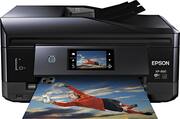
PROS: + Very compact design & foot print + Fast printing speeds + Nice photo print quality + 6 Separate Ink Cartridges + Great touch screen and interface + Easy Setup Process + Automatic paper output tray + Software is basic, but functional + 2-Sided Printing (with thicker paper) CONS: - Limited paper storage - Flimsy touch panel assembly - Cheap plastic CD Tray - Android and PC Software need improvements - Bit expensive My first impression was simply how compact the box was, let alone the printer itself. It's rare I can actually carry a printer box with one hand. So we've got a compact high-end ink-jet printer that promises to provide a lot of features. Now it's time to see how it worked out in my hands. OUT OF THE BOX Un-boxing goes just about as you'd expect with a new printer. Lots and lots of tape / wrapping to keep everything in place during shipment. You've also got a power cable, quick start guide and driver CD in the box; and that's it. No USB or network cables included; although if you have Wi-Fi, they aren't technically needed. Just plug it in and off you go with setup. You'll also immediately note that there are in fact 6 different colored ink cartridges. Be sure to shop around for prices as these can get expensive if you plan on ordering them all. On the plus side, you only need to replace the colors that happen to be low. In either case, they are quite easy to install. DESIGN Before we start setup, let's look at the printer. As initially noted, the printer is super compact. I'm surprised they fit all of these features into such a small package. You do sacrifice paper storage and such. But for most home and home offices who aren't printing 100 pages a day, that's all you need. Not to mention, you wouldn't be buying an ink-jet! The printer has a nifty LCD screen that automatically rotates outward when you power it on. Then closes again, at power off. The LCD and it's user friendly interface as a nice touch. Which can also be taken literally as it's also a touch screen. One that happens to be fast and intuitive to navigate. A slight negative here is that the touch panel assembly wobbles a bit when you push it, in particular in the closed position. More noticeable as the power button is on the same panel. The output tray even automatically extends when you print to catch the print-outs. A button on the touch panel allows you to easily open and close at will. Nice. Not so nice? The CD "tray" is a cheap piece of plastic that slides in at the bottom of the printer. SETUP First step, toss the CD, and go to epson's website to download the Driver and Software suite. It's going to be more up-to-date. Then run the file and follow the steps. I decided to do this via Wi-Fi as I suspect that's how many folks will tackle this step. You can also setup via LAN and USB cable, if you choose to do so. Even though as previously noted, those cables aren't included. During setup, it will try to attach to the printer with your notebooks wireless card. So yes, you will need a computer with wireless capability if you choose to go this route. Alternatively, you could manually setup via the printer's touch panel. Unless some older printers, this is nowhere near as painful as it used to be. But I'd still stick with the software to save a few steps. In my case, the software failed to connect automatically on the first try on my Windows 7 notebook. I instructed me to kick off a few steps on the printer itself to get it ready to go, and then off it went. Software installed and ready to go. I did note that on both test systems, one with Windows 7 and the other with Windows 8, the firmware update failed (software crashed). Simply reboot and run the Software Updater program separately. Fairly easy to do as it's all automated. At this point you've got the printer attached to your Wi-Fi network, drivers, and software installed ready to go! PRINTING (ANDROID) I first decided to try printing from my Galaxy Note 3 phone and Galaxy Note Pro 12.2 tablet. I simply installed the Epson "iPrint" application from the Play Store, allowed it to find the printer, and it's ready to go. The application itself is rather primitive, but does show the printer's status, ink levels, and other basic info. However, it is limited in functionality. It's only a print application, not a service. In other words, you have to print from within the Epson application. if you print a document or file on your tablet, you'll have the option to select the program to handle that task. So you can select Epson iPrint, and off you go. If you try to print from within another application, such as the Gmail app or browser, you cannot. It's looking for a Print Service, such as the one Samsung and HP apps provide. This needs to be updated. PRINTING (WINDOWS) For the rest of my testing, I decided to jump back into Windows 8. You're going to do all printing from the application you are printing. And scanning, from the old-school stand-alone scanning application that's been around for many years. There is no Windows 8 Metro app. Beyond that, everything printed just as good as you'd expect from a high-end ink-jet printer. Open whatever you want to print and off you go. For some reason I do enjoy watching the automatic paper holder extend. Scanning also worked great with this compact Epson. Print speed doesn't set any records, but is plenty fast for it's design. DOUBLE SIDED PRINT I found this feature both odd and interesting. For one, you rarely see this feature on an ink-jet printer. Mostly because of what I experienced & confirmed with my testing, which is ink bleed. Whether you print B&W or Color, if you're using normal office paper, it'll bleed through the paper. Laser printers don't have that issue. You could use photo paper, although those are usually meant to be used on one side. Basically, you'll need to go buy some thicker paper if you want to print on both sides. Although it is nice to have, should you have the need (and correct paper). It worked just fine in my tests. CONCLUSION: I didn't go much into some basic features such as faxing and copying since they pretty much work like they always have. Which is to say very well. This "small-in-one" printer, as they call it, has just about everything you could need in a home and home office print environment. It takes up very little space and they just don't get any easier to use than this. However, I do still have my concerns with PC and Android software that's a bit out of date. The Android software needs to run as a service. Windows software needs to not crash during a firmware update. And how about some love for Windows 8? I only mention this because my Samsung printer does all of that perfectly and far more "feature rich." Although the Epson software does technically get the job done. At the end of the day, I still consider these issues to be relatively minor and can easily give this printer a solid recommendation (4.5 stars).
Posted by omegafiler