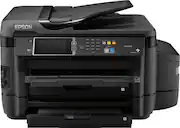
Rating 4.5 out of 5 stars with 119 reviews
4.5- Print Quality (77)
- Paper Trays (18)
- Ease of use (13)
- Setup (12)
- Touch Screen (8)
- Size (6)
- Weight (4)
- AirPrint (3)
Customer Images
The vast majority of our reviews come from verified purchases. Reviews from customers may include My Best Buy members, employees, and Tech Insider Network members (as tagged). Select reviewers may receive discounted products, promotional considerations or entries into drawings for honest, helpful reviews.
- Rated 5 out of 5 stars
Prints Fast & Very Crisp and Clear & very cheaply
This printer does a fantastic job of printing faster than any printer I've had & does it very crisp and clear in both B&W and Color - also I love how cheap the ink bottles are compared to cartridges and how much longer the ink lasts
Posted by Sammsungfan
- Rated 1 out of 5 stars
Broken out of box, poor support from Epson
Item arrived in good physical condition. After initial setup, I tried to configure scan-to-email options via the web admin interface. Noticed that the printer had an available firmware update, and downloaded/installed it. The email server options were no longer available, which I suspect is a bug. The web configuration page with the missing "email server" category under "Wifi/Network Settings" and should be between "Services" and "LDAP Server" on the left-hand side of the page is posted with this review. Contacted Epson support about it and it was the worst hour of customer service support I've ever experienced in my life. Rude employees, asking nonsensical questions not related to the issue or hardware, and got hung up on for my trouble after they confirmed that they can recreate the issue on their end. No resolution. I have no choice but to return the product to Best Buy and look at other wide-format printing options. Buyer beware, Epson products aren't worth the paper your receipt is printed on.
Posted by FrustratedEpson
- Rated 5 out of 5 stars
Save time and Money with this printer!!
The unboxing: The printer arrived two days ago in a bulky brown box that was wheeled in with a dolly. When I opened it, it was neatly packaged in Styrofoam that protected the top and bottom from shipping impact. After removing the Styrofoam, I found that this packaging material held the ink bottles, installation instructions and the power cord. The unit was wrapped in protective plastic that was easy to remove. There were little pieces of blue tape in several places that were easy to see and remove. The tape kept any moving parts from shifting during shipping. When I took everything apart and finally placed the printer (which required help from my husband because it is pretty heavy) in my office, the unit fit very easily and securely on top of the existing printer cabinet I had. Not as bulky as I feared it would be when the box arrived. Initial setup: I followed the instructions on the pamphlet which were numbered and easy to understand. Filling the ink was so cool! I liked how the plugs had a resting place during fill so that they didn't get dirty or misplaced during filling. I squeezed the black ink in pretty quickly so it bubbled up which made it so the whole bottle wouldn't fit the first time. I let the bubbles settle and then squeezed a little slower the second time and watching the reservoir fill up was really neat. Never again will I have to question whether I have ink or not. I learned from my initial experience and filled the other colors more slowly. All the ink from the bottles fit in the tanks and right up to the visible fill line. I then connected the power cord and waited for the magic to happen. The LCD touch screen lit up and gave me instructions that were also easy to follow. I was able to update the date and time and set my language settings. I then pressed the start button as instructed and waited for my test page. Alas, I knew everything was going too smooth. I got a paper jam error message despite not having put any paper in yet. I looked into the unit to make sure I had not missed any blue pieces of tape and then followed the un-jam instructions showing on the screen. I then moved the printer head from the starting right position over to the left and when it wouldn't slide, I noticed that there was a flat cable that had been dislodged (probably during shipping) that was blocking the way. I moved this cable over and voila, the unit was in perfect working order! I then popped the CD into my PC and was expecting all kinds of instructions on how to set my printer up to print on command. Low and behold, the CD and on-line update did EVERYTHING for me. I barely had to select two options before I was ready to print and scan and fax and do all the wonderful things this machine could do for me. I also was issued an e-mail address so that if I was across town and wanted to print something, it would be waiting for me when I got back to the office. I didn't have to be in the same building as the printer to get it to do my work for me! I can easily use any device (Android phone, Fire tablet, and PC) connected to my WiFi network to print from as well as e-mail items from other computers and networks. The use: The printing was fast and crisp. The colors did not run together and the pages were dry to the touch immediately after ejection. The pages also did not come out curved like my other printer did so taping them to the walls or gluing them together is easier now. I also like how I can command it to scan to any device hooked up to the network from the on-board touch screen. I can also scan to the web or my Google account and have someone in another place access the scan. No need for faxing anymore! The top load scanner works smoothly and also does double sided scans and copies without taking an excessive amount of time to process. Since the initial set up, I have not had a single jam issue with the machine and I am almost a whole ream in. Rating: I for sure award this machine 5 stars. Not only is it a huge upgrade from what I had before (and not that big of a price difference either), it is operating completely as advertised. I am more productive now in the office which saves me time and money and will pay for itself in ink savings versus the cost of replacement toner in no time at all. One week Update: I have been using the printer almost daily for a full week now. The printer just keeps amazing me. Printers stay with us for years. I was hesitant about this printer because the price tag is a bit steep and I didn't think I needed all the options but man am I glad I have them now! I look at it as someone who drives a manual transmission and never wanted to switch to automatic... until they did! . It was only a couple hundred more than what I paid for my Samsung wireless printer and yet this one does so much more and so much faster than the other one. It's like I'm my own print shop! The ink in this machine is already lasting me longer than my toner was and the machine comes with an extra refill so I'm set for the next 2 years. And I have still not received any jams since the initial set up. If I have any negative or unexpected experiences, I will update my review but so far so good! This is a review for the Epson ET-16500 EcoTank that I received free of charge to do a beta test and review.
Posted by Epson16500
- Rated 5 out of 5 stars
Excellent All-in-One Printer
Epson has created the best All-in-One printer that I have ever used with the Workforce ET-16500. It is perfect for home and small business use. The feature that I like best is that you never have to change cartridges. All you do is fill the eco-tanks up from the included bottles and it will print 11,000 pages. Then you only need to buy more bottles of ink to refill approximately one a year. Enough ink is included with the printer to last the average user two years! That is equal to 50 cartridges on other printers! The cost of the bottles of ink is comparable or less costly the cartridges for other printers that only last 1000 pages or less. This printer has finally solved the problem of always running out of ink and has made owning an inkjet printer truly affordable. The initial cost of the printer is high, however, you will soon recover this cost in the savings of not having to buy expensive ink cartridges all the time. The features I like best on this printer: - two high capacity paper trays that hold a wide variety of sizes and types of paper up to 11 x14 paper and a single sheet feeder on the back that can take 13x19 paper - two sided printing and copying - high quality flatbed scanner with ADF that can scan up to 11 x 17 - laser quality black text and photo quality color prints - extremely fast printing - the fastest inkjet printer that I have ever used - the color touch screen on the printer makes setup, maintenance, and troubleshooting easy - ability to print and scan from your android or IOS devices, google cloud, and Epson connect gives your printer an email address Epson has created a beautiful and well designed printer with the ET-16500. It is a pleasure to use and I think it has been designed to last a long time. This is a review for the Epson ET-16500 EcoTank that I received free of charge to do a beta test and review.
Posted by rlfarr
- Rated 4 out of 5 stars
Perfect for business or students.
The Epson ET-16500 EcoTank is perfect for businesses or students that do a lot of printing, and more for those that do printing of varying sizes. The multiple paper trays make it easy to change sizes and the large ink reservoirs make printing in color way less stressful than a standard cartridge printer would. Knowing how large the tanks are means never worrying that you will run out of ink in the middle of a project. Setup was simple, just following the setup handout that came with the system. It is rather large, so you will need to have a sturdy table to hold the unit. Filling the ink tanks was a breeze, and it comes with two bottles of each color, giving you 11,000 black and white or 8500 color pages before buying refills, which are rather economical in comparison to cartridge printers. Scanning was fast, and crystal clear, saving multiple page scans to a single pdf file was a life saver. The ability to email a document to printer from anywhere to come home and have it printed and waiting for you is probably my favorite feature. This is a review for the Epson ET-16500 EcoTank that I received free of charge to do a beta test and review.
Posted by MikeS