Rating 4 out of 5 stars with 12 reviews
4.0- Humidity (4)
Customer Images
The vast majority of our reviews come from verified purchases. Reviews from customers may include My Best Buy members, employees, and Tech Insider Network members (as tagged). Select reviewers may receive discounted products, promotional considerations or entries into drawings for honest, helpful reviews.
- Rated 5 out of 5 stars
Great for monitoring your environment
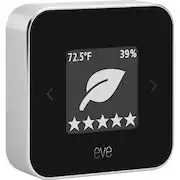
I bought this primarily so I could monitor and track the temperature and humidity in various rooms so I could fine-tune the heating and AC vents. It works great for that. I especially love the graphs in the Eve app that show history. But what surprised me, is the air quality monitoring feature. I didn't really expect to learn much from it, but I definitely did. It's fascinating to see how it varies depending on the weather, how much the heat/AC is running and other activities in the house (like when we were doing a bunch of painting & refinishing work.) Setting it up was very simple, using the Eve app, and its readings also shows up in the Apple Home app. Physically, it's a very compact and elegant gadget, that blends in to any decor. The display is very clear, and you can switch it between different modes to highlight the data you prefer. A useful device that gives me insights into my surroundings that I really didn't expect.
Posted by TheNerd
- Rated 4 out of 5 stars
Does it measure enough for the price?
Pros: the battery lasts a month or more. Cons: I don’t see how or what goes into the air quality rating. I’d like to see what it’s rating is evaluating, and also what it’s not (ex. Radon?). For price, it’s compact and long lasting battery...just not sure if I bought an overpriced temperature station or a true air quality monitor.
Posted by WebDev98
- Rated 5 out of 5 stars
Nice design
I bought a second Eve after getting the first. The device is nicely designed, small, and runs for about a month on a battery charge (maybe longer). I like having the temperature, humidity, and air quality all on the same device that I can access via Bluetooth on my phone and see a nice set of graphs. You have several options as to what/how it displays the data. I like having the temperature as the largest item, then the stars for air quality, and the humidity smaller.
Posted by John
- Rated 5 out of 5 stars
Install using Eve app
Use the Eve app to add the device and it will add also to Apple Home app on your iOS device. After trial and error using the Eve app, use Settings to Add Accessory. When the accessory is found on the screen press it’s icon on the left to pair it with your iOS device then scan the Apple HomeKit code on the card inside the box then complete. If it cannot find it, follow reset instructions. Overall, I am satisfied with the product working with the app at this time.
Posted by Overseer
- Rated 4 out of 5 stars
Does the job
Got this so I could keep an eye on the temp in a separate building. Works as advertised. Looking to add a thread border router to see if thread works better than Bluetooth LE for the homekit connection.
Posted by Wallygator
Customer reviews from bestbuy-ca
See all bestbuy-ca reviewsSyndicated rating, 1 out of 5 stars with 1 review on bestbuy-ca.
1.0(1 review)