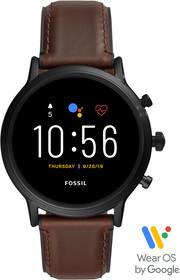
Rating 4.2 out of 5 stars with 521 reviews
4.2- Design (66)
- Easy to use (12)
- Price (12)
- Fitness tracking (10)
- Google assistant (10)
- Battery life (106)
- Compatibility (12)
- Connectivity (12)
- Wear os (10)
- Charging (8)
Customer Images
The vast majority of our reviews come from verified purchases. Reviews from customers may include My Best Buy members, employees, and Tech Insider Network members (as tagged). Select reviewers may receive discounted products, promotional considerations or entries into drawings for honest, helpful reviews.
- Rated 4 out of 5 stars
Decent product.
Purchased this watch over a year ago and a half ago. I had upgraded from the Gen 4 so more features in this current model. I do regret not getting screen protector but honestly for what I do for a living I forget to take it off, so I'm impressed it doesn't have more scratched on it then what it does already have. Battery last time is affected by the cold weather so as long as you're not out in the cold all day it should last all day on the one charge.
This review is from Fossil - Gen 5 Smartwatch 44mm Stainless Steel - Smoke with Smoke Stainless Steel Band - (2019)
Posted by EstebanT
- Rated 4 out of 5 stars
Fossil watches finally come of age
I choose this particular style because it looked a bit more "dressy" than the others. My previous watch was a Samsung 42mm model, and since I have small wrists, I was hoping to find another 42mm watch, but none of the Fossils I saw were -- they were all 44mm. I am happy to say that the difference is far less dramatic than going from 42mm to 46mm (see photos). Still a hair bigger than I'd like, but I'll adjust. Performance-wise, it works fine. The heart rate monitor and step counter seem accurate. I do miss the rotating bezel of the Samsung, and the dollar-store version on this watch (the middle rotating dial) will probably never get used. I'm still getting used to the differences between Tizen and WearOS -- Tizen seems a bit cleaner, while WearOS seems to want to throw too much at you. Again, I'll adjust, it's not a big deal, just different. Build-wise, it feels more like a real watch and less like a gadget like my old Samsung. Still getting used to the heft, but that will come with time. Battery life seems on par with the Samsung. It was initially draining quicker than I expected, so I turned off wi-fi (no need for it), and the difference was pretty dramatic. Since then it lasts me from morning to night. But if you intend to leave wifi enabled, you may find it doesn't last as long. So yeah, these Fossil watches have grown up since their earlier attempts, and I'd recommend it. If I had a gripe, it's that I think it's a bit overpriced.
This review is from Fossil - Gen 5 Smartwatch 44mm Stainless Steel - Smoke with Smoke Stainless Steel Band - (2019)
Posted by Scott
- Rated 4 out of 5 stars
Best of wear is,but far far away from Apple watch
Overall it ok, however I sometimes have connection issues with my pixel 4.battery is one day,which is the same like it was 3years ago...
Posted by ko3ak
- Rated 2 out of 5 stars
Meh...
I was looking for a dressier alternative to my Apple Watch. I hate its square face, and it doesn’t matter what band you add to it, it’s just not an attractive watch. I had fossil watches in college and loved them, I liked having a decent looking watch to wear when I wore a suit...so I purchased this watch. You’d figure after all this time that wearables have been in the market that Android Wear would be solid to that of Apple...no where close. It’s quite disappointing the disparity between the two. I find the UI/UX on the watch very clunky and unrefined. There are conflicts with my Bluetooth link up in my car when ever I wear this watch. The battery life of this is a joke. I’m lucky if I can get a full day out of the battery. I bought a second charger for work. I can get 2 days out of my Apple Watch series 4. Also the face does not stay lit long enough when I raise my are to read the time Google assistant doesn’t work. It could be that I am using an Apple phone. Not sure. This watch’s only saving grace is its ability to customize the watch face, which is a HUGE gripe of mine with the Apple Watch. I actually dropped 30 bucks on the Facer app, because I can push out awesome watch faces from the app. They are truly beautiful, and kept me from returning the watch after day one. This watch isn’t for the faint of heart. If you can get past it’s shortcoming, it’s Ok. Sadly, this watch is Gen 5 and received rave reviews...it may work great with a pixel or Samsung. Not so much with iOS.
This review is from Fossil - Gen 5 Smartwatch 44mm Stainless Steel - Smoke with Smoke Stainless Steel Band - (2019)
Posted by Tekguy761
- Rated 4 out of 5 stars
Comfortable, Feature Rich Smart Watch
I must say I was skeptical because I am not much of a smartwatch person. I actually used to wear nice watches all the time but in the last few years had just stopped because I always had my phone with me. I was always looking at the other brands and got close a couple times but never went forward. I finally did that with the Fossil Gen 5. First, I was impressed with the size. It is very thin and fits my normal to smaller wrist even better than some of my older non-smartwatches I used to wear. The fact that it is thin, and light made this really easy to get back into the habit of wearing a watch. This watch runs on Google’s Wear-OS. You download the app, sync with the phone with the watch and setup was quick and easy. I was a bit disappointed in the Wear-OS options on the app. You can change the face setting, manage notifications, change tiles (you can have 5 on your rotation), I use Weather Forecast, Headlines, Heart Rate, Heart Points and Agenda. I really like being able to control my Pandora and Spotify from the watch. I can still not get Spotify to download music to the watch. I was however able to open Play Music and see playlists that I had previously setup. I was then able to download them to the watch and since I had paird my headset, I was able to take a walk and enjoy music from the watch without my phone. That was Great! If I could do that with Spotify, it would be amazing! I also setup the watch with my Galaxy S10+ and was able to answer, speak and be heard from watch but I only was able to get an echo from those that called me, and I could not hear them on the watch. I have seen posts that Fossil is preparing a fix for this. One of the cool things I like is my blink camera notifications show up on the watch and even have an image capture from it so I can see if I really need to go to the phone and see the clip or realize it was just a squirrel! I love the Cardiogram function and have it tracking my heartrate every 5 min. It is very accurate and comparable to my higher end home blood pressure tracking machine. It seems to accurately measure my move minutes. I wish it would automatically track my step vs. me having to go into fit and select start workout and select walking. They really should add step tracking to occur automatically. My hope is that Wear-OS will continue to improve because I really like the feel of this watch and getting the notifications, alarm, fitness tracking, news. Fossil has done a great job on the watch but I really want the music on my watch from my Spotify. I hope that I will not be limited to Play Music only. I did not actually use Google pay yet but was able to quickly setup my newer card. Battery Life is average. I like all the features so I am getting 20hrs or so. What I do is after I get settled at work in the AM, I take it off and charge it for less than an hour while I am working. Charges quickly so has not been an issue. I bought extra cables on Amazon for less than $12 bucks so I threw one in the car, perfect! Overall, this thing is really nice. Comfort and features are key for me. Comfort has me at a 5 while features are still lagging at a 4 but I am hopeful. I would still highly recommend this watch, it’s beautiful, comfortable and full of features and opportunity!
This review is from Fossil - Gen 5 Smartwatch 44mm Stainless Steel - Smoke with Smoke Stainless Steel Band - (2019)
Posted by bradrobster