Garmin - DriveSmart 51 LMT-S 5" GPS with Built-In Bluetooth, Lifetime Map and Traffic Updates - Black
- Key Specs
- Screen Size: 5 inches (Size of the screen, measured diagonally from corner to corner.)
- Touch Screen: true (Touch-screen devices make navigating more intuitive. Using a touch-screen display, you can do things such as tap to select, hold and drag to move items, swipe to scroll, and pinch to zoom.)
- 3D-Map View: true
- Lifetime Map Updates: true
- Topographic Maps: false
- Lifetime Traffic Updates: true
- Programmable Routes: true
- Alerts: Other
- Integrated Camera: false
- App Compatible: true (The product can be connected to a program or software application on a mobile device, which then receives collected data from the product.)
- Wi-Fi Built-in: true (Able to connect directly to a wireless network without the use of an adapter.)
- General
- Brand: Garmin
- Model Number: 010-01680-02
- Product Name: DriveSmart 51 LMT-S 5" GPS with Built-In Bluetooth, Lifetime Map and Traffic Updates
- Color: Black
- Designed Usage: Car
- Case Included: false
- Display
- Screen Size: 5 inches (Size of the screen, measured diagonally from corner to corner.)
- Touch Screen: true (Touch-screen devices make navigating more intuitive. Using a touch-screen display, you can do things such as tap to select, hold and drag to move items, swipe to scroll, and pinch to zoom.)
- Color Display: true
- 3D-Map View: true
- Resolution: 480 x 272 (Refers to the number of pixels, both horizontally and vertically, used to capture video/images. The higher the resolution the finer the detail that can be seen.)
- Backlit Display: true (Integrated lights allow for visibility of the display in low-light conditions.)
- Map
- Lifetime Map Updates: true
- Integrated Base Maps: true
- Map Coverage Area: North America
- Map Sharing: false
- Map Provider: Other
- Number Of Waypoints: 1000
- Geocaching Mode: false
- Topographic Maps: false
- Uploadable Maps: false
- Navigation
- Lifetime Traffic Updates: true
- Programmable Routes: true
- Voice Prompts: true
- Emergency Services Locator: false
- Electronic Compass: false
- Environmental
- Water Resistant: false (Resists some degree of water penetration.)
- Barometric Altimeter: false
- Sun/Moon Information: false
- Hunt/Fish Calendar: false
- Features
- Location Reporting: false
- Alerts: Other
- Integrated Camera: false
- Pedestrian Mode: false
- Text-To-Speech: true (A system that converts language text into speech.)
- MP3 Playback: false
- Storage
- Expandable Storage: true
- Memory Card Slot: true
- Memory Card Included: false (Indicates whether a memory card is included.)
- Compatibility
- App Compatible: true (The product can be connected to a program or software application on a mobile device, which then receives collected data from the product.)
- Computer Compatibility: Mac, Windows
- Unit-To-Unit Transfer: false
- Automatic Sync: false
- Works With: Cortana, Siri (Compatible with or able to be connected to other smart devices or applications.)
- Connectivity
- Bluetooth Enabled: true (The device is capable of communicating with another device via Bluetooth, provided they are within the required range of each other. A Bluetooth-enabled device must also be the same Bluetooth version or higher than the accessory it is intended to pair with.)
- Number Of USB Port(s): 1 (The total number of USB ports including all generations and versions.)
- Wi-Fi Built-in: true (Able to connect directly to a wireless network without the use of an adapter.)
- Dimensions
- Product Height: 3.3 inches (The out of box height of the item. Height is measured as the vertical distance from the bottom of the item to the top as it would be primarily used or placed.)
- Product Width: 5.5 inches (The out of box width of the item. Width is measured as the horizontal distance from one side of the item to the other as it would be primarily used or placed.)
- Product Depth: 0.7 inches (The out of box depth of the item. Depth is measured as the distance from the front of the item to the back as it would be primarily used or placed.)
- Product Weight: 0.4 pounds (The out of box weight of the item.)
- Power
- Rechargeable Battery: true
- Battery Life: 1 hours (Battery life will vary depending on the product configuration, product model, applications loaded on the product, power management setting of the product and the product features used by the customer. As with all batteries, the maximum capacity of this battery will decrease with time and usage.)
- Battery Chemistry: Lithium-ion
- Interface(s): USB (Refers to the types of connections that devices use to interact and communicate with each other.)
- Charging Method: USB
- Warranty
- Warranty - Parts: 1 year limited
- Warranty - Labor: 1 year limited
- Other
- UPC: 753759169855
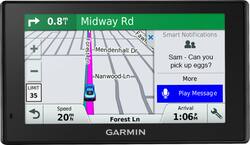
Get where you're going without fuss when using this Garmin DriveSmart 51 GPS. It has a 5-inch edge-do-edge display so that you can see plenty of data, and easy-to-use indicators show how fast you're traveling and what time you should arrive. This Garmin DriveSmart 51 GPS has maps for the United States and Canada for easy cross-country journeys.
- Update your maps for free: The pre-loaded maps of North America can always be updated for free.
- 5" color touch screen offers a clear view: The large screen makes it simple to enter destinations and navigate functions and settings.
- Lane assistance keeps you ready for the next turn: Colorful arrows tell you which lane to be in to make your next exit or turn.
- Customize your route options: You can set up three alternate routes so you're prepared to take advantage of the road ahead.
- Connect your unit using USB interface: Easily connect to your computer, smartphone or car charger to get map updates, access real-time traffic and more.
- Bluetooth technology: Allows you to pair with compatible devices, so you can enjoy hands-free calling in your vehicle.
Whats Included
- Garmin DriveSmart 51 LMT-S
- USB cable, suction cup mount, car power cable
A: Drivesmart 51/61 is the 2017 model whereas Drivesmart 60 is the 2016 model. Main difference is that Drivesmart 51 has a built in Wifi, that can connect to a wireless network to download updates. Drivesmart 60 requires connecting to a PC via USB and installing Garmin Express software in PC for updates.
A: The voice command is great and was fairly easy to learn even for an old guy. You can even add to your trip in progress using voice command and it was simple enough to do without reading the manual. The manual is actually included on the unit if you have to stop and figure something out. Didn't really need it.
Q: Does it has canada map included?
A: Yes, the NA stands for North America.
A: This one is voice activated. Your husband can speak the address, no need for typing. Hope this helps.
Q: Where can I get an owners manual for this? The Garmin website does not list this one.
A: Maps updated when connected via USB to my computer at Garmin. Also, updates map automatically using my wi-fi. The first time out of the box it took about 1 hour to upload the updates.
Q: What is the difference between LMT and LMT-S
A: The LMT-S model includes the Live Traffic feature provided through the Garmin Smartphone link using your smartphone’s data connection. The LMT version receives traffic through the included traffic antenna/vehicle power cable.
Q: Do I need internet connection with my Garmin Drive 51 LTM-S with Smartlink?
A: You only need internet if you want the traffic updates. I did not use internet because I have limited internet with my cell phone carrier. However, I did use my home computer internet to update the GPS with all updates when I set it up originally.
A: Hello, thank you for leaving a review. Live traffic alerts on the DriveSmart 51 require a live traffic source. This model is equipped with the ability to connect wirelessly to most smartphones, and the Smartphone Link application (with included Live Traffic) is available at no additional cost. Vehicle power cables with built-in traffic receivers are available for purchase as optional accessories for your device, should you prefer to use this method over the default traffic solution. A GTM 36 cable, which offers standard Garmin traffic, can be found with part number 010-01009-02. A GTM 60, which provides HD Digital Traffic, can be found with part number 010-01031-00. An explanation of the differences between the two services can be found in the following Support Center FAQ: https://support.garmin.com/faqSearch/en-US/faq/content/i34WV8maJa11t7iwvYnz18 -MH
People also viewed
 $312.99The price was $349.99
 $499.99The price was $599.99
 $420.99The price was $449.99
Today's top picks
 $479.99The price was $729.99
 $199.99The price was $249.99
 $789.99The price was $1,049.99
 $799.99The price was $1,199.99