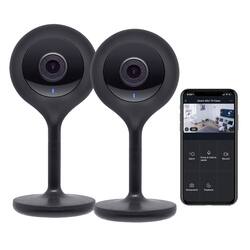
Geeni - Indoor Wi-Fi Wireless Network Surveillance Cameras (2-Pack) - Black
- Key Specs
- Video Camera Resolution: Full HD (1080p) (Refers to the number of pixels, both horizontally and vertically, used to capture video/images. The higher the resolution the finer the detail that can be seen.)
- Night Vision: true
- Number Of Cameras Included: 2
- Camera Power Source: Cable with AC Adapter/Plug-in
- Wireless Connectivity: Wi-Fi (The manner in which a device sends data to another device over a short distance without the use of wires or cables.)
- Storage Type: Memory card
- Indoor Or Outdoor Use: Indoor (Indicates the appropriate environment product was designed to be used in.)
- Audio Communication: 2-way (1-way communication devices allow a user to hear detected audio, while 2-way communication adds the ability for a user to talk back through the device.)
- General
- Brand: Geeni
- Model Number: GN-CW028-999
- Product Name: Indoor Wi-Fi Wireless Network Surveillance Cameras (2-Pack)
- Color: Black
- Camera
- Video Camera Resolution: Full HD (1080p) (Refers to the number of pixels, both horizontally and vertically, used to capture video/images. The higher the resolution the finer the detail that can be seen.)
- Camera Resolution: 1080 (Refers to the number of pixels, both horizontally and vertically, used to capture video/images. The higher the resolution the finer the detail that can be seen.)
- Night Vision: true
- Night Vision Image: Black and white
- Number Of Cameras Included: 2
- Day/Night Mode: true (Captures images/video with optimal clarity by automatically adjusting settings to various light levels.)
- IP Camera: true (An Internet Protocol (IP) camera is able to record and display image/video data via the internet, without need for a local recording device.)
- Power
- Camera Power Source: Cable with AC Adapter/Plug-in
- Compatibility
- App Compatible: true (The product can be connected to a program or software application on a mobile device, which then receives collected data from the product.)
- Compatibility: Universal
- Voice Assistant Built-in: No (A digital assistant built into the device that uses voice commands to answer questions and control smart devices.)
- Connectivity
- Camera Connectivity: Wireless (Security system cameras can be set up in several ways. Wired cameras require cables for power and footage transmission, while wire-free cameras don't need cables for either. Wireless cameras still require cables for receiving power but are able to transmit footage via a wireless network.)
- Wireless Connectivity: Wi-Fi (The manner in which a device sends data to another device over a short distance without the use of wires or cables.)
- Recording & Playback
- Records Audio: true
- Subscription: None
- Storage
- Storage Type: Memory card
- Memory Card Type: microSD
- Lighting
- Lighting Type: None
- Performance
- Indoor Or Outdoor Use: Indoor (Indicates the appropriate environment product was designed to be used in.)
- Features
- Audio Communication: 2-way (1-way communication devices allow a user to hear detected audio, while 2-way communication adds the ability for a user to talk back through the device.)
- Dimensions
- Product Height: 4.5 inches (The out of box height of the item. Height is measured as the vertical distance from the bottom of the item to the top as it would be primarily used or placed.)
- Product Width: 2 inches (The out of box width of the item. Width is measured as the horizontal distance from one side of the item to the other as it would be primarily used or placed.)
- Product Depth: 2 inches (The out of box depth of the item. Depth is measured as the distance from the front of the item to the back as it would be primarily used or placed.)
- Product Weight: 0.3 pounds (The out of box weight of the item.)
- Display
- Color Display: true
- Warranty
- Warranty - Parts: 1 year
- Warranty - Labor: 1 year
- Other
- UPC: 844702077980
Track activity at home from anywhere with this Wi-Fi-enabled Geeni LOOK Smart security camera. Automatic night vision gives you a clear view even in dim lighting, and 1080p high definition recording capability captures all the details. This Geeni LOOK Smart security camera has a built-in microphone and speaker for two-way communication.
- 2-way communication: Built-in microphone and speaker let you hear what happens around the camera and talk back through your phone, no matter where you are.
- Capture everything in HD: Vivid 1080p resolution allows you to see small details on your screen.
- Night vision lets you see in the dark: Keep an eye on things when there's little to no light.
- Save essential images: Use a microSD cards to store your footage.
- Connects to your Wi-Fi network: For convenience and simple setup.
Whats Included
- Geeni Indoor Wi-Fi Wireless Network Surveillance Cameras (2-Pack)
A: Hi ! It's only your night vision that kick in and yes the lights that reflex in the window,is annoying just try to put dark tape for the black camera or white duck tape on your camera,to cover the lights from reflecting in the window,so your camera can see,better in the dark. Take care and stay safe !
A: Hello, Greg. If you are using the camera to view the outside part of your home and this camera is situated in front of a glassed window will bounce back and will blind the camera. If your purpose is to use this camera to view the outside part of your house clearly we advise that you physically place the camera outside the window to eliminate the glare, hence we would like to set your expectation that this is an indoor camera. We do have an outdoor camera named Hawk. For android phones, it should be 4.1× or higher. For more details, please let us know as we’re here to help. Feel free to contact our revamped support channels via email at support@mygeeni.com or call us at +1 (888) 232-3143, available from Mon-Sun, 9:00 AM to 9:00 PM EST
A: The power cord is about 8 in. But thats the least of your worries. It constantly looses internet connection and overheats. Dont buy this product.
Q: can this camera be hooked up to show on a laptop computer rather than a smartphone
A: It absolutely can, I recently purchased 3 Geeni Hawk 2s, and wanted to have it show up on my office monitor as well as my phone. The solution I found was to download an emulator called "Nox" which essentially allows you to run an android device as a virtual computer on your PC. From there I simply ran Nox, went to to the play store, downloaded the Geeni app, and there you have it. Keep the emulator running on one of your PC monitors and you have constant video feed from your cameras. Hope I was of some help!
Q: Where would I put an sd card in the camera? Also what kind of sad card to I get?
A: You would need to get the saddest card you can find for use in this camera. Like emo sad.
Q: CAN I USED MY INDOOR FOR OUTSIDE CAMERA
A: Its not recommended. Indoor cameras dont have a protective shell and is incased so no moisture dirt or anything else can get inside and reach the components. Being Cold will also not be good for the indoor camera
Q: So where do the videos go when they are saved? I can't find them
A: The videos should go to the SD card that you put in the side of the camera. Hook the cord up to a computer and open your finder/windows manager app or take the SD card out and put it in an adapter to plug it into a USB port or directly into an SD slot.
Q: Can I connect to my hotspot on my phone
A: Thank you for your interest in one of our products, Jason. To answer your question, For connecting the device using the mobile hotspot, you will need two mobile phones, one is to access the Geeni app and the other will be the one to serve as the source of the mobile hotspot (make sure this phone has a mobile data). The mobile phone that is the source of the mobile hotspot needs to be always near the camera. Kindly turn on the mobile hotspot of the other phone and connect your phone to the hotspot. Upon adding the device to the Geeni app, select the "Change Network" on the Set up your WiFi page and kindly make sure to enter the WiFi name and password for the mobile hotspot. We don't recommend you to use a mobile hotspot for connecting the device since a mobile hotspot is not as stable as a regular home router. For more details, please contact us via email at support@mygeeni.com, phone +1 (888) 232-3143, support.mygeeni.com for online chat support. We are available from Mon-Sun, 9:00 AM to 9:00 PM EST.
People also viewed
 $29.99The price was $34.99
 $70.99The price was $79.99
Today's top picks
- $29.99The price was $34.99
- $70.99The price was $79.99