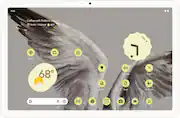
The Pixel Tablet is designed to be helpful at home and with work. Control your smart home, and say “Hey Google” for hands-free help, ¹. It’s powered by the Google Tensor G2 chip, and it’s the perfect companion to your Pixel phone.
A: Hey there! You can charge your Pixel Tablet without the Speaker Dock. Simply use a USB cable. For more information, tap the link below: https://support.google.com/googlepixeltablet/answer/13554742?hl=en
Q: Can i read books on the tablet?
A: Of course. If you have installed an appropriate app like Libby (download ebooks from your library) or Kindle (for free and purchased books from Amazon). I read books and newspapers on my Pixel tablet all the time.
Q: Does this tablet have an SD slot for additional storage?
A: Hi Mike, thanks for sharing your concern. Our Pixel Tablet doesn't have a SD slot. But no worries we will be taking this comment in consideration for future developments. In the meantime, you can check out the Pixel Tablet specs here: https://store.google.com/us/product/pixel_tablet_specs?hl=en-US
Q: Can you download a movie and mirror it to a tv without wifi
A: Hi, Zzskgs. Yes, you can download a movie on your Google Pixel Tablet 11" and mirror it to a TV without Wi-Fi by using a wired connection like an HDMI cable to connect your tablet directly to the TV. To use this feature, you must use a display device that supports DisplayPort or HDMI to USB-C cable. To project content from your Pixel phone into a display device: 1. Plug the DisplayPort or HDMI cable into the display device. 2. Plug the USB-C cable into your Pixel phone. 3. Select the Mirror display dialogue that appears on your phone. 4. Follow the on-screen instructions. To get more information you can click the following link: https://support.google.com/pixelphone/answer/2865484
A: Unfortunately not, I was disappointed to know that it does not work as a 2nd monitor... Hopefully google addresses this issue and provides support for casting to it's display
Q: Does it work with Microsoft products
A: Yes
Q: Tamil typing is available just like pixel phone
A: Great question! The Pixel tablet should offer a seamless Tamil typing experience. Google's Gboard is the default keyboard on Pixel devices and it's known for its robust language support, including Tamil.
Q: Can you add a word processor?
A: We appreciate the question, Joyner. The Pixel Tablet supports app downloads directly from the Google Play Store. Any app available on the Google Play Store should be compatible with the Pixel Tablet. For precise app compatibility information, contact the app developer directly.

The Pixel Tablet is designed to be helpful at home and with work. Control your smart home, and say “Hey Google” for hands-free help, ¹. It’s powered by the Google Tensor G2 chip, and it’s the perfect companion to your Pixel phone.

Meet your go to device for on the go family fun Galaxy Tab A9+. A bright, engaging 11" screen is perfect for every family member to do what they love. Whether they’re enjoying a show, unwinding with a game or catching up on schoolwork or day to day tasks, an upgraded chipset makes every experience feel smooth and easy. You can even open multiple apps at the same time and get all your everyday tasks done quickly. Use it for hours without worrying about power, and keep everything you love together with plenty of storage space. Plus, the preloaded Samsung Kids app provides a safe digital environment for your little ones to happily learn and play. Give your family a great all in one Tab that perfectly meets all their everyday needs without taking a bite out of your wallet Galaxy Tab A9+.

Lenovo Idea Tab Plus is designed to fit your style and power your study. With a thin, lightweight build and a choice of three fresh colors, this tablet feels personal from the start. The 12.1" display with 800nits HBM brightness and 96% DCI-P3 color keeps everything sharp and vibrant, even outdoors. AI-powered study tools and the responsive Lenovo Tab Pen help elevate focus and make note-taking feel smooth and natural.

The 11-inch iPad is now more capable than ever with the superfast A16 chip, Liquid Retina display, advanced cameras, fast Wi-Fi 6, USB-C connector, and four gorgeous colors. iPad delivers a powerful way to create, stay connected, and get things done—all for a surprisingly affordable price.
| Pros for Google - Pixel Tablet - 11" Android Tablet - 128GB - WiFi - Porcelain | |||
|---|---|---|---|
| There were no pros for this product— | |||
| Cons for Google - Pixel Tablet - 11" Android Tablet - 128GB - WiFi - Porcelain | |||
| There were no cons for this product— | There were no cons for this product— |
Customers are enthusiastic about the Pixel Tablet, highlighting its great screen quality and strong performance. Many users find it easy to use and appreciate its impressive battery life and fast processor speed. The tablet also offers ample storage for various needs. However, a few users have noted some issues with the fingerprint reader.
The vast majority of our reviews come from verified purchases. Reviews from customers may include My Best Buy members, employees, and Tech Insider Network members (as tagged). Select reviewers may receive discounted products, promotional considerations or entries into drawings for honest, helpful reviews.
This tablet is pretty good: Nice screen, great software and interface, good performance with very little lag. Finger print on the power button works great, brightness is good and it will get regular updates from Google. Great sale price at Best Buy too.
Posted by Starion6
I switched to this tablet after a different brand had mysteriously stopped working. I have the pixel phone and watch, so I figured why not the tablet too? I have loved everything Google so far. This tablet is the perfect size, has nice options for keyboards, connects Bluetooth, great video quality, and is nice to look at.
Posted by SARAH
I like this tablet very much and I recommend to others as well and it Google supported everything will be backed by Google.
Posted by Jitin