Rating 4.8 out of 5 stars with 41 reviews
4.8Customer Images
The vast majority of our reviews come from verified purchases. Reviews from customers may include My Best Buy members, employees, and Tech Insider Network members (as tagged). Select reviewers may receive discounted products, promotional considerations or entries into drawings for honest, helpful reviews.
- Rated 5 out of 5 stars
Paradigm Shift.
I said I’ve always been a big fan of the idea of GoPro’s and being able to video record your activities in a wild. But I always felt like the picture called was just OK. Mission one changes that with the 8K quality and 30 frames per second. Mission one captures unbelievable video. Highly recommended.
This review is from GoPro - Mission 1 Pro Grip Edition Camera - Black
Posted by RYANR
- Rated 5 out of 5 stars
Worked great in Jamaica
Very easy to you use. You are able to pull pictures from videos. Very clean picture while snorkeling in the ocean.
This review is from GoPro - Mission 1 Pro Grip Edition Camera - Black
Posted by TAMMYS
- Rated 5 out of 5 stars
Weekend Dad Need Action Cameras Too!
The GoPro Mission 1 Pro has been a really solid camera for the kind of family/action stuff I wanted it for. My main use so far has been outdoors, including taking video of my daughter at a splash pad where I didn’t want to worry about getting my phone or another camera wet. I also used it during a 4th of July parade when my daughter got to ride on a fire truck, and that was where this camera really impressed me. For the parade, I mounted the GoPro inside the cab of the fire truck using a flex mount while I recorded from outside. The camera was only about two feet away from the main driving area, but it still captured the entire cab. The image quality was excellent, and the stabilization was great. The wider, image took me a minute to get used to because it has that fisheye look, especially toward the edges. Once I understood how much flexibility that gave me while editing, I actually appreciated it. Being able to choose the center of the frame or shift the view a bit after the fact is really useful and because the resolution was so good I can crop and zoom and it still looks great. Build quality is one of the biggest strengths here. The camera feels solid, and the included grip with the steel cage gives it an even more durable and stable feel. I also really like the standard quarter-inch mount on the bottom and the ability to mount it vertically with the camera grip. It makes the whole setup feel very versatile. Around water, it handled splash pad use with no issues. I didn’t fully submerge it, but it got wet and never missed a beat. Battery life is probably my biggest complaint. When I had it recording in 4K inside the fire truck, it lasted through about an hour of recording just fine, but it was definitely getting close to needing a charge. I would guess it may have made it around 90 minutes or so in that setup. To be fair, it was sitting in the cab of a fire truck on the 4th of July in around 90-degree weather, so heat was already a factor. The camera did get warm to the touch, but the footage recorded perfectly, so I can’t really complain too much there. The Quik app works okay for pulling footage, but I found it slower than just plugging the camera into my MacBook with USB and using Image Capture to drag and drop the files. That was much faster and only took a few minutes. I prefer editing on a computer or tablet anyway, so I probably won’t use the app much. One thing I was disappointed by is that it currently doesn’t work with the GoPro webcam app. For a camera like this, webcam support feels like something that should just be included, especially if you only use the action camera features every couple weekends. It would be nice to get some extra use out of it that way. Overall, I’m really impressed with the Mission 1 Pro. The build quality, mounting options, water resistance, image quality, and stabilization are all excellent. The battery life could be better, and the lack of webcam support is frustrating, but for action shots, family outings, and situations where I don’t want to risk my phone or other camera, this is a great camera to have.
This review is from GoPro - Mission 1 Pro Grip Edition Camera - Black
Posted by Farns
- Rated 5 out of 5 stars
Settings and video modes galore!
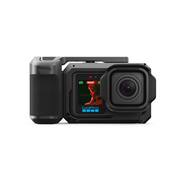
In the short time I have had the GoPro Mission 1 Pro Grip Edition Camera, I have found myself being very impressed by it. I am barely an intermediate user of Go Pro cameras. I have an older model that I have enjoyed using for vacations, so when I saw this Grip Edition Mission 1 model, I just had to try it out. I have to start off by saying that I absolutely love the included grip with this camera. As someone with larger hands, the grip makes holding the camera feel way more comfortable and natural. The grip is well made (metal) and very secure, but also easy enough to remove. For some users, this grip addition may not be as necessary depending on their primary use of the GoPro (with consideration of the amount of accessory attachments available), but for people with heavy “point and shoot” type of use (camera or video) I highly recommend this add-on. As for the camera itself, I found it to be easy to navigate and use. I was very impressed by the amount of camera and video settings along with the included video modes available. The different video modes are really fun, but there is definitely a learning curve to figuring out the best set up and settings for quality shots. I felt that the camera performed very well in low light but the Night Effects settings probably work best with the use of a tripod or stand. While the camera features are very nice, I didn’t love that the zoom for the camera was embedded within the camera’s settings instead of being able to simply use a pinch touch like phone cameras are. The screens of the camera are vibrant and sharp. The touch screen is fairly accurate but the small size of the screen definitely lessened the touch accuracy for me. The built-in microphone works extremely well - perhaps almost too well lol. The speaker on the camera is impressively loud and very clear too. The battery life of the camera is really good. On a single charge I used the camera for light use for 3 out of 5 days, and accidentally recorded a 45 minute video, in addition to the photos and short videos (1 minute or less), before the battery ran down to 3%. The battery charges very quickly though and within less than an hour it was back to 100%. Last, the GoPro Quick app is an excellent app, even without a subscription. It works smoothly in connecting to the camera, and allows for viewing of the camera’s saved material from your phone. The videos and images can also be edited and downloaded from the GoPro camera through the app, directly to your phone. Overall, I feel that this is a quality camera, perfect for all types of outdoor enthusiasts or even a perfect compact size camera for traveling. The durability of the camera and the amount of settings make this worth the investment to capture priceless moments of fun.
This review is from GoPro - Mission 1 Pro Grip Edition Camera - Black
Posted by KMiller
- Rated 4 out of 5 stars
Mission 1 Pro is Superb; Grip Imposes Limitations
📦 UNBOXING: Inside the box, you’ll find a durable case with the GoPro Mission 1 Pro, the point-and-shoot grip, a rubber hood, an Enduro 2 battery rated at 2150mAh, a wrist strap, a USB Type-C to C cable, a basic GoPro mounting bracket, and a single curved adhesive mount. 💪 BUILD: The Mission 1 Pro is durable as ever and is waterproof up to 66ft right out of the box without an additional housing. The primary rear display uses a new 2.59" Touch OLED panel, while the front display uses a 1.4” LCD panel. Both can get very bright for monitoring, and while the OLED display isn’t strictly necessary, it’s nice to see that GoPro isn’t falling behind the competition. The built-in speaker is good enough for some basic playback, but can certainly sound a lot harsher than the actual audio recorded by the internal microphones. The point-and-shoot grip, however, has some mechanical imperfections that could make it perform inconsistently. The grip consists of a metal housing, a plastic grip handle, and a plastic lever that is supposed to press the button on the housing. The plastic grip does lock to the metal housing quite well, and there’s not any noticeable rattle once it’s attached. But in my experience, the plastic lever didn’t always seem to press the button enough to start/stop recording or take a photo. Sometimes it would work quite well, but then there were times where I would pick it up, turn it on, press the button, and it wouldn’t do anything. The entire point of the “grip edition” is to provide a point-and-shoot camera experience on the GoPro. But the “shoot” portion doesn’t work reliably enough. It’s just a lever that presses a button on the metal housing which presses the actual button on the GoPro. I think that GoPro wasn’t willing to engineer an electronic shutter over USB-C since it could impact their waterproofing. But the reality is that I don’t trust that it will capture the shot in the moment when I really need it to. 🛠️ SETUP: For the point-and-shoot grip, instructions are included in the box that indicate how to assemble and disassemble it. After a few Setup requires a firmware update out-of-box. For some reason, the app did struggle to find the GoPro despite being fully-up-to-date. Only after closing and re-opening the app and toggling the power and on the GoPro did I manage to properly connect and perform the firmware update. Ever since that, I have had no issues re-connecting. And I appreciate that GoPro continues to allow you to use their app without an account, and you do not need to use their cloud services if you don’t want to. 💿 SOFTWARE: GoPro continues to expand on their capabilities for both users who want the simple experience and users who want the “pro” experience. Pro settings let you configure settings like field of view, frame rate, 8-bit vs 10-bit color, bitrate, SDR or HLG HDR profiles, image tuning, motion stabilization, de-noising, and much more. Meanwhile, audio capture has standard and voice tunings, wind reduction, and even support for recording a separate .wav file in either 32-bit float or 24-bit PCM. The addition of 32-bit float support means you get massive dynamic range without clipping or distortion and much better control of audio in post-production so you can suppress loud noises and raise quiet sounds without introducing noise. The Mission 1 Pro also has Wi-Fi 6 for fast wireless transfer speeds and super low latency for connection to your phone for use with the GoPro Quik app. GoPro continues to include onboard Bluetooth, so you can pair wireless headphones for playback or even use wireless microphones like GoPro’s own Wireless Mic Transmitter. However, Mission 1 Pro only supports a single microphone over Bluetooth. If you purchase the GoPro Wireless Mic Complete Kit and want to use both microphones, you will need to purchase the Media Mod for Mission 1 Pro to use the Mic receiver over 3.5mm, or get the USB pass-through door to use the alternative USB-C adapter. But in either case, you cannot use the point-and-shoot grip. 📱 MOBILE APP: GoPro’s mobile app lets you control all the same settings on the physical hardware, but via Bluetooth. However, you can also directly connect your phone to Mission 1 Pro over a 5GHz Wi-Fi connection for live previews, or connect the Mission 1 Pro to your local Wi-Fi network for livestreaming to Twitch, YouTube, Facebook, GoPro.com, or RTMP. You can also preview your recorded media in lower resolution without transferring the files to your phone, and subscribe to GoPro’s cloud services so you can backup directly to the cloud. At the time of this review, the GoPro Webcam desktop app did not support the Mission 1 Pro. 📸 IMAGE QUALITY: One of the main selling points of the Mission 1 Pro is its new 1 inch sensor and a number of improvements that GoPro has been able to make to take advantage of it. Across the board, images are notably more crisp and detailed. This is because the image sensor is significantly larger than the previous generation, and GoPro has pushed the resolution to a whopping 50.3MP (8192 x 6144 resolution sensor) up from 27.6MP (5599 x 4927 resolution sensor). Compared to last generation, each pixel on the image sensor is larger for better light. This means that recording at 4K also uses much better pixel binning for better low-light performance and noise. Under the normal Video mode, Mission 1 Pro excels at delivering up to 8K@60fps in 16:9 and 8K@30fps at 4:3, but these higher resolutions are best suited to well-lit environments. Its dedicated Low Light video mode can achieve 4K@60fps at 16:9 and 4K@30fps at 4:3. The difference between the normal Video mode and Low Light mode is significant in the late evening. While this won’t do miracles for capturing pitch black areas, adding an external light source can yield much lower noise and detail than ever before. Using its Slo-Mo mode, it can record at up to 1080p@480fps, but GoPro has also added the ability to record 10 second clips at 1080p@960fps. At 4K, you can achieve 240fps, and at 8K only 60fps is possible. I wouldn’t call 60fps “Slo-Mo”, but with some interpolation in post production you could certainly achieve Slo-Mo with a sharper image. If you want to use Slo-Mo in low light conditions, Mission 1 Pro is able to achieve a significantly better image than last gen with much lower noise, but you’ll still want your subject to be illuminated for the best results. The general wisdom for Photo Mode on GoPro has often been to avoid it, but Mission 1 Pro does improve image quality for photos. The lack of autofocus means this won’t replace your smartphone for many photos, but for fixed-focus photography where your subject is at least 2 feet away, you can achieve a lot of excellent shots. If you don’t want that “wide angle” shot that most action cameras are known for, the “Linear” Digital Lens mode can help yield a traditional look. You won’t get the bokeh and depth of field that you would want from a modern mirrorless camera, but for those who want even more versatility with interchangeable lenses, GoPro’s upcoming Mission 1 Pro ILS model will support Micro Four Thirds lenses to make it a better option for photographers. 🎤 MICROPHONE: Audio quality of the built-in microphones are good but still don’t have the directionality of most modern smartphones. You can enable RAW audio in case you want to process the internal microphone audio yourself, and you can always use an external microphone without the point-and-shoot grip. 🔋 BATTERY: GoPro says that the removable Enduro 2 Battery should achieve up to 3 hours at 4K@30fps and 5 hours at 1080p@30fps. If you’re recording at 8K@60fps, expect a bit over 60 minutes of recording time, and 8K@30fps extends that to about 90 minutes. These are pretty significant improvements over GoPro’s previous battery, especially considering that the battery has to remain physically small in order to keep the action cam small enough to be used for circumstances where conventional cameras would not be ideal. 🧐 CONCLUSION: Overall, Mission 1 Pro is a real win for action cameras, and for GoPro. There has been a lot of competition for great action cameras in recent years, and for a while it’s felt like GoPro has been lacking some innovation. But it feels like Mission 1 Pro is a real win for consumers that delivers significantly better image quality over last generation. But I do think the point-and-shoot grip does impose some strong limitations that a lot of folks may want to consider before paying the additional price for it.
This review is from GoPro - Mission 1 Pro Grip Edition Camera - Black
Posted by Xephyroth