Rating 4.5 out of 5 stars with 94 reviews
4.5- Ease of use (27)
- Size (13)
- Performance (9)
- Price (7)
- Speed (6)
- CD Drive (3)
Customer Images
The vast majority of our reviews come from verified purchases. Reviews from customers may include My Best Buy members, employees, and Tech Insider Network members (as tagged). Select reviewers may receive discounted products, promotional considerations or entries into drawings for honest, helpful reviews.
- Rated 5 out of 5 stars
Classy Desk Top
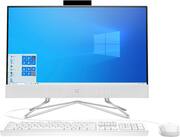
My computer is really nice. I'm enjoying the size, and color. It looks so classy. Thank you
Posted by Blessed
- Rated 5 out of 5 stars
Great purchase
Great purchase and deal.. wide screen excellent features
Posted by SooVainFee
- Rated 5 out of 5 stars
work at home computer
so far I love it. it's so beautiful and everything works great. I also purchased a geek squad protection plan.
- Rated 4 out of 5 stars
So Far So Good
So far so good. Only thing I'm bummed out about is that is doesn't have a disc drive but I'm sure if I bought the next model it would have. LOVE the camera is hidden and you can pop it up when needed....OH downside but probably only my experience...the mouse that came with the computer DID NOT work at all and in order to exchange it I would have had to take the entire computer back...yeah wasn't gonna do that so we just bought a whole new upgraded set. All in all this thing rocks and is doing its job, no real complaints.
Posted by Motherofbeasts
- Rated 5 out of 5 stars
Good quality of best buy
So I decided that it was time to buy a Tele. No collection is complete without one, right? ... Perhaps the Tele just isn't for me (although I plan to play some more in future to find out for sure) Reactions Shop with best buy
Posted by MissK