Rating 4.7 out of 5 stars with 1043 reviews
4.7- Screen Size (424)
- Ease of use (117)
- Price (75)
- Resolution (47)
- Design (43)
- Eye Strain (8)
- Speakers (8)
- Refresh Rate (4)
Customer Images
The vast majority of our reviews come from verified purchases. Reviews from customers may include My Best Buy members, employees, and Tech Insider Network members (as tagged). Select reviewers may receive discounted products, promotional considerations or entries into drawings for honest, helpful reviews.
- Rated 5 out of 5 stars
Clarity and Comfort
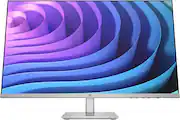
I recently purchased the HP 27" IPS LED FHD FreeSync Monitor, and I must say, it has been a phenomenal addition to my workspace. The first thing that struck me was its sleek design, boasting a modern silver and black color scheme that fits seamlessly into both professional and gaming setups. The monitor's 27-inch Full HD display offers stunning visuals. Colors are vibrant and consistent across the screen, thanks to the IPS technology. The FHD resolution ensures that everything from text to images is sharp and clear, making it ideal for productivity tasks, graphic design, and media consumption. One of the standout features for me has been the FreeSync technology. The adjustable height stand is a boon for ergonomics. It allows me to easily adjust the monitor to my preferred viewing angle, reducing neck strain during long work sessions. The inclusion of both HDMI and VGA ports provides versatile connectivity options, making it easy to connect to various devices. Another significant advantage is the eye comfort technology. The monitor's low blue light mode is gentle on the eyes, which is a huge plus for someone who spends extended hours in front of the screen. In conclusion, the HP 27" IPS Monitor is a fantastic choice for anyone looking for a large, high-quality display. Whether it’s for work, gaming, or general use, it offers great value for its price. I'm thoroughly satisfied with my purchase and would recommend it to anyone in the market for a reliable, feature-rich monitor.
Posted by Swaroopa
- Rated 4 out of 5 stars
A Comprehensive Review of the HP 27" IPS LED FHD
As someone who's spent a considerable amount of time researching monitors, I decided to go with the HP 27" IPS LED FHD FreeSync Monitor with Adjustable Height (HDMI, VGA) - Silver & Black, and I'm glad to say it deserves a solid 4-star rating from me. My experience with this monitor has been largely positive, and here's why: Image Quality: First off, the image quality is something I can't help but praise. The IPS panel delivers sharp, clear visuals with colors that pop, making everything from text to images look crisp and vibrant. Whether I'm working on design projects or just browsing the web, the clarity and color consistency across the screen are impressive. The Full HD resolution is a big plus, ensuring that every detail is visible without any strain. Performance: The performance of this monitor, especially with FreeSync technology, has significantly enhanced my gaming sessions by eliminating screen tearing and stuttering. The adjustable height stand is another feature I've come to appreciate, allowing me to find the perfect viewing angle and significantly reducing neck strain during long hours of use. The low blue light mode has been a lifesaver for my eyes, making extended sessions much more comfortable. While I'm not a hardcore gamer, the 75Hz refresh rate and 5ms response time have provided a smooth experience for my casual gaming and video playback needs. Design and Connectivity: I'm quite fond of the monitor's sleek design. The silver and black color scheme fits perfectly with my setup, adding a touch of modern elegance. The inclusion of HDMI and VGA ports covers my connectivity needs, though I do acknowledge that some might find the options a bit limited compared to other models on the market. Conclusion: Overall, the HP 27" IPS LED FHD FreeSync Monitor with Adjustable Height has been a fantastic addition to my setup. It strikes a great balance between image quality, performance, and ergonomic design. While it might not meet the highest demands of professional gamers or creatives needing more extensive color spaces, it's an excellent choice for someone like me, looking for a reliable and feature-rich monitor for everyday use.
Posted by MatabuM
- Rated 4 out of 5 stars
Beautiful design and easy to install
This monitor is a great option for general purpose. I use it for programming and eventually to play with my Xbox Series S. Beautiful colors, and nice design. Easy to install.
Posted by Andres
- Rated 4 out of 5 stars
It DOESN’T have 75hz capabilities.
Great monitor. Good colors, good angles and height adjustment is fantastic. Just keep in mind you CAN’T get the full 75hz from it as the 75hz is over display port which it DOESN’T have. (Check the box says it right on there) Would be nice for them to not advertise it on the box or in store (yes they advertised it as 75hz without even checking if it can use the 75hz) Still a great monitor for a low cost though.
Posted by DatBoiM
- Rated 5 out of 5 stars
Perfect monitor
Very happy with the purchase, the monitor has a superb resolution and a stylish appearance. It only takes a few minutes to put together and get going. It's advantageous that an HDMI cable is included so you won't have to pay extra.
Posted by MinhT