Appliances Presidents’ Day SaleEnds 2/25. Limited quantities. No rainchecks.Shop now

Main Content
product image

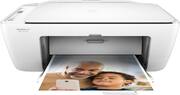
HP - DeskJet 2624 Wireless All-In-One Instant Ink Ready Printer

Model: V1N08A#B1H
SKU: 6102800
This item is no longer available in new condition. See similar items below
  • Key Specs
    • Networking: Wired, Wireless
    • ENERGY STAR Certified: true (Devices carrying the ENERGY STAR service mark, such as computer products and peripherals, kitchen appliances, and other products, generally use 20% to 30% less energy than required by federal standards.)
    • Printer Type: All In One
    • ISO Color Print Speed: 5.5 pages per minute (The number of color pages able to be printed per minute in the device's default single-side mode, as tested by the International Standards Organization (ISO).)
    • ISO Mono Print Speed: 7.5 pages per minute (The number of black ink (grayscale) pages able to be printed per minute in the device's default single-side mode, as tested by the International Standards Organization (ISO).)
    • Output Tray Capacity: 25
  • General
    • Brand: HP
    • Model Number: V1N08A#B1H
    • Product Name: DeskJet 2624 Wireless All-In-One Instant Ink Ready Printer
    • Display Screen: false
  • Dimensions
    • Product Height: 5.87 inches (The out of box height of the item. Height is measured as the vertical distance from the bottom of the item to the top as it would be primarily used or placed.)
    • Product Width: 16.74 inches (The out of box width of the item. Width is measured as the horizontal distance from one side of the item to the other as it would be primarily used or placed.)
    • Product Depth: 16.74 inches (The out of box depth of the item. Depth is measured as the distance from the front of the item to the back as it would be primarily used or placed.)
    • Product Weight: 7.55 pounds (The out of box weight of the item.)
  • Features
    • Automatic Document Feeder: false
    • Photo Printing: true
    • Automatic Two-Sided Printing: false
    • Tray Capacity: 60
    • Duty Cycle: Up to 1,000 (The maximum number of pages per month that the device can produce without failing, as specified by the manufacturer.)
  • Certifications Listings & Approvals
    • EPEAT Qualified: false (The Electronic Product Environmental Assessment Tool (EPEAT) was designed to provide an environmental assessment tool for purchasers. In order to qualify for EPEAT, a product must meet all 23 required criteria.)
  • Scanner Info
    • Scanner Type: Flatbed
    • Scanner Resolution: Up to 1200 x 1200 (Refers to the number of pixels/dots, both horizontally and vertically, of the image produced by the scanner. Generally, the higher the resolution, the sharper and cleaner the produced image.)
  • Ink
    • Compatible Cartridges: HP 65 Black, HP 65 Tri-color, HP 65XL Black, HP 65XL Tri-color
  • Paper Info
    • Maximum Document Length: 14 inches
    • Maximum Document Width: 8.5 inches
    • Supported Paper Sizes: Letter; legal; 4 x 6 in; 5 x 7 in; 8 x 10 in; No. 10 envelopes
    • Paper Feeder: Tray loader
    • Paper Handling: 60-sheet input tray,y, 25-sheet output tray
    • Compatible Media Types: Plain paper, Photo paper, Brochure paper
  • Copier Info
    • Maximum Number Of Copies: 9
    • Copier Resolution (Black): Up to 600 x 300 (Refers to the number of pixels/dots, both horizontally and vertically, of the image produced by the copier in black ink. Generally, the higher the resolution, the sharper and cleaner the produced image.)
    • Copier Resolution (Color): Up to 600 x 300 (Refers to the number of pixels/dots, both horizontally and vertically, of the image produced by the copier in colored ink. Generally, the higher the resolution, the sharper and cleaner the produced image.)
  • Performance
    • Printer Resolution (Black): Up to 1200 x 1200 (Refers to the number of pixels/dots, both horizontally and vertically, of the image produced by the printer in black ink. Generally, the higher the resolution, the sharper and cleaner the produced image.)
    • Printer Resolution (Color): Up to 4800 x 1200 (Refers to the number of pixels/dots, both horizontally and vertically, of the image produced by the printer in colored ink. Generally, the higher the resolution, the sharper and cleaner the produced image.)
  • Connectivity
    • Minimum System Requirements: PC: Windows XP (32-bit, SP3): Intel Pentium II, Celeron or compatible 233MHz processor; 850MB hdd space; CD-ROM/DVD drive or Internet connection, USB port, Internet Explorer 8; MAC: OS X v10.10 Yosemite, 1 GB HD, Internet access
  • Other
    • UPC: 191628246854

Print from computers or mobile devices with this wireless HP DeskJet all-in-one printer. Copy and scan capabilities let you tackle multiple office tasks with the same machine, and the compact design saves space in small offices. This HP DeskJet all-in-one printer produces up to 7.5 pages per minute for a fast, reliable workflow.

Printer Buying Guide

Prints up to 7.5 ppm* in black, up to 5.5 ppm* in color

  • Easy Replenish: With a printer set up for Easy Replenish, you'll automatically receive shipments of the ink you need. The printer monitors its own ink levels, so you'll only receive ink when you need it.
  • Prints up to 7.5 ISO ppm* in black, up to 5.5 ISO ppm* in color: To generate documents quickly.
  • Inkjet printers are best for home or small business use: They offer excellent print quality for photos and documents and accept a variety of paper types and sizes.
  • Wireless and mobile printing capability**: Connect this printer to your home or office network with built-in Ethernet or wireless LAN. Plus, print from your mobile device with the free HP ePrint app or Apple® AirPrint.
  • Up to 4800 x 1200 dpi (dots per inch) color resolution: High resolution for producing incredible quality and detail in documents and photos.
  • HP Instant Ink: Original HP Ink ordered by your printer, delivered to your door.
  • One black and one tri-color print cartridge: Three dye-based inks produce vivid color in photos, and the pigment-based black ink produces crisp text.
  • 60-sheet input tray and 25-sheet output tray: Offer easy paper handling.
  • Easy-to-use control panel: Includes ink cartridge and network indicator lights, plus wireless, ePrint, power and resume buttons with lights.
  • One USB port for simple connectivity: One high-speed USB 2.0 port offers a standard connection to your PC or a simple way to plug in and print with a USB drive, camera or other device.
  • Manual duplex printing mode (driver support provided): If you want to print double sided, you have to manually flip the paper over after printing the first side so you can then send the document through again to print the other side.
  • More print, copy and scan solutions: Automatically print two-sided documents, scan documents to your computer or directly to e-mail, send quick faxes and more.
  • Easy Replenish: With a printer set up for Easy Replenish, you'll automatically receive shipments of the ink you need. The printer monitors its own ink levels, so you'll only receive ink when you need it.
  • Prints up to 7.5 ISO ppm* in black, up to 5.5 ISO ppm* in color: To generate documents quickly.
  • Inkjet printers are best for home or small business use: They offer excellent print quality for photos and documents and accept a variety of paper types and sizes.
  • Wireless and mobile printing capability**: Connect this printer to your home or office network with built-in Ethernet or wireless LAN. Plus, print from your mobile device with the free HP ePrint app or Apple® AirPrint.
  • Up to 4800 x 1200 dpi (dots per inch) color resolution: High resolution for producing incredible quality and detail in documents and photos.
  • HP Instant Ink: Original HP Ink ordered by your printer, delivered to your door.
  • One black and one tri-color print cartridge: Three dye-based inks produce vivid color in photos, and the pigment-based black ink produces crisp text.
  • 60-sheet input tray and 25-sheet output tray: Offer easy paper handling.
  • Easy-to-use control panel: Includes ink cartridge and network indicator lights, plus wireless, ePrint, power and resume buttons with lights.
  • One USB port for simple connectivity: One high-speed USB 2.0 port offers a standard connection to your PC or a simple way to plug in and print with a USB drive, camera or other device.
  • Manual duplex printing mode (driver support provided): If you want to print double sided, you have to manually flip the paper over after printing the first side so you can then send the document through again to print the other side.
  • More print, copy and scan solutions: Automatically print two-sided documents, scan documents to your computer or directly to e-mail, send quick faxes and more.
Whats Included
  • Flyer Ink Caution
  • HP 65 Setup Black Instant Ink Cartridges
  • HP 65 Setup Tri-color Instant Ink Cartridge
  • HP DeskJet 2624 Wireless All-In-One Instant Ink Ready Printer
  • Instant Ink Flyer
  • Power cord
  • Setup Poster
  • USB Cable
  • Flyer Ink Caution
  • HP 65 Setup Black Instant Ink Cartridges
  • HP 65 Setup Tri-color Instant Ink Cartridge
  • HP DeskJet 2624 Wireless All-In-One Instant Ink Ready Printer
  • Instant Ink Flyer
  • Power cord
  • Setup Poster
  • USB Cable

Q: What does instant ink mean how does it work?

A: Instant Ink is a ink recycling program that allows your printer to automatically request ink from HP when you're low and they deliver it straight to your door before you run out. It requires that your printer be connected either wired or wirelessly to the web and you pick the plan that works best for you; 50 pages/month ($2.99); 100 pages/month ($4.99) or 300 pages/month for $9.99. They also offer a free plan at 15 pages/month. You are required to send back the used cartridges (HP pays for return postage and supplies what you need to do this). They also offer rollover (i.e. if you have the 50-page plan and only print 25 pages, the remaining 25 would roll into the next month). If you don't want to do the Instant Ink program, check out my recommended printer models from HP. In the long-term these would save you costs by using multiple cartridges on color instead of the tri-color (all inks in one tank) that a lot of other HP printers use. This makes the cost to replace a single color around $10-$15 versus replacing ALL the colors in a tri-color for 2-3x the price, even if you haven't used all the ink from all the colors. Hope that helps!

Q: So I am confused does this take a ink cartridge or is it ink ready? Can someone please explain this a little better for me cause I am reading this both ways. Thanks, Tammy

A: This printer comes with bottles of ink per ink tank, they made them fool proof, meaning you can't put the wrong ink in a compartment. you get enough ink for 2 years & you will not buy anymore cartridges. After 2 years you buy the kit of ink & it last another 2 yrs.

Q: will it print black with only a black cartridge , and no color cartridge????

A: HP has a gotcha. I have an HP8710 for my office and when one of the 3 color cartridges ran out it stopped printing - even when there was plenty of black and I had it set for Black Only! I have a rental I want to supply with a Wi-Fi printer, but want it for boarding passes and not to print everyone's vacation pics, so only want black ink. It doesn't sound like HP has any that will do that. So they get you to buy the color cartridges as well, even when you only need black. They make their money on ink.

Q: Can I print wirelessly from an Iphone6?

A: My Iphone 4s works well with it so I imagine the 6 will also. Pretty easy to set up!

Q: Can you make color photocopies and if so does it have to be connected to laptop to do so?

A: Yes you can and as a copier, this all-in-one operates independent of a computer.

Q: does this work with a chrome book?

A: These links show what HP printers are google cloud print ready or would be compatible with google cloud print, which is basically what you'd be using to print from Chrome OS. From what I gather, this printer should work via the wireless connection by downloading the HP eprint app or registering it with google cloud print but I suggest looking more into it. https://support.hp.com/us-en/document/c04550279 https://www.google.com/cloudprint/learn/printers/

Q: Does it come with ink

A: Yes 2 years with. I do notice the prints in color are very very dull not vibrant and the red comes out light maroon.

Reviews