Rating 4.5 out of 5 stars with 241 reviews
4.5- Speed (57)
- Performance (48)
- Ease of use (36)
- Price (21)
- SSD (15)
The vast majority of our reviews come from verified purchases. Reviews from customers may include My Best Buy members, employees, and Tech Insider Network members (as tagged). Select reviewers may receive discounted products, promotional considerations or entries into drawings for honest, helpful reviews.
- Rated 5 out of 5 stars
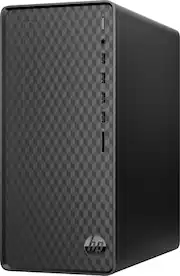
Great computer, but what's with the power button?
It seems that power buttons are getting worse with every new generation of computers. They are getting smaller, flush with the case, and black to match the case--everything to make them harder to find. For my senior clients who have vision and touch sensitivity issues, and difficulty bending over, this computer presents a challenge. Manufacturers should make power buttons bigger, more colorful, and have them protrude from the case--the way they used to be! Aside from that, this is a GREAT computer! No complaints from the new owner. I enjoyed setting it up. Speed and performance were excellent!
Posted by Richard
- Rated 5 out of 5 stars
Ryzen 3/8 GB RAM/256 GB SSD; plenty for most users
This HP desktop with AMD Ryzen 3, 8GB RAM, and 256 GB SSD is plenty powerful for most average users like myself who mostly do web browsing, reading email, light word processing (letters, etc.), and Zoom-type meetings. Setup was easy, speed and bootup fast, and enough storage unless you store LOTS of movies and/or music (and that's what the Cloud and external storage devices are for).
Posted by Papi
- Rated 5 out of 5 stars
Speed demon
Bought this for my wife as she is technically challenged. The Last time she had a PC it was always SLOW. She is also impatient. She keeps me jumping around because her Ipad does this and that. I gave up and for her BD I bought her the AMD Ryzen desktop with an SSD, WOW! This thing just screams it is so fast. (I wish it was mine) Now I have to break her away from the Ipad because she is still technically challenged and needs to relearn how to use a PC. Once she does that I'll have some peace. Bottom line, it is a great PC and should last a long time.
Posted by crssr1
- Rated 4 out of 5 stars
Works mostly fine
Good computer. Enough graphical power to run doom 2016 and gta 5 at 1080p pretty easily, and has enough processing power to do my office work. Has two monitor ports, although one of them has to support vga or you need an adapter. I immediately upgraded the ram and that was easy. I like that it has so many USB ports on the front, that’s actually somewhat hard to find. One issue from hp in general is that it has a proprietary power supply. I haven’t looked specifically into this model, but you’ll probably need an adaptor to add a video card or anything. Also this website doesn’t list any expansion slots *for* a video card, but when I looked up the model number for the motherboard it does seem to have at least 1 pci express 3 slot, which means you can fit some of them. I do not have enough know how to tell just by looking at the thing. That being said, I figured I would need to replace this cheap computer after saving up more money for a much more powerful pc, but it worked well enough (as someone who isn’t crazy about running everything in 4K at 180 frames a second) that I don’t feel like I need to. I have had issues with some crashing. I can’t say for certain this is my model as I bought it used. I definitely had to reinstall steam because of how much it was hanging. Hasn’t been bad since but I definitely got a few blue screens of death, especially in the first week or so. Also the hard drive is very small, but an external hard drive is like 50 bucks so that’s not a huge problem even if you don’t want to open everything
Posted by Computerboi
- Rated 5 out of 5 stars
Nice computer for the money
For the money, this is a really nice computer. Easily handled all of my basic needs. If you are into gaming, this is not for you. It's great for pretty much everything else. Computer operated very quickly.
Posted by whodeybengals9