Rating 4.6 out of 5 stars with 647 reviews
4.6- Speed (214)
- Performance (117)
- Ease of use (60)
- SSD (50)
- Price (40)
- Graphics Card (13)
- Power Supply (5)
- Start Button (4)
Customer Images
The vast majority of our reviews come from verified purchases. Reviews from customers may include My Best Buy members, employees, and Tech Insider Network members (as tagged). Select reviewers may receive discounted products, promotional considerations or entries into drawings for honest, helpful reviews.
- Rated 5 out of 5 stars
Awesome Purchase
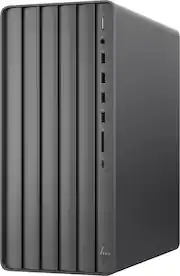
Absolutely love this Tower, I went from Windows 7 to 11 with this purchase, very easy to set up, and easier to learn all the new stuff. Runs well and is silent which is amazing, also has plenty of ports. Enjoying it very much. I would definitely recommend this tower.
Posted by JanetP
- Rated 5 out of 5 stars
A Great Value!!
I love it. It is fast and simple. The 1TB SSD is a great addition and I was looking for that plus 16 GB ram. I added a WD Red Plus 4 TB drive (easy install) for more room for pictures, etc. Fast, reliable and easily accessible hardware!
Posted by MFMixerLA
- Rated 5 out of 5 stars
Its a great size
A good buy. Computer is fast, no noise. Price is fair.
Posted by TracyT
- Rated 5 out of 5 stars
Compact, fits under desk with w/ air circulation
My new HP Envy desktop w/ Intel Core i7 is very quick to respond to commands. When using my Pinnacle Studio 24 Ultimate program which I use to edit and create video with audio, it runs smoothly without stalling, Microsoft 365 runs without any hesitation as do additional applications. I quite pleased with my purchase.
Posted by Happy
- Rated 5 out of 5 stars
HAPPILY FROM ONE HP-ENVY TO ANOTHER
Very nice and I'm getting used to Windows 11. I had an HP-ENVY Desktop-Intel Core I5 which lasted me eight years and gave me great service. I have no doubt this computer will also be an outstanding investment.
Posted by HPFAN