Appliances Presidents’ Day SaleEnds 2/25. Limited quantities. No rainchecks.Shop now

Main Content
product image

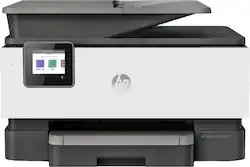
HP - OfficeJet Pro 9015 Wireless All-In-One Instant Ink Ready Inkjet Printer - Gray

Model: 1KR42A#B1H
SKU: 6320038
This item is no longer available in new condition. See similar items below
  • Key Specs
    • Networking: Wired, Wireless
    • ENERGY STAR Certified: true (Devices carrying the ENERGY STAR service mark, such as computer products and peripherals, kitchen appliances, and other products, generally use 20% to 30% less energy than required by federal standards.)
    • Printer Type: Copier, Fax, Printer, Scanner
    • ISO Color Print Speed: 18 pages per minute (The number of color pages able to be printed per minute in the device's default single-side mode, as tested by the International Standards Organization (ISO).)
    • ISO Mono Print Speed: 22 pages per minute (The number of black ink (grayscale) pages able to be printed per minute in the device's default single-side mode, as tested by the International Standards Organization (ISO).)
    • Output Tray Capacity: 60
    • Touch Screen: true (Touch-screen devices make navigating more intuitive. Using a touch-screen display, you can do things such as tap to select, hold and drag to move items, swipe to scroll, and pinch to zoom.)
  • General
    • Brand: HP
    • Model Number: 1KR42A#B1H
    • Product Name: OfficeJet Pro 9015 Wireless All-In-One Instant Ink Ready Inkjet Printer
    • Color: Gray
    • Display Screen: true
    • Display Screen Size: 2.65 inches
  • Dimensions
    • Product Height: 10.9 inches (The out of box height of the item. Height is measured as the vertical distance from the bottom of the item to the top as it would be primarily used or placed.)
    • Product Width: 17.3 inches (The out of box width of the item. Width is measured as the horizontal distance from one side of the item to the other as it would be primarily used or placed.)
    • Product Weight: 19.7 pounds (The out of box weight of the item.)
  • Features
    • Automatic Document Feeder: true
    • Photo Printing: true
    • Monochromatic/Color: Color
    • Automatic Two-Sided Printing: true
    • Tray Capacity: 250
    • Duty Cycle: Up to 25,000 (The maximum number of pages per month that the device can produce without failing, as specified by the manufacturer.)
  • Certifications Listings & Approvals
    • EPEAT Qualified: true (The Electronic Product Environmental Assessment Tool (EPEAT) was designed to provide an environmental assessment tool for purchasers. In order to qualify for EPEAT, a product must meet all 23 required criteria.)
    • EPEAT Level: Silver (The Electronic Product Environmental Assessment Tool (EPEAT) was designed to provide an environmental assessment tool for purchasers. In order to qualify for EPEAT, a product must meet all 23 required criteria. Products are rated Bronze, Silver or Gold based on how many of 28 optional criteria they meet (below 50%, 50%, 75%).)
  • Scanner Info
    • Scanner Type: Flatbed
    • Scanner Resolution: Up to 1200 x 1200 (Refers to the number of pixels/dots, both horizontally and vertically, of the image produced by the scanner. Generally, the higher the resolution, the sharper and cleaner the produced image.)
  • Fax Info
    • Integrated Fax: true
  • Ink
    • Compatible Cartridges: HP 962 Black Original Ink Cartridge 3HZ99A, HP 962 Cyan Original Ink Cartridge 3HZ96A, HP 962 Magenta Original Ink Cartridge 3HZ97A, HP 962 Yellow Original Ink Cartridge 3HZ98A, HP 962XL Black Original Ink Cartridge 3JA03A, HP 962XL Cyan Original Ink Cartridge 3JA00A, HP 962XL Magenta Original Ink Cartridge 3JA01A, HP 962XL Yellow Original Ink Cartridge 3JA02A
    • Ink Subscription Service Available: false (The printer monitors ink usage and alerts the subscription provider when levels are low. A purchased subscription provides refills of ink based on usage.)
  • Memory
    • Memory Card Slot: false
  • Paper Info
    • Automatic Document Feeder Capacity: 35 sheets
    • Maximum Document Length: 14 inches
    • Maximum Document Width: 8.5 inches
    • Supported Paper Sizes: Letter; Legal; Government Legal; Executive; Statement; 3 x 5 in; 4 x 6 in; 5 x 7 in; 13 x 18 cm; 8 x 10 in; 10 x 15 cm; L; Photo 2L; Envelope( #10, Monarch, 5.5 bar); Card (3 x 5 in, 4 x 6 in, 5 x 8 in)
    • Paper Feeder: Tray loader
    • Paper Handling: 250-sheet input tray; 60-sheet output tray
    • Media Weight (Minimum): 16 grams per square meter
    • Media Weight (Maximum): 110 grams per square meter
    • Compatible Media Types: Plain Paper, HP Photo Papers, HP Matte/Glossy Brochure or Professional Paper, HP Matte Presentation Paper, Other Photo Inkjet Papers and other
  • Copier Info
    • Maximum Number Of Copies: 99
    • Copier Resolution (Black): Up to 600 (Refers to the number of pixels/dots, both horizontally and vertically, of the image produced by the copier in black ink. Generally, the higher the resolution, the sharper and cleaner the produced image.)
    • Copier Resolution (Color): Up to 600 (Refers to the number of pixels/dots, both horizontally and vertically, of the image produced by the copier in colored ink. Generally, the higher the resolution, the sharper and cleaner the produced image.)
  • Performance
    • First Page Out Time: 9 seconds (The time it takes the printer to print and deliver the first page in the output tray. May depend on the complexity of the copy being printed.)
    • Printer Resolution (Black): Up to 1200 x 1200 (Refers to the number of pixels/dots, both horizontally and vertically, of the image produced by the printer in black ink. Generally, the higher the resolution, the sharper and cleaner the produced image.)
    • Printer Resolution (Color): Up to 4800 x 1200 (Refers to the number of pixels/dots, both horizontally and vertically, of the image produced by the printer in colored ink. Generally, the higher the resolution, the sharper and cleaner the produced image.)
    • Approximate Page Yield (Black): 1000
    • Approximate Page Yield (Color): 700
  • Compatibility
    • Works With: Amazon Alexa, Google Assistant (Compatible with or able to be connected to other smart devices or applications.)
  • Connectivity
    • Minimum System Requirements: Windows 7 or later: 1GHz 32-bit (x86) processor; macOS 10.11 El Capitan or later; CD-ROM or Internet connection; USB port
  • Other
    • UPC: 193424191550

A revolutionary smart printer that works the way you need. Help save time with Smart Tasks shortcuts, and get automatic two-sided scanning. Count on easy mobile printing, Borderless print, seamless connections, and enhanced security. Save up to 50% on ink with HP Instant Ink. Prints up to 22 ISO ppm*, up to 18 ppm* in color.

  • Fast print speeds up to 22 ISO ppm* in black, up to 18 ISO ppm* in color: This printer lets you generate documents quickly.
  • Be sure you have the right cartridge: Enter your printer's model number into Ink and Toner Finder to find compatible cartridges. Get started ›
  • Perfect for home or small business use: This inkjet printer offers excellent print quality for photos and documents and accepts a variety of paper types and sizes.
  • Wireless and mobile printing capability: Connect this printer to your home or office network with built-in Ethernet or wireless LAN. Plus, print from your mobile device with HP Smart, Apple AirPrint, Wi-Fi Direct printing, or Mopria Print Service. **
  • Apple AirPrint enabled: For Apple iPad and iPhone printing.
  • Designed to save you time: Eliminate steps in repetitive tasks, using Smart Tasks. Scan to the cloud, email, and more - in a tap. Create editable, searchable documents scanning from your phone or printer, using Smart Tasks. ***
  • Compatible with HP 962 Instant Ink-ready cartridges: Including HP 962 (black, cyan, magenta, yellow) and HP 962XL (black, cyan, magenta, yellow).
  • Up to 4800 x 1200 dpi (dots per inch) color resolution: The high resolution allows producing incredible quality and detail in documents and photos.
  • HP Instant Ink compatible: Save up to 50% on Ink with HP Instant Ink.
  • Borderless print: Professional-quality photos at your fingertips.
  • Standard paper handling: Features a 250-sheet input tray and a 60-sheet output tray. Easily copy, scan, or fax multiple pages with the 35-sheet automatic document feeder.
  • 2.65" CGD (Color Graphics Display) touch screen: Use the intuitive touch screen to print, store files, and access business apps directly from the printer.
  • USB port for simple connectivity: Insert your USB flash drive to view and print photos - plus scan files directly at the device.
  • Built-in duplex printing: Print on both sides of the page without turning it over manually to minimize your printing costs and help the environment.
  • Dynamic Security: This printer uses dynamic security, which may be updated periodically by firmware updates. The printer is intended to be used solely with cartridges using an original HP chip. Cartridges using a non‐HP chip may not function or may cease to function.
Whats Included
  • HP 962 Setup Black Instant Ink Ready Cartridge
  • HP 962 Setup Cyan Instant Ink Ready Cartridge
  • HP 962 Setup Magenta Instant Ink Ready Cartridge
  • HP 962 Setup Yellow Instant Ink Ready Cartridge
  • HP OfficeJet Pro 9015 All-In-One Instant Ink Ready Printer
  • No CD Flyer, Ink Caution Flyer
  • Owner's manual
  • Power cord
  • Setup Poster, Reference Guide, Instant Ink Flyer

Q: Can this printer feed card stock ? My previous HP printer did fine with that, then I upgraded to the 8710 and it did ok until it didn't. I need to print on card stock fairly often

A: I am afraid to do card stock on this HO9015 because that is how I messed up my HP8710, so I can't say for sure. I'm told that if you want to use card stock, you need a printer with a back loader so that the card stock just stays flat and rolls through the printer. This 9015 one loads from the bottom and then the paper has to curl around to go through the printer. That is where card stock can get totally jammed. That's all I know.

Q: what is the difference between the 9015 and the 9018

A: There are no differences between the HP OfficeJet Pro 9015 and 9018 All-in-One Printers. They are just sold in different retailers, for example, the HP OfficeJet Pro 9015 is sold at Best Buy. The the HP OfficeJet Pro 9018 will be found in the club warehouses.

Q: I want to cancel the Instant Ink subscription for the HP 9015 because I upgraded to the HP color laser jet. But if I cancel the subscription, will HP disable the ink cartridges that are in there now and are almost full?

A: About a week ago we had a power outage and after it was restored a message on our 9015 printer said that our cartridge could not be used until the printer was enrolled in Hp instant ink. We did not voluntarily unroll in instant ink. To be sure, this printer is no good to my family and I. Moreover Hp does not mention how this situation can be resolved. I feel that that it is quite unfair to be treated so callously. Is this the way all your customers are treated?

Q: AirPrint?

A: Yes, the 9015 handles AirPrint easily. Also, since the printer has its own IP address it also is given an email address. You can forward emails from any computer or phone and print on your printer. Just add printer as a contact with its email address.

Q: if one of the color cartridges are empty, can you still print with the black ink?

A: Unfortunately no, if a color cartridge runs empty, it must be replaced before you can continue printing.

Q: Does printer purchase come with full set of ink cartridges?

A: If by full you mean you get all 4, yes. If by full you mean cartridges that are completely full of ink, that was not my experience. The day I got the printer and installed the cartridges that came with It it immediately started saying it was low on ink. Which was strange because I thought, and I could be wrong , that the ink was measured by usage and not actual volume. And if these were new how could there be usage? It’s been a month and it finally got to where the printer refused to print color pages. So I just replaced the cartridges, and by just the weight of the old cartridges in my hand versus the new ones, the old ones were definitely empty. I would say we’ve printed maybe 20 pages and rarely color. But all 3 color cartridges were empty. So, either they ship crap very low cartridges with the printer , or I got some used cartridges. And I bought the printer new and unopened.

Reviews