Rating 4.4 out of 5 stars with 147 reviews
4.4- Performance (34)
- Screen Quality (28)
- Processor Speed (14)
- Portability (13)
- SSD (8)
- Battery Life (15)
- Speakers (3)
Customer Images
The vast majority of our reviews come from verified purchases. Reviews from customers may include My Best Buy members, employees, and Tech Insider Network members (as tagged). Select reviewers may receive discounted products, promotional considerations or entries into drawings for honest, helpful reviews.
- Rated 5 out of 5 stars
I LOVE THIS LAPTOP
I LOVE THIS LAPTOP! I walked into Best Buy thinking I was only going to spend $800 on a laptop for school. I am an avid gamer though and I always wanted to PC game without fully committing. The expert in the laptop area really sold me on this laptop. I haven’t had an HP since 2008. From what I know - HP was great but they’ve gone really down hill in the last decade. The expert I talked to sold me and after I spent $1700 ahaha I felt tricked, had anxiety about the purchase. I was sad because I felt like I didn’t do enough research but in the end - it was the best thing I could have bought. The graphics are amazing. It’s fast. I mainly use it for school but I also run games through Xbox with it. It’s so nice. The only issues I would say are that I wish the battery life was longer. The speakers aren’t super loud. & the fact that I can’t add RAM are sad - but I honestly knew about the RAM before I bought it. I usually use headphones if I’m gaming or watching a lecture and I keep my charger close by - so they’re not huge issues. You also cannot use the full graphics card unless you hdmi it to a monitor. I just bought the Samsung odyssey g8 and it’s an amazing pair. I wanted a monitor and smart tv built in. Monitors don’t usually have speakers and I like to watch tv so it’s amazing. Never thought I’d spend $1700 on a laptop and $1200 on a monitor but my setup is amazing. Overall this laptop is amazing and if you game but primarily game on console - this is the laptop for you. I have a PS5. An Xbox Series X and a Switch, this is a wonderful addition to my gaming lifestyle and does everything I need and more for finishing my bachelors. I did get roped into buying Microsoft 365 instead of the actual full Microsoft programs but it’s fine. I’ll pay the money each year. If you buy the full word, PowerPoint, etc - you don’t get updates so be aware. Also have been paying for Xbox ultimate and I don’t use it a ton but it’s honestly fine because I like to have access to the catalogs when I do (: Enjoy your new laptop babes xoxo
Posted by Nische
- Rated 4 out of 5 stars
Build quality needs some work
After 2 weeks of use, I would say it works well. I bought the laptop mostly for work (ArcGIS) and it responds quickly, much better than Parallels on my Mac. The only issue was the fan was always on and kind of distracted me. And the build quality needs to improve, especially around the camera. Every time I lift the lid from the camera area, I feel like the layers are gonna fall apart (cracks in between).
Posted by zli27
- Rated 4 out of 5 stars
Almost hit the landing
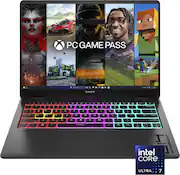
The HP Omen Transcend 14 is a new player in the world of 14 inch gaming laptops. The challenge is how do you get a great performing laptop, in a minimal size, and one that won’t turn into a jet engine/heater when hardware is pushed. With the Transcend, there were some great, and some okay/good to one bad feature. Out of the box you get the laptop, a 140 W USB-C power adaptor, and inserts. On my test, I was at about 15% battery life, plugged in the plug, ad had about 65% in about 30’ish minutes, so their claim of 50% in 30 minutes is pretty on point. I never heard of a laptop fast charger, so it was a pleasant surprise. The laptop has a nice aluminum body. I do prefer it over plastic, but it’s still a fingerprint magnet. After one day of use, it has smudges on either side of the touch pad, and on the outside from me holding it to move it to my bag and around the house. I wonder if the white color has this problem. The design of the laptop is almost muted. There’s nothing that screams it’s a gaming laptop. The cover simply has the OMEN branding, and that’s it. There isn’t any RGB lighting on the exterior. You can even turn off the keyboard RGB lighting in the Omen gaming hub. I like this fact. When I’m home and playing in low lighting, I can turn RGB lights on, so that’s a plus. In terms of ports you have a USB-C on the back which is for charging, and a HDMI 2.1 right next to it. One of the biggest disappointments is that you can’t fully use the RTX 4060 on it’s own. On the Omen gaming hub, you have the option of using the integrated graphics card for battery life, or a hybrid for when you need that extra bit of juice. I would have liked to see a way to use the GPU on its own. So using the HDMI 2.1 port to an external monitor is the only way to use the RTX 4060 on its own. The drawback is of course unless you have a OLED gaming monitor, you won’t have that lovely screen to look at. The ports in general were placed well, I would have liked to see one more USB-C port. You get 2 USB-A ports on the right side. I’m glad that companies haven’t completely abandoned the good old USB-A yet. You have 1 USB-C on the left side and a headphone jack. I do appreciate that you have a headphone jack. Unfortunately for me, all my gaming headphones are wireless, so I think in the next iteration, they can remove it and add another USB-C. Considering that this laptop touts the Intel Core Ultra 7 which is more AI focused, I’m surprised that there isn’t even a micro SD card slot for content creators. I get that you can plug in an external HDD or any other alternative, but it just detracts from the whole portability aspect. The hinges on the laptop seem sturdy, but there is some wobble on the screen when opened. One of the key selling points on the Transcend 14 is the OLED screen. It’s a 2.8K OLED. I didn’t even know they made a 2.8K. The screen is absolutely gorgeous. As with most OLED’s, you get the dark distinct blacks, and bright colors throughout. I tested with a few games and a few movies. With movies is where it really shined. The only caveat is that the screen is glossy. I think this is the only laptop I have with a glossy screen, or THIS glossy. In a dark room with the keyboard RGB lights on, it’s a bit distracting, but you can always turn them off. You also have a high refresh rate, but you’ll have to go into Windows setting to set it to 120hz. The screen is also bright. At 500 nits, you see the colors pop. All in all, a great screen. The Hyper X speakers are great, but not excellent. As in most cases, you’ll probably use headphones when gaming or watching a movie, but when it needs recharging, it’s time to get some life out of them. I would say they sound great, but not the greatest bass. The keyboard is comfortable to type on, and it’s not super clicky, so you can remain incognito when out and about at your favorite café. The touchpad is large and responsive. You get multitouch gestures like with just about every other modern laptop. The surface area is responsive. I do wish there was a way to disable it when using a mouse so you don’t accidentally touch it when typing. (Minor gripe). Just about everybody will use a separate gaming mouse so the touchpad becomes a secondary means. The one impressive thing that I found is that even when on performance mode, and hybrid GPU, I don’t hear the laptop turning into a jet engine. There are vents on the back of the base of the laptop, and vents underneath where you can see two of the fans. For most of the my testing, the laptop stayed cool. Even when I cam close to ultra settings on my games test, I didn’t feel the laptop turning into a heater. That’s either a result of great engineering for the cooling and or the fact that you can’t use the RTX 4060 at full blast. I think it was a conscious decision to help maintain battery life and prevent overheating. One of the biggest flaws is that you can’t add more RAM. I guess in a small package, you get limited spacing. Most games still don’t require 32 GB of ram, but this fact does limit the future state of this laptop. The webcam is a good 1080p webcam. You have the option of using Windows hello which I like a lot. The image from the camera is still grainy, and the video recording is limited to 30FPS. Even setting the flicker reduction to 60 hz, doesn’t change much. It’s good enough for virtual meetings or something basic, but for streaming, a nice 4K camera is recommended. The mic is also just good. You get a bit of that echo effect, and once again, it’s good for meetings, but beyond that, your gaming headset mic is probably much better in terms of quality. In my actual gaming tests, I immediately saw some of the shortcomings with the laptop. I couldn’t run any of the 2 modern games from 2023 at ultra settings without losing framerates and stability. On high settings, I was able to get a range from 50-60 fps. Once I turned ray tracing on, I needed to adjust a lot of the settings to make up for the difference in stability. I tested a game from 2015 on ultra high, and I couldn’t get more than 78 fps during a benchmark test so yeah. I love seeing ray tracing in action, but sometimes you just want a great performing game with smooth playability. I mean, the games looked great on high settings with ray tracing, but couldn’t get ray tracing and ultra in the same settings. My other laptop that has a 4070 with 32 gigs of ram, and a mux switch was able to handle the games on ultra with ray tracing, but it sounded like a jet engine was about to take off on the runway, so there’s that. I’m just as happy playing on a quiet laptop that doesn’t turn into a room heater with graphics that still look on par. On a side note, I played a flight simulator, and that’s where I saw the oled screen really shine. In the night time settings, you could see the beautiful color detail against the blackness of the night sky. I had the settings at ultra, and the 4060 handled it pretty well. There were some few occasional frame dips, but nothing that really took me out of the game. All in all, HP’s Transcend 14 is a nice start into the world of 14 inch gaming laptops. The design engineers and hardware engineers have found a nice way to minimize the footprint of the laptop while achieving good cooling and low fan noise. Some of the decisions to include or omit certain ports was a bit of ahead scratcher, and the lack of a mux switch (Mux switch = let’s you use the gpu only) is another missed opportunity. The screen is excellent. The overall build quality is almost top notch. All in all, a great 1st gen entry. For 2025’s HP Omen Transcend 14, I hope to see some more post purchase upgrade options.
Posted by EthanH
- Rated 5 out of 5 stars
The PERFECT Laptop
I could not recommend this laptop more. Not only is this laptop a BEAST for gaming, but it also was able to easily handle heavy engineering programs for my Masters in Mechanical Engineering such as ANSYS, Abaqus CAE, Inventor Professional, and other advanced engineering programs. Moreover, battery life was surprisingly great compared to other gaming laptops. Obviously it had to be plugged in when running major programs, but for occasional engineering programs and day to day school, it would last me a full 10 hours.
Posted by TechReviewerZone
- Rated 4 out of 5 stars
Amazing gaming device
Amazing device very powerful for gaming but if you are using it to edit high-quality camera footage, it will run slow
Posted by IdrissaM