Customer Ratings & Reviews
 See more images
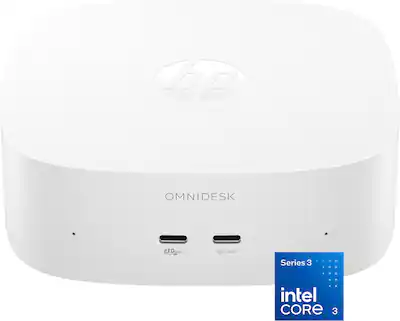
HP - OmniDesk Mini PC - Intel Core 3 304 - 8GB Memory - 128GB Storage - Cashmere White
- Model:
- M05-0034
- SKU:
- 13240006
Customer reviews
Rating 4.1 out of 5 stars with 11 reviews
would recommend to a friend
- Rated 4 out of 5 stars
Good Office/Home PC
Wildsoldier Posted
This mini-PC is powerful on a small package with some limitations. The intention of this pc is most likely office pc/home pc for light office tasks, browsing and YouTube streaming. It is NOT a portable gaming machine. However, you should be able to play old games if you like some retro gaming. But not the latest and greatest. The computer comes with an Intel Core 3 304, 5-core microprocessor that comes with integrated Intel graphics GPU (graphics processor) and NPU (for artificial intelligence tasks). The pc is responsive in Windows 11 even though the Core 3 is an entry level processor. Being that it has an Intel microprocessor with integrated graphics, it would be great for a Plex or Jellyfin server since it has Intel Quick sync for hardware transcoding. Storage for your movies and tv series may need to be stored in a NAS or external hard drive. The pc does not include keyboard, mouse or monitor you need to buy separately (I attached some pictures of what was included in the box). Regarding ports it comes with the following: (1) Headphone/microphone jack (1) USB C capable of 10Gbps (2) USB A capable of 10Gbps (2) USB C capable of 10Gbps and Display port support (1) HDMI 2.0b (Note: With this HDMI and 2 USB C ports that support display port you should be able to connect 3 monitors. But you need (2) additional USB C to HDMI adapters not included) (1) RJ-45 connector for Ethernet 10/100/1000 Mbps (1) USB C below the pc for Power Only (Having USB C connector for power is the right step in the right direction. The old days of having a proprietary connector for power it needs to be a thing of the past and stay in the past) Regarding memory it comes with 8GB of DDR5 ram and built in 128 GB of storage. I believe this is the weakest point of this mini-PC. I am not sure if the 8GB is upgradable or even if the 128 GB of storage is upgradable probably not. It is my understanding that those components are soldered to the board with no slots for upgrading, do your own research if this affects you. Currently 8GB of ram and 128 GB of storage is not enough these days. From the 128 GB storage Windows 11 takes half of it. I recommend a minimum of 16 GB of RAM and at least 512 GB of storage. Regarding Ram, if the ram is soldered to the motherboard there is no work around for this. But regarding storage, what I recommend is to leave the internal 128GB for operating system and buy an external USB C SSD and install any additional program or data on the external SSD, that’s the safe way. The more complex way is if a second M.2 slot is available buy a NVMe SSD (for this the PC needs to be opened and like I said I am not sure if a second M.2 slot is included and available). Also, I want you to be aware that if the internal storage and ram are all soldered to the motherboard and if any of those components fail it is not going to be an easy fix. For connectivity the computer comes with 10/100/1000 Mbps ethernet and Wi-Fi 6. I ran a speed test, and the upload was half of my download for some reason. I have a 2.5Gbps down, 1 Gbps upload via fiber Internet. On speed test I got 824Mbps down (great) and 447mbps up (could be better) using WIFI. In my testing I was about 6 feet away from the router. One thing to note is that I was not getting these speeds at first, it was a lot slower. But after running all the windows updates and driver updates it improved to those speeds. Bluetooth is included so you should be able to use Bluetooth speakers, mouse, keyboards etc. This mini pc has a built-in speaker that sounds clear for a built-in speaker. For me it sounded a lot better than some laptops in my opinion. Also, it comes with built in microphone which is good for teams and zoom meetings and if you need help with something you can always say “Hey Copilot” and ask the AI assistant whatever you like. But you need to allow copilot to use the built-in microphone for this feature. If streaming is part of your daily life. YouTube streaming runs very smoothly even at 4k content I didn’t experience any problems. The computer came with HP TV+, which is a free (by using ads) streaming service like Pluto TV. You can also download all the streaming apps that are in the Microsoft app store if you like. Final thoughts, this pc like I said above is excellent for office tasks like word processing, email, YouTube, Internet, etc. However, there is the issue of storage and ram. Everyone use computers in different ways is up to you to decide if these factors affect you. For that reason, I subtracted one star. But I love the idea that the pc is small, lightweight, and fast. Another thing I noticed is that the computer is not loud at all, even in the CPU stress test I was able to hear the fan, but it was not loud as other fans I have heard on other PCs in this category. I also added pictures of CPU benchmark using CPU z and Storage benchmark using CrystalDisk Mark in case you are interested in those. Will I recommend this computer, YES absolutely but the person needs to be aware of the ram and storage limitations and execute your best judgment.
I would recommend this to a friendThis review is from HP - OmniDesk Mini PC - Intel Core 3 304 - 8GB Memory - 128GB Storage - Cashmere White
- Rated 4 out of 5 stars
Good upgradable mini-PC, but support is lacking
Jim1590 Posted
I got this HP OmniDesk Mini for use as a small always-on PC for security camera monitoring. So far, the machine itself has actually been pretty impressive. Right now it’s running an Agent DVR with 4 camera feeds on a 1080p monitor. CPU usage is staying low, even when I maximize a 2K camera feed. It is also quiet and easy to leave running 24/7 without taking up much room. I connected a few USB dongles for a keyboard and mouse, HDMI, cat6 and the USB power. The Intel Core 3 304 is not going to run your latest FPS games, but that really is not what this computer is for. For what I’ve been using it for, simple security camera monitoring (not recording), it has been flawless. The 8GB of RAM is probably the biggest limitation. Windows and a few background services can use almost all of that up, so I would have preferred 16GB out of the box. However, RAM is expensive right now and would probably raised the prices to desktop level. Opening the OmniDesk Mini up showed that the RAM is not soldered. Inside is a removable DDR5 SO-DIMM. I also found a empty M.2 2280 NVMe SSD slot inside. The onboard storage is probably on the underside of the board with the CPU. You can upgrade both the storage and the RAM. One significant issue that I ran into was that the included 100W USB-C power adapter failed almost immediately. I tested the outlet and wire with different devices and was 100% confident that the original power block was dead. Getting HP to replace it was much more difficult than it should have been. It took about 90 minutes, two chat sessions, a phone call, and eventually demanding to speak to a supervisor before they finally agreed to send a replacement. Or at least, they will send it. It hasn’t shipped yet. I knew it was getting ridiculous when they asked me to do Windows troubleshooting on a computer that would not power on. I found another 100W USB-C charger online for cheap enough so I could finish setting this up and run it through its paces while waiting for HP’s replacement. After about a weeks worth of tinkering, I really like the OmniDesk. It’s quiet and unobtrusive.
I would recommend this to a friendThis review is from HP - OmniDesk Mini PC - Intel Core 3 304 - 8GB Memory - 128GB Storage - Cashmere White
- Rated 4 out of 5 stars
Compact, Powerful, Versatile Mini PC
gadgetguy11 Posted
HP released the OmniDesk Mini PC in 2026, an impressive performer, featuring an Intel Core 3 304 processor, 8GB of RAM, and 128 GB of storage. This PC streams in 4K, and handles typical office & home office light duties & browsing, using integrated Intel graphics & Microsoft Copilot Ai. Its form factor is an ultra-compact mini desktop enclosed in a cashmere white case, measuring 1.89" H x 5.12" W x 5.12" D. Setting up this PC is very easy. Plug the included 100-watt power supply in a wall receptacle, connect the provided USB-C cable to the power supply & to the USB-C jack located below the mini PC. Next, add a keyboard, mouse & monitor; add a camera if you prefer. I connected my monitor to a Display Port 2.1; you can also connect your monitor using the HDMI 2.0 port. Press the power button and you will hear a confirming tone from the PC. Connect to your Wi-Fi, then update Windows to the latest Windows 11 Home Operating System. The connection versatility is impressive, with 3 x USB-C 3.1, and 2 x USB-A 3.1. There is one Ethernet port, plus Bluetooth & Wi-Fi 6. CONCLUSION: The HP OmniDesk Mini PC features amazing 5-core CPU performance, is ENERGY STAR Certified, and earns my high recommendation!
I would recommend this to a friendThis review is from HP - OmniDesk Mini PC - Intel Core 3 304 - 8GB Memory - 128GB Storage - Cashmere White
- Rated 5 out of 5 stars
HP OmniDesk mini PC
Stephen H Posted
I wanted to put a computer in our kitchen, something that could show the weather forecast, keep recipes, run a photo slideshow for all those pictures we take that never get printed since we don’t use photo albums anymore. Something that would be handy for a quick internet search without having to go to the home office desktop since I don’t always carry my phone. And I needed something that could run my PC client for our home security cameras. We probably all have extra monitors that we’re not using so recycling one of those for this project was a given. I believe this computer is almost perfect for what I need. I say almost because we have fifty-something years of photos to pick through for the slideshow and I’m probably going to be light on storage space but that’s fixable. I picked a monitor that has a stand and also has a VESA 100 mount available so I can 3D print a mounting bracket to hold this PC behind the monitor. This came with a small power supply with built-in foldable prongs and a 6 1/2’ power cable so there’s no giant power brick on the counter to deal with. There are two usb-A ports which I used for the initial setup for a wired keyboard and mouse but once I had it up and running I paired a Razer Joro mini Bluetooth keyboard and a Corsair M55 Bluetooth mouse that I wasn’t using to free up those two ports and eliminate the wire clutter. The Joro charges from a usb-C so the port on the front of the PC can recharge it when needed. The Joro gaming keyboard is probably overkill for this setup but since it can pair with up to three devices it pulls extra duty when I need to type a longer message on my phone like I’m doing right now! Lol I needed to free up the usb-A ports to plug in a flash drive for the photos, the PC itself has 119gb of storage, about 53gb of which is used for system files as delivered so I wanted to increase the storage available. I was surprised to see that HP has launched a free ad-supported TV service to stream shows, movies, and music. That’s a nice bonus so I can watch TV while doing meal prep or cleaning the kitchen. This PC gives you the Windows 11 experience you expect so emails, internet surfing, and streaming work great. With 128mb of memory dedicated to graphics, you’re not going to run graphics-intensive games but I don’t believe that’s the market this is aimed at. You should look at their Omen line for that, my 35L is awesome! The only possible complaint I have is with the power indicator light, it’s a thin white light under the front of the unit. It seems very bright to me so I put a small piece of tape over most of it to dim it down. Other than that minor quibble, it works great for my needs and I recommend it! I will add that I appreciate the way it came packaged, it was all materials that I can recycle easily - no Styrofoam!
I would recommend this to a friendThis review is from HP - OmniDesk Mini PC - Intel Core 3 304 - 8GB Memory - 128GB Storage - Cashmere White
- Rated 3 out of 5 stars
Quiet, Small, and Stuck in Purgatory
Dan0Sterling Posted
I set this up as an always-on box hooked to my TV, and as a piece of hardware it does a lot right. The form factor is very small. It works quietly, and I mean quietly. After playing videos on it for several hours there was no noise from a fan at all, and the case is compact without feeling cramped, with what seems like good ventilation. Boot up was fast. Windows update has become a bear, but it’s only a one time issue. HP does include some bloatware, including heavy promotion for its preferred antivirus provider. You're being sold to before you've opened a single app of your own. Getting rid of it wasn't too difficult, though, so call it a nuisance rather than a problem. The part I liked most is what's under the bottom panel. Four small screws and it comes off. The 8 GB RAM module can be replaced, and so can the 128 GB SSD. Nothing is soldered to the board. That's the right way to build a small machine, and it's a real point in its favor if you plan to keep it around. For ports, it has multiple USB-C, including a couple of Thunderbolt ports for higher-power accessories. Where it gets fussy… It needs its own power supply. I tried a laptop charger I already had, one whose power output matched or exceeded the adapter that came in the box, and it would not boot. So keep track of the brick it ships with and make sure you have space on your power strip for a good sized block to plug directly in. You also need a USB keyboard and mouse to get started. There's no external Bluetooth connect button, so any Bluetooth accessories are useless until you pair them through the standard Windows setup. On a desk that's a minor annoyance. As a home theater PC it's a bit of an inconvenience, because you'll need a wired keyboard to get through setup and then a wireless one to actually use it from the couch. I got lucky. I'd previously had a different machine hooked up to my TV for Zoom meetings during COVID, so I reused my Logitech K600 keyboard and touchpad combo. I’d certainly recommend something like that for a home theater PC setup. Then there's the price, and the question of who this is actually for. It's priced a little high for the market segment it's aimed at. For the same money you could get a gaming console to hook up to your TV and use as a media and entertainment device. For a little bit more, you could get a laptop with a keyboard, touchpad, screen, and battery all included, and take your compute needs wherever you need to go. That's the purgatory this machine sits in. It works great as something that's always on, but the specs aren't high enough to run much of anything beyond a sign or a kiosk for any length of time. Even with basic software, the SSD is already two-thirds full. The upgradeable RAM and drive help, but that's more money on top of a price that was already a stretch. This feels like it was designed before parts and storage got so expensive. A larger drive to store media or a built in video adapter for better gaming performance would have made this a much better machine. Bottom Line: A genuinely quiet, very small PC that boots fast, cleans up easily, and lets you swap the RAM and SSD yourself. If you need an always-on machine for digital signage, a kiosk, or a light media box, and you already own a USB keyboard and mouse, it does that job well. If you want a home theater or entertainment box, a console will do more for the same money, and if you want a general-purpose computer, spend a little more on a laptop.
No, I would not recommend this to a friendThis review is from HP - OmniDesk Mini PC - Intel Core 3 304 - 8GB Memory - 128GB Storage - Cashmere White
- Rated 5 out of 5 stars
A Peppy, Compact Mini PC
buckbabes Posted
I’ve been testing the HP OmniDesk for a couple of days, and overall, it’s a peppy budget Mini PC, HTPC (Home Theater PC), or streaming device alternative. The unit I tested came equipped with an Intel Core 3 processor, 8GB of RAM, and 128GB of UFS storage. Inside, you’ll find the PC itself, a compact power brick, and a USB-C power cable. All other peripherals must be supplied by the consumer—meaning you’ll need to bring your own HDMI cable, monitor, keyboard, and mouse. Setup is fairly simple, provided you know where the power goes. The power USB-C port is actually located on the underside of the OmniDesk. I initially made the mistake of plugging into the rear USB-C port expecting power, but that isn't what it's for. Design-wise, it looks very classy and sports all the ports you’d reasonably need or want in a compact PC. What I like most about the OmniDesk is how easily it replaces a bulky, full-sized desktop. Even with its modest specs, it handles web browsing and everyday work tasks effortlessly. It also shines as a media hub. As a streaming device alternative, It comes preinstalled with the HP TV app. Which is easy to navigate, though it mostly consists of free channels I likely won't watch often. It also works great as an HTPC / Plex Server. I installed Plex, attached an external hard drive with my movie library, and voila—I was instantly streaming my movies anywhere in the house. With that said, I would definitely recommend the HP OmniDesk to anyone looking for a small, lightweight PC that can handle basic everyday tasks or specialized setups like streaming and home media servers..
I would recommend this to a friendThis review is from HP - OmniDesk Mini PC - Intel Core 3 304 - 8GB Memory - 128GB Storage - Cashmere White
- Rated 3 out of 5 stars
Overpriced
zezba9000 Posted
The hardware is massively overpriced. You can buy the same thing for 2x storage and ram other places with the same chip. Also these hardware has BIOS issues where sometimes it will not boot unless you power cycle it and the latest BIOS doesn't fix the issue.
No, I would not recommend this to a friendThis review is from HP - OmniDesk Mini PC - Intel Core 3 304 - 8GB Memory - 128GB Storage - Cashmere White
- Rated 4 out of 5 stars
Perfect for an HTPC setup, but not full-use PC
Drj5j Posted
I constructed my first home theater setup 13 years ago, sparing no expense for any component I could find (even a digital high-definition VCR player). The PC component for the setup was a full-fledged Windows 7 computer in a beautiful Antec Overture black media case. However, with the exponential increase in audio-video streaming over the years through boxes like Roku and directly to smart TVs, my equipment lineup has changed drastically. The need for a home theater personal computer (HTPC) was greatly reduced, and I began using mini computers to save space and generate less heat and noise. These small HTPCs, from Chromeboxes to Windows computers, have served me well, but they sometimes needed to be replaced when the RAM became insufficient and could be upgraded, or an older Windows system did not qualify for a Windows 11 upgrade, which was the situation with my basement home theater (yes, I have two HTs, one upstairs and one in the basement). Knowing exactly what I needed and wanted, I jumped at the chance to replace my old HTPC with the Intel Core 3 HP Omnidesk. It is small, whisper-quiet, and perfectly sufficient in processing speed and power, RAM, and storage. Granted, the 128 GB UFS storage will not hold much more than the operating system, so if you want a PC that can store a lot of media directly on the hard drive, the Omnidesk will not do. I keep my media on a separate server, so this is not an issue for me. You could, of course, expand the storage on the Omnidesk by connecting a USB hard drive. Another issue to watch is configuring the Omnidesk for multichannel sound. It does not have an optical audio out port, so you have to depend on an HDMI connection to your full surround receiver to get surround sound and special effects such as Dolby Atmos. You also have to make sure that the setting on any media players you might be using are set to passthrough, sending raw audio data to your receiver and that Windows sound settings match the number of speaker channels in your setup. If you have a 4K HDTV and 4K video pass-through on your receiver, you are all set because the Intel Core 3 304 processor in the Omnidesk handles 4K decoding easily. I discovered one unexpected bonus after setting up and using the Omnidesk: a preinstalled app called HP TV+ that streams a variety of free, ad-supported content. A nice extra for my home theater. My review has focused on using the Omnidesk as an HTPC, and for a good reason. I do not think it would make a great all-purpose Windows PC. For about the same price, you can get a full laptop with comparable or even better components. But if you are looking for a small, unobtrusive Windows computer for a home theater system, this one is just about perfect.
I would recommend this to a friendThis review is from HP - OmniDesk Mini PC - Intel Core 3 304 - 8GB Memory - 128GB Storage - Cashmere White
- Rated 4 out of 5 stars
Great for Tinkerers, Less Great as a Standard PC
Matt Posted
This is a tough machine to recommend. If all you do is use a web browser I think you will have a pretty good time! Or if you want this to be a home theater PC (HTPC) or server you’ll have a great time. You can even do some very basic 2D gaming! The biggest detractor on this machine by far though is that it only has 8GB of RAM. At this point, Windows is so bloated that it needs 6+ GB when idling on the desktop so 8GB is just not enough in today’s market. I use Firefox which uses significantly less RAM then Chrome and I was able to keep memory usage under the 8GB but barely. This isn’t sustainable as a main PC. That’s why I decided to pivot this device to an emulation machine/media transcoding device for the TV and that fared a lot better. This was only after I removed Windows from the device and installed Ubuntu Linux. That brought down the baseline RAM usage significantly and gave me more headroom to play games and use it in conjunction with my local network storage device. This is an out of the box system for few people, only those that barely use their PC. But if you like to tinker and need an extra, very tiny and cute PC to hook up to your TV, then this is a great contender. Obviously we are in the RAMpocalypse so there is only so much that PC manufacturers can do to keep prices down, however that doesn’t change the fact that the price for this machine is dangerously close to other machines that are significantly more performant. So if this is going to be your only PC, then look elsewhere, but if this is being used as an extension of your main PC, either through being a HTPC, a retro game emulation machine, a media transcoding device, or if you truly only check your email and Facebook, then this is a solid option. If it goes on sale sometime in the future then it will be a great option.
No, I would not recommend this to a friendThis review is from HP - OmniDesk Mini PC - Intel Core 3 304 - 8GB Memory - 128GB Storage - Cashmere White
- Rated 4 out of 5 stars
Great basic desktop, RAM is limiting
ZachG Posted
I got this little mini PC to sit on my desk alongside my Mac mini to have easy access to Windows, and for the most part, it's doing exactly what I need it to...but nothing more. I'll cut right to the chase...8 GB for Windows 11 is pretty minimal. I use this PC for a specific piece of legacy software that doesn't need anything more, but if I wanted to use it for something else other than web browsing or streaming, it would be rough. The good - very responsive web browsing in Edge, Firefox, and Chrome; quick and responsive in Microsoft Word, Excel, and PowerPoint; no lag navigating the Windows UI. The "meh" - pretty slow booting/loading with light gaming (Stardew Valley, Balatro, etc) - once you're in the games it's fine, but you need patience; also pretty slow loading up Adobe Audition (didn't even try the rest of the Adobe suite). The bad - be prepared for a pretty brutal update experience out of the box. For some reason, this comes with BitLocker enabled but doesn't inform you of that fact. When I booted it up for the first time and ran the Windows Updates, I was confronted with a BitLocker screen after the first reboot. I didn't even know what BitLocker was, and needed to go down an internet search rabbit hole to figure out how to gain access to my computer again. All in all, this PC does what I need it to, and nothing more. If you are looking for an affordable unitasker, or if you're just looking for a Windows machine to browse the web and stream video content, you'll do fine with this - just don't expect anything more.
I would recommend this to a friendThis review is from HP - OmniDesk Mini PC - Intel Core 3 304 - 8GB Memory - 128GB Storage - Cashmere White
- Rated 5 out of 5 stars
Snappy, Speedy, Space-savvy
MnstrMike Posted
If I had to equate this MiniPC to a cartoon character, I would have to go with Speedy Gonzalez; not necessarily strong, nothing in particular that it does extremely well, but its snappy, fast, light and agile, and here for the party! Looking at the specs sheet, the 8GB RAM seemed a little anemic, but out-of-the-box I haven't had any issues using this pc as a general use machine (documents, web browsing, video watching). I originally had plans of it replacing my media streamer in my living room, as with the announcement of the option to start Windows in XBOX Mode, I thought I could maybe use this with streaming apps. However, only games are visible from the XBOX Mode, so my goal was not achievable via this route. I may end up using it as a Home Media Server with an attached storage device to hold the majority of the files. The Omnidesk has a 3 total USB-C ports, 2 are for DP Out and 1 is a 10GB/s USB 2.0 Type C. Along with 2 USB 3.0 Type A ports on the back. You would think that this device would have zero upgradeability as current laptops have gone that way. However, the RAM is a SODIMM slot and the storage is soldered UFS, but there is a M.2 2280 slot as well. As for actual gaming, I struggled to get older PC games via XBOX App to play. There is a limited amount of PC games available via XBOX that would work within the hardware specs of this machine. Unfortunately, I ran into XBOX side issues. Looking at cloud gaming though, everything runs smoothly since it is offloaded to a server. Something not seen on typical standalone desktops is the addition of a speaker. While not loud, it is definitely useful. Its true purpose though is for AI queries as the MiniPC also has 2 forward facing mics. All-in-all, I can easily recommend this little desktop.
I would recommend this to a friendThis review is from HP - OmniDesk Mini PC - Intel Core 3 304 - 8GB Memory - 128GB Storage - Cashmere White