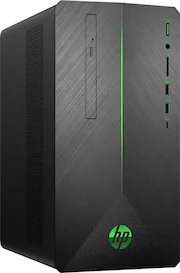
Rating 4.3 out of 5 stars with 376 reviews
4.3- Performance (86)
- Speed (55)
- Graphics (50)
- SSD (41)
- Price (30)
- Lag (6)
- Size (3)
Customer Images
The vast majority of our reviews come from verified purchases. Reviews from customers may include My Best Buy members, employees, and Tech Insider Network members (as tagged). Select reviewers may receive discounted products, promotional considerations or entries into drawings for honest, helpful reviews.
- Rated 5 out of 5 stars
Well-Balanced Components
This HP is a fast little computer which was a great deal at $650, but is less competitive with the price raised back to over $800. I added another 8 GB of RAM ($41) and the memory is now operating in dual-channel mode, which increased the performance of the memory-hungry Ryzen CPU and the dedicated 4 GB RX 580 graphics both by about 8% to 9% and the speed of the memory by about 34%. Even with this improvement, the 4 GB RX 580 is about 36% slower than a "real" 8 GB RX 580, but still handles graphics-intensive games like Subnautica with impressive speed (80 fps on high settings at 1920x1080). The covered port to the iGPU uses proprietary screws, so I wasn't able to see if there was an HDMI port underneath. Likewise, the BIOS offers no visible way to disable the iGPU, which seems to have reserved 1 GB of RAM for itself. You'll want to uninstall the Mcafee software and some other craplets, but the bloat isn't too heavy. And then there are some pretty huge Windows 10 updates to download and apply. As someone else pointed out, the case and internal design make this computer relatively non-upgradable, though it should be repairable if a part fails. Unless you are looking for ultimate gaming rig bragging rights or want to do heavy-duty VR, this machine's performance won't disappoint and it will likely remain a good workstation and light gaming computer for many years to come. I would wait for the price to drop back down to $650 before purchasing it, though.
Posted by Whirligig
- Rated 5 out of 5 stars
Mid Range Desktop - Small but Mighty
The HP Pavilion Gaming Desktop (Model 690-0024) is a solid mid range gaming tower. It packs more than enough power to handle E-sports titles (CS:GO, Overwatch, LoL) at high to ultra settings and 1080p. It also has no problem running Fortnite at epic settings, 1080p, with 60+ fps. AAA titles can be played at med-high settings and still pull around 60fps. Specs Processor – AMD Ryzen 5 Pro 2400G with Vega 8 Graphics - CPU 4C/8T @ 3.6 GHz with boost to 3.9 GHz Graphics – AMD Radeon RX 580 4GB [Discrete] / Vega 8 iGPU 11 cores Motherboard – AMD B350 with AGESA 1.0.0.5 BIOS Memory – 8GB DDR4 2666 Single Channel (20-19-19-43) Storage – 128GB Samsung SSD (M.2); 1 TB Seagate Barracuda 7200 RPM HDD with 64MB Cache Buffer Network Adapter – 802.11AC WiFi adapter / 1X Gigabit LAN Port / Bluetooth 4.2 Radio External Ports – 1X USB-C / 2X USB 3.1 / 4X USB 3.0 / 2X USB 2.0 / 1X SD Card Reader / 1X HDMI / 3X Displayport / 3.5mm jacks for speakers, mic, and AUX. Additional Internal Expansion Ports – 1X 288-pin DDR4 slot / 1X PCIE (3.0?) x1 slot / 1X M.2 SATA* / 1X SATA 3 6Gb/s CD/DVD Burner Includes a standard wired HP keyboard and mouse The HP Pavilion Desktop (690-0024) comes with an all AMD setup. It’s equipped with their stellar Ryzen 5 2400G processor and Radeon RX 580 graphics card. [Full disclosure I am an AMD fan with an R7 1800X/Vega64 powered main tower]. The R5 sports 4 cores with 8 threads that performs better than an i5-7400 and just a hair behind the 8400. The RX-580 graphics card performs similarly to the Nvidia 1060 3GB. It is a perfectly good card that can play AAA games, and still deliver an enjoyable gaming experience. I had the pleasure of hooking my 580 up to a HP 25x 1080p 144Hz Freesync monitor, and got to experience some smooth 144Hz action. I also used the card to drive my 4 1080p monitors, which is great for people who might need some more screen real estate. The HP Pavilion comes with a single 8GB DDR4 2666 (CAS 19) RAM stick. This, for the most part, is enough RAM to play most games without becoming a bottleneck. It should be noted that Ryzen processors are hindered by single channel RAM and adding a second RAM module is a significant benefit. Storage comes in the form of a 128GB M.2 NVME SSD and a 1TB 7200RPM hard drive. The SSD can handle the install of the majority of your programs and the OS, but its size will force you to install your games to the 1TB HDD. The specs for the HP list 2 M.2 slots. In all reality only 1 can be used for an SSD. The other is an M.2 WLAN slot, which is meant for a Wi-Fi card. This spec is misleading, and really should be defined as 2 different slots. Games and Benchmarking I ran the Pavilion through a series of benchmarks to test its various capabilities. Tests included 3DMark Time Spy (scored 3882) and Skydiver (scored 23097), PC Mark 10 (scored 4467), and CrystalDiskMark 6 (Sequential 535 Read / 309 Write for the SSD). The results showed me basically what I already knew. This computer is a competent mid-range gaming PC that can play any game available at 1080p with settings tailored to the game being played. It’s not going to set any records, but it will play E-Sports title at high frame rates (100+ @high to ultra settings), and the most popular games (looking at you Fortnite) at good framerates (60+ @ Epic settings). I made sure to run it through the 1 game I know will be played on it – Fortnite. I was able to achieve mid 60s to low 70’s with V-sync enabled on Epic (not customized) settings with a long draw distance. Dialing down the settings I would get a better max FPS but would still bottom out into the 60’s leading me to believe at 1080p the CPU was the bottleneck. An extra 8GB of RAM would have probably helped these numbers out, but as tested the game ran just fine. In all reality the game played/looked better at max settings with a lower framerate. I also played some Dirt Rally to see how it held up with the fast-paced scenery changes. Running the game on high settings with V-Sync on I was maxing out at 130 FPS while getting and average FPS of 85. If this game support Freesync, the average/max numbers would be closer together. And in a run through of Shadow of War on high settings I was pulling around 60FPS avg. Overall pretty good results for this system. Again affirming its spots as a mid-range gaming desktop. Design The Design of the Pavilion is small and sleek. It has a very simple, clean shape. The front buttons and inputs are flush with the face, which helps it keep its sleek exterior. The green accent LED’s give the front of the case a nice accent feature. I like the green, mostly because I am so tired of blue LED’s. Also green is less intense of a light color, so leaving this tower on at night in your room shouldn’t cause you any problems – unlike the blinky blue lights of a router. Compared to my main tower (Thermaltake Core P3 Mid), the Pavilion is diminutive. I chuckled when I sat them next to each and the P3 dwarfed the Pavilion. However, that led me to be impressed with how much performance was packed into this little case. The layout of the ports are as you would expect. USB’s in the front and the rear. What is nice to see is the addition of USB C to the front I/O panel. Its nice to see this port finally brought out from the rear I/O to the front where it can be used more readily. The case is a mATX mini tower that use SFF (small form factor) components. The power supply is a 400W 80 Plus Platinum (very nice) SFX PSU. The GPU is a single fan 170-175mm long version of the 580, and the DVD drive is a laptop form factor (5.25” slim) version. All of this together comes out to only 11.4 lbs. That’s only a pound more than the PSU for my main tower! I can easily bring this little tower to LAN parties. Value I mostly look at prebuilt systems from a value perspective. I enjoy spec’ing and assembling my own PC, but if the value is there in a pre-built I don’t see the point. I built up a similar system in PCPartPicker – matching about 95% of the specs. I came out to a final total of $835 – and would have to source all the parts from 4 different online stores (Amazon, Newegg, B&H, and Outlet PC). This is without shipping or tax and with some items on sale. Or for the same price (MSRP is $830) I can get the HP Pavilion Gaming Desktop from Best Buy, save the hassle of ordering from all over, skip the fun/frustrating assembly stage, and be up and running right away. Already this HP comes out as a better value proposition, and that’s at full MSRP. Sales happen, and you can catch these towers for a tremendous deal which just makes the DIY route make even less sense. I love building PC’s, but there are times when the big OEM’s put alot of value in their offering that is tough to beat. Besides, I can always fiddle with upgrades to satisfy that DIY need. Upgradability The biggest issues with pre-built systems is their narrow upgradability and BIOS limitations. Usually you are limited to just adding RAM, or swapping slower parts for faster ones. In the case of the Pavilion, you have a few other options, which are nice. You can still upgrade the RAM by adding a second DDR4 2666 stick. *Ryzen processors can handle DDR4 3200 (CAS 14) – The GSkill Flare-X series are ensured to run at stated speeds with Ryzen processors. You can still swap out the main drives for faster/larger versions. There is also an additional hard drive mounting location in the case. You can add either a larger capacity 2.5” SSD or get something like a Seagate Firecuda hybrid drive (has an 8GB SSD built in as a cache buffer to increase speeds). The GPU can also be readily upgraded as long as you stick within the parameters of the current card. Card length will need to be SFF compatible and only need an 8-pin power connection. The card can be It also can’t exceed the 400W PSU without that needing an upgrade as well. A longer card can be used (maybe up to 240mm), but you will need to do some modification to the special HP 8 pin harness holder or discard it. Also, since HP produces a version of this desktop with an R7 2700, it is safe to say that in the future you could buy an R7 2700 or 2700X and swap the processors. That upgrade isn’t for everyone, but it would double your core/thread count. It’s something that can be done when stores are clearing out their R7 2000 series stock or snag a used one. Depending on the BIOS, you may even be able to upgrade to the Ryzen 3000 or 4000 series – this is more of a long shot though and not likely to be available. Also, per comments from an HP rep in the forums about this lineup, Overclocking the processor is locked on HP MOBO’s. I haven’t tried the Ryzen Master Application to OC from within the OS, so there may be some wiggle room there. Final Thoughts I really enjoyed using the HP Pavilion Gaming Desktop. I took my main tower (1800X/Vega64) out of service for 2 weeks and used the HP in its place. It drove all 4 of my monitors for day to day activities with ease. It had no issue with anything I threw at it honestly. Aside from being able to play games at higher settings on my main rig, there wasn’t much difference in my computing experience. That is impressive, and sad (for me) at the same time – my main rig cost 2-3 times as much ☹. When I went to game I played exclusively on my HP 25x 144Hz 1080p panel to get the best image quality out of my setup. The RX 580 had no problem with the higher refresh monitor, and it allowed me to have an enjoyable gaming experience. This is a great little tower that has a solid value proposition. It has entry level pricing, and mid-range performance. It is a great tower for anyone getting into gaming, or just looking to upgrade an old rig without blowing the budget. It has some future upgrade potential as well, so you can always add some extra power down the line.
Posted by DaveW
- Rated 5 out of 5 stars
Omen with a different skin. Perfect 1080p gaming!
The HP Pavillion gaming desktop is a solid choice for the holidays if you looking to get into PC gaming. It has just enough specs to enjoy this at a rock solid and consistent FPS. The best part is it's fully upgradeable so you really can throw more into the machine. First, I'm a team green Nvidia guy myself (Main rig: Core i5, 980TI, 16GB RAM) but I'm insanely blown away by what AMD has managed to put into Ryzen, in fact, I'm just blown away by the performance you get from this rig at this price point. Performance: So far its been fantastic as a gaming rig, I would up suspect many would love this as their first gaming rig as well. 1080p gaming works flawless and paired with a FreeSync monitor as I do (HP 25x 24 inch) every game was smooth and buttery! Forza Horizon 5 looks so breathtaking on this RX 580. The downside is the RX 580 is only loaded with 4GB...This is great if you only want to do 1080p gaming but you going to need a lot more power to push even 1440p gaming. I find that the RX 580 did fine in a bunch of games like Fortnite (Which is the machine is perfect for. 90+ FPS at the highest settings), Witcher 3, COD: Black Ops 4, Forza Series, Gears of War 4, Cuphead, CS: GO, and Rainbow Six: Segie all ran at high framerates 60+. I did have some issues with Final Fantasy XV for some reason. The cutscenes ran at lower frames then the actual gameplay. Maybe its a driver issue but it didn't run that well at all. Keeping the settings on GTA V gave 50-60 FPS @1080p. eSports titles like Overwatch do well @ 88 fps at the highest with this HP gaming desktop As for the PC itself, applications open up quickly with the fast SSD in there. Ryzen 5 rips through everything you can throw at it. Bootup times are fast, Chrome opens quickly, Windows is speedy. Everything else seems fine with testing. Design: I mean its, not an ugly machine just a very basic one. I guess you can say this PC is an HP Omen with a different skin but it's strange they went with just a green LED seeing how this is an AMD rig but I guess red was HP OMEN's thing. It really should have been muti-LED colors at the very least, but the good news is you can turn off the light in the BIOS. It does have that design element of a gaming PC put its something missing here to give it that total gaming feel. Brush hairline looks good with the blackish silver like the color but overly simplistic. There are tons of I/O ports on the machine giving you many to use and work with. HP gave a plethora of USB ports and I/O. 8 USB, 1 USB-C, and an SD card reader. Not only that HP was kind enough to put a CD disc drive for legacy gaming media. The AMD Radeon RX580 GPU has 1x HDMI and 3x Display ports so you can hook a good amount of displays up to the desktop itself. Overall: I like it, it works as a 1080p PC gaming rig perfectly, I still think its perfect if it's paired with a FreeSync monitor. And you really shouldn't have any issues playing future titles especially if you plan to upgrade in the future. there is enough room in the case for it. This is pretty much an HP Omen at a low cost and I don't see anything wrong with that. If this is your first gaming PC, Need something updated for gaming, or just looking for that perfect holiday gaming PC this would be a perfect rig. HP hit the right mark and price point on this Pavilion.
Posted by CrysisComplex
- Rated 4 out of 5 stars
Great Entry Level Gaming Desktop
Gaming: This is an entry level gaming desktop. For the price, it is a solid performer. I started by running the SuperPosition benchmarking software. It scored low when compared to Unigine’s public benchmarking score board. However, when I put in my favorite game, Mechwarrior Online, I was scoring between 40 to 110 fps at highest detail settings. I averaged 60 fps. For comparison, my two-year-old Nvidia 970 scored a little higher on the SuperPosition benchmark but can only average 40 fps in this same game at medium graphical detail settings. Goes to show that benchmarks only tell part of the story. Playing this game on the AMD RX 580 was like playing a whole new game. For the first time in years, I can see the dust and particles thrown into the air by every mechs footfall. I saw fireballs falling through the air and impacting the sides of volcanic rock. Things that are meaningless to the actual game but increase the impressiveness of the game and my overall enjoyment of the game. Next, I tried Batman: Arkham Asylum at full resolution and the graphical settings maxed out. Smooth as butter. I am also impressed that the Radeon software recognized my HP 25X gaming monitor that is FreeSync enabled. I do believe this had a lot to do with the frame rates hitting higher than 60 fps. My impression? This is a great choice for a budget gaming machine. I cannot wait to throw more games at it. Setup: Unpacking the system was easy. The computer comes with a mouse, keyboard, power cable, the computer, and a quick setup guide. The first two pages of the setup guide shows how to setup the computer using easy to follow pictures. The rest of the guide does have some troubleshooting information, basic system care instructions, and a section on where to get additional help from various HP support options. Setup for me took minutes mostly because I replaced this system with a pre-existing system. It may take 15 minutes or more if you are putting together a new space with all new equipment. Just keep your expectations reasonable. Look and Feel: The system is black with a dark grey, brushed metal finish. There is a small slit running along the center face of the case. A green racing stripe appears when the computer is powered on. When the power is off then the stripe is imperceptible. There are six USB ports on the back of the system, two on the front, and a USB type C connector on the front. The computer also has a memory card reader and a laptop style DVD Writer drive. The AMD RX 580 has a single HDMI connector and three DisplayPort connections. The computer is currently driving two monitors with a third on its way. I typically pick a single monitor for gaming while using the extras to post information, web surf, or perform some other task while I wait for levels to load. For some reason, HP chose to go with the Ryzen 5 2400G. This is an APU, meaning it has an integrated graphics processor. The integrated Vega 11 graphics processor in this APU is not being used. To further drive the point home, HP bolted a cover over the motherboard’s HDMI port. During testing, the Vega 11 graphics were never used regardless of the system idle or content. I own a laptop with the same processor and the AMD 560 mobile processor. The driver’s on that system will swap between graphics processors depending on workload. So, what is the point of adding an APU to this system if there is no intent of leveraging it? No idea. I did not remove the HDMI cover to test the port. I do not have the special screw driver bit to remove the cover, yet. I plan on testing this sometime in the future. The computer does come with a mouse and keyboard. Both are cheap, period. The keyboard narrow from number keys to space bar, nothing to differentiate it as a gaming computer’s keyboard, and adequate enough for typing. I would game on it if I did not already have a dedicated gaming keyboard and mouse. The mouse is not even worth talking about. It is my opinion that HP cheaped out on the mouse and keyboard to give us a nice mid-tier graphics card. I will take the trade-off. Plus, you can always save up for a better mouse and keyboard. Finally, HP chose to place a white sticker on the side of the computer case. This is basic system information. No idea why HP chose to do this other than for their own needs at the factory. It does ruin that initial “wow, I’ve got a new gaming computer at Christmas!” feeling. HP could have chosen a different route on this one. Half the meal is eaten with the eyes, HP! Inside the Case: All gamers I know love to tinker with their rides. So, I tore the system apart. I also included two photos. The computer case is not a screwless design; meaning, everything is screwed in and secured in some fashion. Thankfully, the system will come apart with a simple flathead screwdriver. The system is compact with some cleaver design choices. The drive cage holds the 1TB drive vertically. The DVD write is directly beside it. Cabling is minimal and well managed. The drive cage does block access to 1/3 of the case’s interior. You must remove this cage in order to replace or upgrade the memory, the HDD, or add a small PCIe card. You could replace the M.2 SSD but I don’t see the point for this system. You would be better of picking up a cheap SSD and leaving the M.2 drive alone. This, of course, is my opinion. There is a single 8GB stick of memory. I did not pull the memory card to get the numbers off of it. The power supply is 400 Watts and is rated at 80 Plus Platinum. This should make it an efficient power supply. There is a single expansion slot. You could get away with a PCIe audio card, video capture card, or some other compact PCIe expansion card. You will not be able to add a second video card to this system. If, for some reason, this is your intent, then you would be better investing in a more expensive system with a stronger graphics performer. The video card, even though a separate card, cannot be upgraded in this system unless you go straight to HP. The computer case is designed around this card. I did include a photo of the video card. It is a single fan design with a decent head sink. It is not super heavy like you will find from a third-party manufacturer like EVGA or Gigabyte. The drive cage is design to fit and support the video card and heatsink. This way, the PCIe socket does not need to bear the full burden of the card’s weight. Again, if you want a higher end card then spend the extra money for a higher end system. For the money, this is a solid performer. Finally, there is an extra drive bay of sorts on the 1/3 cover. This, again, HP made a strange design choice. The drive must be suspended from the opening with screws. HP did not include any screws. There is a second SATA connection but no companion power connection. There are three SATA connections on the motherboard. Without a way to power a third drive I fear that the only upgrade to storage available is either by adding an external USB device or replacing the included 1TB HDD. Final thoughts: Overall, I found this system to be a nice upgrade from what I had before. My old system is more than five years old. I was going to build a new system that, with current memory and storage prices, would have costs me significantly more money. What I need is a system that is capable of light gaming, office work, web surfing, and entertainment. I need the ability to drive multiple monitors which this system can do. And I need ample storage. I like the compact design, the Ryzen 5 delivers great performance and strong multi-tasking capabilities over my aging Intel processor, and the AMD RX 580 blows the doors off my older Nvidia card. The proof is in my real-world experience with my games and not the silly, generic benchmarks. I consider this an entry level gaming computer and will be treated as such. There are other systems around this price point that have their own unique offering. I think HP made the right compromises with this model. The 128 GB M.2 SSD is fast enough to run the system and the 1TB drive is large enough and fast enough to store and load my programs in a timely manner. The super cheap keyboard and mouse are functional and allowed HP to include a strong mid-tier graphics card at a solid price point. The system even looks cool next to the matching 25X gaming monitor once you remove that stupid sticker. I think this would make a good entry level computer for a teenager, collage kid, or for someone who needs a computer first and performance gaming second. Please like this review if you found it helpful. Thank you.
Posted by ITJim
- Rated 5 out of 5 stars
great computer for anyone!
The HP Pavilion is fantastic! I've had it over a month now and still haven't begun to see everything it can do. It is fast and even though I didn't buy it for gaming it does everything I need it for. The price was great as I got it used but took out the Geek Squad warranty which I wouldn't do without. HP is great! Happy Customer
Posted by oneclassylady