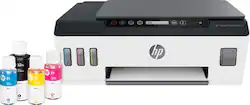
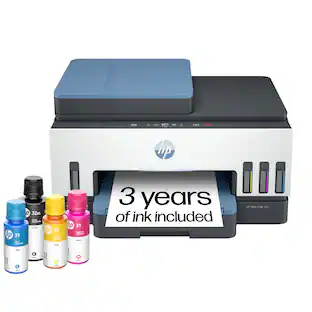
HP - Smart Tank Plus 551 Wireless All-In-One Inkjet Printer
- Key Specs
- Networking: Wireless
- ENERGY STAR Certified: true (Devices carrying the ENERGY STAR service mark, such as computer products and peripherals, kitchen appliances, and other products, generally use 20% to 30% less energy than required by federal standards.)
- Printer Type: All In One, Copier, Printer, Scanner
- ISO Color Print Speed: 5 pages per minute (The number of color pages able to be printed per minute in the device's default single-side mode, as tested by the International Standards Organization (ISO).)
- ISO Mono Print Speed: 11 pages per minute (The number of black ink (grayscale) pages able to be printed per minute in the device's default single-side mode, as tested by the International Standards Organization (ISO).)
- Output Tray Capacity: 30
- Touch Screen: false (Touch-screen devices make navigating more intuitive. Using a touch-screen display, you can do things such as tap to select, hold and drag to move items, swipe to scroll, and pinch to zoom.)
- General
- Brand: HP
- Model Number: 6HF11A#B1H
- Product Name: Smart Tank Plus 551 Wireless All-In-One Inkjet Printer
- Display Screen: true
- Display Screen Size: 2 inches
- Dimensions
- Product Height: 10.2 inches (The out of box height of the item. Height is measured as the vertical distance from the bottom of the item to the top as it would be primarily used or placed.)
- Product Width: 17.7 inches (The out of box width of the item. Width is measured as the horizontal distance from one side of the item to the other as it would be primarily used or placed.)
- Product Weight: 11.3 pounds (The out of box weight of the item.)
- Features
- Automatic Document Feeder: false
- Photo Printing: true
- Monochromatic/Color: Color
- Automatic Two-Sided Printing: false
- Tray Capacity: 100
- Duty Cycle: Up to 1,000 (The maximum number of pages per month that the device can produce without failing, as specified by the manufacturer.)
- Scanner Info
- Scanner Type: Flatbed
- Scanner Resolution: Up to 1200 x 1200 (Refers to the number of pixels/dots, both horizontally and vertically, of the image produced by the scanner. Generally, the higher the resolution, the sharper and cleaner the produced image.)
- Ink
- Compatible Cartridges: HP 32XL 135-ml Black Original Ink Bottle 1VV24AN, HP 31 70-ml Cyan Original Ink Bottle 1VU26AN, HP 31 70-ml Magenta Original Ink Bottle 1VU27AN, HP 31 70-ml Yellow Original Ink Bottle 1VU28AN
- Ink Subscription Service Available: false (The printer monitors ink usage and alerts the subscription provider when levels are low. A purchased subscription provides refills of ink based on usage.)
- Paper Info
- Maximum Document Length: 8.5 inches
- Maximum Document Width: 14 inches
- Supported Paper Sizes: Letter; legal; 4 x 6 in; 5 x 7 in; 8 x 10 in; 3 x 5 in to 8.5 x 14 in; No.10 envelopes
- Paper Handling: 100-sheet input tray; 30-sheet output tray
- Compatible Media Types: Plain paper, Matte brochure papers, Glossy brochure papers, Photo papers, Envelopes
- Copier Info
- Maximum Number Of Copies: 99
- Copier Resolution (Black): Up to 600 (Refers to the number of pixels/dots, both horizontally and vertically, of the image produced by the copier in black ink. Generally, the higher the resolution, the sharper and cleaner the produced image.)
- Copier Resolution (Color): Up to 600 (Refers to the number of pixels/dots, both horizontally and vertically, of the image produced by the copier in colored ink. Generally, the higher the resolution, the sharper and cleaner the produced image.)
- Performance
- First Page Out Time: 14 seconds (The time it takes the printer to print and deliver the first page in the output tray. May depend on the complexity of the copy being printed.)
- Printer Resolution (Black): Up to 1200 x 1200 (Refers to the number of pixels/dots, both horizontally and vertically, of the image produced by the printer in black ink. Generally, the higher the resolution, the sharper and cleaner the produced image.)
- Printer Resolution (Color): Up to 4800 x 1200 (Refers to the number of pixels/dots, both horizontally and vertically, of the image produced by the printer in colored ink. Generally, the higher the resolution, the sharper and cleaner the produced image.)
- Connectivity
- Minimum System Requirements: PC: Windows 7 or higher, 1 GHz 32-bit (x86) or 64-bit (x64) processor, 2 GB hard disk space, internet connection, USB port, Internet Explorer.; Mac: OS X v10.11 El Capitan and higher, internet connection
- Other
- UPC: 194441263794
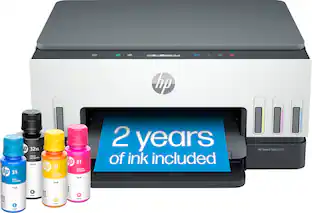
This high-quality ink tank printer delivers up to 2 years of ink in bottles included in the box.³ Get faster connections with dual-band Wi-Fi¹, and easy mobile printing with HP Smart app.²
Whats Included
- HP Smart Tank Plus 551 Wireless All-In-One Inkjet Printer
- HP 32XL 135-ml black, HP 31 70-ml cyan, magenta and yellow original ink bottles
- Power cord
- Owner's manual
Product Manuals
A: As long as you turn the printer off using its power button, you should have no problems. Using the power button gives the printer the chance to cap the printheads so they're not exposed to air-and it's that air exposure that leads to the ink drying and clogging the head.
Q: Why are the colors on my photos so different from the images on my phone and laptop?
A: I had the same question. A search on the theorynet turned up a lot of suggestions that my monitor (laptop) display needed to be calibrated. A fancy way of saying we need to dumb down the beautiful displays we look at (phone & laptop) to make the printed photos match the (now degraded) laptop & phone. I call BS on that. I found that very often, I needed to over-adjust the photos prior to printing to get a very good photo that "popped" with color & contrast. If it was just a comparison to my laptop, ok, maybe calibration. But same issue with my phone?...…. I don't think so. Salesman at Best Buy told me only a cartridge-type printer would produce great photos. I tried the model he suggested & the prints came out exactly same as the HP 551 Tank.
Q: Can I use this for making shirt decals?
A: You can print on tshirt transfer paper made for inkjet printers with the HP Smart Tank Plus 551 printer.
Q: Is this printer compatible for Sublimation Printing for T-shirts?
A: This printer is not compatible with sublimation.
Q: Can you enlarge or minimize the image for printing?
A: No, terrible printer has no printing options. Was very disappointed you can't even print double-sided.
Q: Can I return this item if not happy with it
A: I looked up the return policy and we are stuck with ours too...had to be returned within 15 days I believe.
A: You can connect this printer to a computer using the USB A to B cable (or USB 2.0 cable). The USB cable is not included with this printer.
A: Yes you can with the hp smart app
People also viewed
 Black Friday in July Deal$199.99The price was $239.99
 Black Friday in July Deal$69.99The price was $109.99
 Black Friday in July Deal$74.00The price was $140.00
 Black Friday in July Deal$79.99The price was $99.99
 Black Friday in July Deal$79.99The price was $159.99
 Black Friday in July Deal$69.00The price was $107.00

Today's top picks
 Black Friday in July Deal$749.99The price was $1,199.99
 Black Friday in July Deal$199.99The price was $399.99
 Black Friday in July Deal$499.99The price was $999.99
 Black Friday in July Deal$199.99The price was $249.99
 Black Friday in July Deal$199.00The price was $419.00