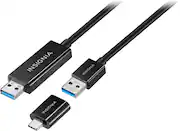
The Insignia 6' USB 3.0 File Transfer Cable has a high-speed transfer cable to move photos, video, audio files and documents between Windows and MacOS systems. The 6 ft. length offers flexible placement options and a plug-and-play design, so you won’t need any additional software or downloads. Finally, a specially fitted adapter lets you use this cable with USB-C computers, giving you more connection options to transfer your files.
Q: Is this cable compatible with USB-C devices?
A: Yes, it comes with an adapter that allows you to connect to a computer with USB-C.
Q: How long is this file transfer cable?
A: This file transfer cable is 6 feet long.
Q: Do I need to install any drivers or software to use this cable?
A: No, this cable has a plug-and-play design, so you won't need any additional software or downloads.
Q: What is the maximum data transfer rate of this cable?
A: This USB 3.0 cable supports a high-speed data transfer rate of up to 5 Gbps.
Q: Can I use this cable to transfer files between a Windows computer and a Mac?
A: Yes, you can transfer files between Windows-to-Windows, Mac-to-Mac, or Windows-to-Mac computers with the auto-launching software.
Q: Does this cable work with Windows computers?
A: Yes, this cable is compatible with Windows 10 or macOS 10.12 or newer systems.
Q: Will it transfer data from a Windows 10 computer to a Windows 11 one?
A: You can transfer files between Windows-to-Windows computers.
Q: Does this transfer cable come with any required software?
A: The cable contains all the software you need. No CDs, downloads or additional adapters required.
Customers enjoy the 6' USB 3.0 File Transfer Cable's ability to transfer files easily and its convenient length. Positive feedback also highlights the cable's ease of use and quality. While some users experienced compatibility issues with certain devices or found the software to be problematic, the majority of users found the product to be effective for its intended purpose. A few customers mentioned that the instructions could be improved for clarity.
The vast majority of our reviews come from verified purchases. Reviews from customers may include My Best Buy members, employees, and Tech Insider Network members (as tagged). Select reviewers may receive discounted products, promotional considerations or entries into drawings for honest, helpful reviews.

The Insignia 6' USB 3.0 File Transfer Cable has a high-speed transfer cable to move photos, video, audio files and documents between Windows and MacOS systems. The 6 ft. length offers flexible placement options and a plug-and-play design, so you won’t need any additional software or downloads. Finally, a specially fitted adapter lets you use this cable with USB-C computers, giving you more connection options to transfer your files.

The 6' USB to Mini-B Charge-and-Sync Printer Cable lets you power and transfer files from USB mini-B devices by connecting to your computer or other USB port. The 6 ft. cable length gives you the reach you need, and corrosion-resistant materials give it a long life.

The Insignia 3.3' USB-C to USB Charge-and-Sync Cable lets you power and transfer files from smartphones, tablets and other devices with a USB-C connection. Sync photos, music, and other data quickly with 10 Gpbs SuperSpeed+ technology. A standard USB connector connects easily to most power adapters.

The Insignia USB-C to USB Adapter lets you connect standard USB products to your Mac, iPad and other USB-C enabled products. It supports up to 5 Gbps of high-speed data transfer between devices, saving you time. The attached, short, braided cable is durable with a compact design.
| Pros for Insignia™ - 6' USB 3.0 File Transfer Cable - Black | |||
|---|---|---|---|
| Quality, Ease of use, USB, Cable Length, File Transfer | Quality, Compatibility, USB, Ease of use, Length | Quality, Compatibility, Cable Length, Speed, USB-C | Compatibility, Quality, Ease of use, USB, Data Transfer |
| Cons for Insignia™ - 6' USB 3.0 File Transfer Cable - Black | |||
| Compatibility, Software, Instructions | Availability | Android Auto | Connection |