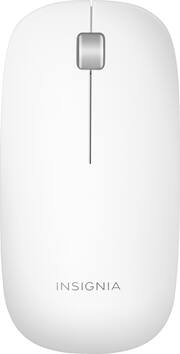
Rating 4.3 out of 5 stars with 316 reviews
4.3- Ease of use (70)
- Bluetooth (34)
- Price (33)
- Size (27)
- Design (18)
- Scroll Wheel (5)
Customer Images
The vast majority of our reviews come from verified purchases. Reviews from customers may include My Best Buy members, employees, and Tech Insider Network members (as tagged). Select reviewers may receive discounted products, promotional considerations or entries into drawings for honest, helpful reviews.
- Rated 4 out of 5 stars
Cheaper Alternative
Picked this lil guy up in-store, mainly as it was sitting next to the Logitech Ultrathin, which they didn't have in stock for Macs. *Sadface* It's pretty good for what it is - a cheaper alternative to the magic mouse with similar aesthetic appeal, however a bit more on the 'flimsy' side. Connected to my Macbook Pro fairly easily, and only takes about a second to be detected upon booting up. The scroll wheel isn't terribly amazing, but since I'm using it in addition to my touchpad it's not a huge deal; probably wouldn't recommend it as being the sole method for navigating yer UI.
Posted by Symboliceon
- Rated 5 out of 5 stars
Easy to connect and use!
Easy to connect and use! Came with batteries and has worked perfect since! Super affordable alternative to the Apple mouse if you prefer using a mouse over a trackpad!
Posted by whymatywhy
- Rated 4 out of 5 stars
Really Solid Mouse
The overall functionality is solid. I’ve had no problems with mouse at all. Pros: It just works! Easy to use because there are not a lot of buttons. Has a great sleek look. Price Cons: it does not feel natural to hold, at first, if you are used to curved mice. You do eventually get used to it.
Posted by ThatTechGuy
- Rated 5 out of 5 stars
Great Apple dupe
This mouse is a dupe for the Apple mouse for way cheaper. I bought it for my iPad Pro and the design is slick which fit perfect . The bluetooth connection was easy to pair and buttons have a great click. Good battery life too.
Posted by Chris
- Rated 5 out of 5 stars
Happy User
Easy to use, easy to Install, lightweight and easy to store to travel with MacBook Pro. Bluetooth was easy to pair and a good value for the investment.
Posted by RegenerativeHealth