Rating 4.3 out of 5 stars with 236 reviews
4.3- Ease of use (113)
- Accuracy (70)
- Price (10)
- Weight (7)
- Battery Life (6)
Customer Images
The vast majority of our reviews come from verified purchases. Reviews from customers may include My Best Buy members, employees, and Tech Insider Network members (as tagged). Select reviewers may receive discounted products, promotional considerations or entries into drawings for honest, helpful reviews.
- Rated 4 out of 5 stars
Satisfied with this thermometer
Simple and easy to use. Smart design that feels comfortable to hold. Good quality product.
Posted by James
- Rated 5 out of 5 stars
Thermometer
Works pretty well, it is good in quality and the use of it is simple.This was a good purchase.
Posted by Sisca
- Rated 5 out of 5 stars
Good looking and easy to use.
Very convenient to use and have a good quality. CP value is so high.
Posted by yoyo
- Rated 5 out of 5 stars
Simple Thermometer!
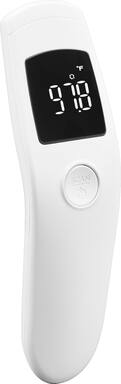
A simple easy to use thermometer. Compared the temperature readings to our old contact thermometer and readings were spot on. For this price, you can’t expect a better non contact thermometer. I love the simplicity of this thermometer!
Posted by Crazyg904
- Rated 5 out of 5 stars
Great Infrared Thermometer
Works reliably, easy to use. Don’t have to touch skin to get reading, Has digital display plus memory recall so can easily keep record of temperatures if not feeling well for a couple days. Bought as a package deal saving $110 on a almost completely useful health monitoring system.
Posted by Disappointed