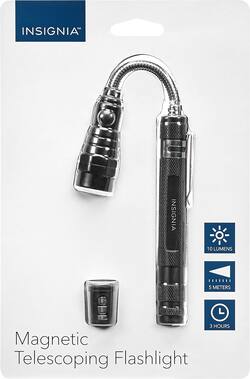
Insignia™ - Magnetic Telescoping Flashlight
- Key Specs
- Bulb Type Required: LED
- General
- Brand: Insignia™
- Model Number: NS-CFLMT
- Product Name: Magnetic Telescoping Flashlight
- Lighting
- Bulb Type Required: LED
- Beam Distance: 5 meters
- Features
- Flashlight Type: Handheld
- Performance
- Run Time: 3 hours
- Power
- Battery Size: Button (The battery size required for operation.)
- Batteries Included: true (Indicates whether the product comes with the required batteries for its operation.)
- Material
- Casing Material: Aluminum
- Dimensions
- Product Weight: 1 pounds (The out of box weight of the item.)
- Other
- UPC: 600603199899
Only at Best Buy
Stop fumbling around in the dark with this versatile Insignia flashlight. Bright LED lights make it easy to see objects up to 5 meters away, and its extendable magnet lets you pick up dropped metal objects. Shine light in even the tightest spots with this Insignia flashlight's flexible, telescoping shaft.
- Super bright 3-LED flashlight: Lights up areas 5 m away.
- Durable aluminum construction: Protects from drops.
- Extendable magnet: Picks up objects in hard-to-reach places.
- Telescoping shaft: Extends and flexes for better use.
Whats Included
- Magnetic Telescoping Flashlight
- 4 LR44 lithium button cell batteries
Product Manuals
A: Do not remove the batteries from the cover. The black cover is inserted into the housing under the LED Light Head. If you look at the head with the LED Light, there are two hexagon shapes like a normal threaded nut. The head will unscrew just below the hexagon area and once the head is separated, you can insert or remove the plastic battery holder, with the positive end facing the LED lights. Take a thin finger nail file, or blade, and insert in between the side area between two of the button batteries and push against the end with the protruding plastic rim, which is the "positive" end of the batteries, and the end battery will pop out, then the others can be removed easily when they need to be replaced. You can identify the positive end of the battery by the end with a "+" sign stamped on the metal battery housing.
People also viewed
 Clearance$13.99The price was $32.99
 $69.99The price was $79.99
 Clearance$13.99The price was $32.99
 $18.99The price was $22.99



Today's top picks
 $479.99The price was $729.99
 $199.99The price was $249.99
 $1,199.99The price was $1,399.99
 $799.99The price was $1,199.99
 $789.99The price was $1,049.99