Everything for Back to School — and then someShop now

Main Content
A Best Buy Brand

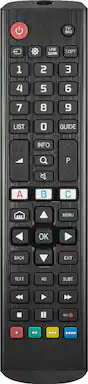
Insignia™ - Replacement Remote for LG TVs - Black

Model: NS-RMTLG21
SKU: 6448218
Sold byBest Buy

Customers are saying

Customers are impressed with the ease of use, overall performance, and functionality of the Replacement Remote for LG TVs. Many find it compatible and easy to set up, offering great value for the price. However, some customers have noted concerns about the button layout, response time, and certain features not being included.

Generated by AI based on customer reviews.
Features
  • Easily replace missing or damaged remote

    Pairs quickly and easily with nearly all existing LG TVs.

  • Custom design

    The layout and keys are designed for full TV control and learnability.

  • Controls soundbar audio

    Pair the remote to your soundbar or audio receiver to control the audio level. Works with Yamaha, Bose, Denon, Samsung, JBL, Harman, Kardon, LG, JVC, Marantz, Philips, Onkyo, Panasonic, Technics, Pioneer and Sony brands.

  • Shortcut buttons

    Program the 3 app shortcut buttons to immediately open apps on your smart TV, like Netflix, Hulu and more.

  • Learns new functions

    If you have your old remote, this remote can learn functions from it for wide-ranging use.

  • Media controls

    Control playback while streaming or watching movies with play, pause, forward, back and stop buttons.

  • Comfortable feel

    Slim, lightweight design gives it a comfortable grip.

  • Just two AA batteries (not included) give you long-lasting use.

See all features
Specifications
  • Remote Control Type
    Dedicated
Sponsored

Reviews

Customers are sayingCustomers are impressed with the ease of use, overall performance, and functionality of the Replacement Remote for LG TVs. Many find it compatible and easy to set up, offering great value for the price. However, some customers have noted concerns about the button layout, response time, and certain features not being included.
This summary was generated by AI based on customer reviews.
  • Ease of use (314)
  • Overall Performance (138)
  • Remote Functionality (66)
  • Compatibility (44)
  • Setup (31)
  • Button Layout (27)
  • Response Time (5)
  • Features (4)

Customer Images

The vast majority of our reviews come from verified purchases. Reviews from customers may include My Best Buy members, employees, and Tech Insider Network members (as tagged). Select reviewers may receive discounted products, promotional considerations or entries into drawings for honest, helpful reviews.

  • Rated 5 out of 5 stars

    Best tv remote for lg «trust me »

    If you have lost your lg remote and want a good remote replacement i recommend this one , I lost my remote and I went to to Best Buy and grabbed this one when I arrived home to my lg tv I didn’t need even to set it up it was working immediately all the buttons

    Posted by African24

  • Rated 4 out of 5 stars

    Perfect replacement, a lot of buttons.

    I bought an Open Box LG OLED and it came with no remote. I got home and could not set up my TV with out a remote. I went back to the store and the Specialist guided me towards this replacement remote. The price was a little high but I got it anyway. It worked right out the box! I will say this remote has so many unnecessary buttons that it does get a little confusing when trying to change the input or picture settings. Trying to multitask at night with no backlight and 49 buttons becomes a task.

    Posted by mossbergcity

  • Rated 4 out of 5 stars

    My remote

    It’s a decent remote. I didn’t even have to set it to my tv. Just put the batteries in and it automatically sets with your LG TV.

    Posted by DavidM

  • Rated 5 out of 5 stars

    LG 86 inch tv remote

    Remote control worked right out of the box. It was easy than I thought it was going to be.

    Posted by Redblaze1981

  • Rated 5 out of 5 stars

    Good replacement

    Works as should! Easy to sync and no issues so far.

    Posted by AlejandroC

Compare similar products

Insignia™ - Replacement Remote for LG TVs - Black

Losing or damaging the remote control is a headache, but you can regain control of your TV with the Insignia NS-RMTLG21 Replacement Remote for LG TVs. Our remote is compatible with nearly all LG TVs and pre-programmed for easy pairing. And you can even set up your remote to adjust your soundbar or audio receiver volume, giving you full control of your audio. Program your three favorite apps to the remote to open your most-used streaming services and more. If you still have your old remote, you can even teach your new remote functions from it, guaranteeing that you’ll have access to everything right at your fingertips. This Insignia remote has just what you need.

Insignia™ - 3-Device Universal Remote - Black

Losing or damaging your remote control can be a headache, but you can regain control of your TV and other devices with the Insignia NS-RMT3D21 3-Device Universal Remote. Our remote is compatible with nearly all major brands and offers easy preprogramming for an effortless pairing that won’t require any codes. And you can even set up your remote to adjust your soundbar volume without changing devices, giving you full control of your audio. Program the remote with your favorite apps, using it to open your most-used streaming services. If you still have your old remote, you can even teach your new remote its functions, guaranteeing that you’ll have access to everything right at your fingertips.

Philips - OneTouch Universal Remote Control for Samsung Smart TV, LG, Sony, VIZIO, Fire TV, Roku TV, Remote Replacement - Black

Skip the hassle of programming your replacement remote with the patent-pending Philips OneTouch Streaming Remote. Designed for smart TVs, this remote comes preprogrammed to control six top TV brands and four popular streaming apps — no programming required. Operate your Samsung, LG, Sony and Vizio TVs, as well as Fire TVs and Roku TVs and enjoy direct access to Netflix, Prime Video, Disney+ and YouTube. You’ll soon discover this is the perfect replacement remote for every TV in your home — not to mention the perfect spare to keep on hand for when your TV’s remote breaks or goes missing. Setup is simple. Insert two AAA batteries, then press the TV device button for your TV’s brand. Whether you have a Samsung TV in the living room, a Sony TV in the kitchen, an LG TV in the bedroom, a Vizio TV in the office, a Fire TV in the den or a Roku TV in the home theater, this remote controls them all for endless entertainment at the touch of a button. Additionally, the fully backlit keypad is perfect for bingeing marathons when the lights are low. Take complete control of all your TVs with the Philips OneTouch Streaming Remote.

LG - 2025 Magic Remote
3.0(1)

Voice Magic Remote control makes interacting with your smart TV easy! The intuitive mouse like pointing and wheel control and select preset app buttons allows to you to access your favorite content quickly.

Pros for Insignia™ - Replacement Remote for LG TVs - Black
Ease of use, Overall Performance, Compatibility, Setup, Remote FunctionalityEase of use, Overall Performance, Compatibility, Connectivity, PriceOverall Performance, Compatibility, Connectivity, Setup, Ease of UseThere were no pros for this product
Cons for Insignia™ - Replacement Remote for LG TVs - Black
Button Layout, Response Time, FeaturesButton Layout, Voice Control, Battery Life, InstructionsButton LayoutThere were no cons for this product

Specs

Questions & Answers
  • If it doesn't have a pointer/cursor, how do you select settings or smart TV options?

    Thank you for your inquiry! The Insignia™ Replacement Remote for LG TVs (Model: NS-RMTLG21) does not have a pointer or cursor like LG’s Magic Remote. However, you can still navigate smart TV settings and apps using the directional pad (up/down/left/right arrows) and OK/Enter button in the center. Keith | Insignia Support

    Answered by InsigniaCustomerSupport
    InsigniaCustomerSupport response
  • My tv doesn’t have a power button on it. 75 inch LG Big screen How do I get my insignia remote to work on my LG tv?

    Thank you for your inquiry! To get your Insignia™ Replacement Remote (Model: NS-RMTLG17) to work with your 75-inch LG TV, start by installing two AAA batteries into the remote, ensuring the + and - symbols match the battery compartment. Make sure your LG TV is on and not in standby mode. On your Insignia remote, press and hold the red and blue buttons until the POWER button blinks twice. Point the remote towards your TV and press and hold the POWER button until your TV turns off, then release the button immediately. The POWER button should blink twice. Turn on your TV using the remote and test other buttons to ensure they work correctly. If some buttons do not work, repeat the pairing process for those specific buttons. If your LG TV doesn't have a visible power button, you can use alternative methods to turn it on, such as the LG ThinQ app.

    Answered by InsigniaCustomerSupport
    InsigniaCustomerSupport response
  • Can this remote learn functions from my old remote?

    Yes, if you still have your old remote, you can teach this new remote functions from it.

    This question and answer was generated by AI based on customer and product data.
  • Can this remote control be used to adjust the volume of a soundbar?

    Yes, you can pair the remote to your soundbar or audio receiver to control the audio level.

    This question and answer was generated by AI based on customer and product data.
  • Does this remote control have any shortcut buttons?

    Yes, you can program the 3 app shortcut buttons to instantly open apps on your smart TV, such as Netflix, Hulu, and more.

    This question and answer was generated by AI based on customer and product data.
Ask a question
No content
Sponsored