Rating 4.4 out of 5 stars with 750 reviews
4.4- Sound Quality (486)
- Comfort (123)
- Battery Life (92)
- Price (52)
- Bluetooth (24)
- Volume (18)
- ANC (5)
Customer Images
The vast majority of our reviews come from verified purchases. Reviews from customers may include My Best Buy members, employees, and Tech Insider Network members (as tagged). Select reviewers may receive discounted products, promotional considerations or entries into drawings for honest, helpful reviews.
- Rated 5 out of 5 stars
Excellent sound&noise cancelling at a Great Price
The first time I bought a headphone with the noise cancelling feature, it was a TCL a week before. That first experience was awful. The noise cancelling did not cancel any sound at all. The sound was terrible but the price was low. At the end I decide to return those and look for a better quality at a higher price. And a week later I discover this superior product with a great noise cancelling feature and crystal-clear sound. The price? $10 higher than the TCL. Yeah, It’s true! For only $79.99 you will be the owner of a great pair of headphones with a nice quality of audio and materials. The battery lasts 20 hours with the noise cancelling activated but without the noise cancelling it could last 40. It has a touch control that works perfectly they are so comfortable that you can stay with them for hours without problems. Thank God there still are companies producing great products, with excellent quality and at a low price out there.
Posted by Carli
- Rated 5 out of 5 stars
Great For Yard Work
Smooth balanced sound. The right balance of bass, treble and mid-range frequencies (I listen to everything from country to rap music along with audio books). I am not an audiophile, but for me, these headphones work great for working in the yard and working on my vehicles. Also being able to make an receive phone calls is a plus as I often am not able to pull out my phone to answer a call while I am performing a task (ever perform brake work on a vehicle?). The noise cancelling works quite well. A great buy for me and may be a great buy for you. Highly recommended to all.
Posted by Wiretwister
- Rated 4 out of 5 stars
Comfortable & Effective Sound-Canceling Headphones
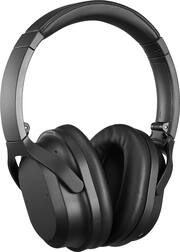
The Insignia NS-AHBTOENC wireless headphones are a very nice option for a comfortable listening experience at home, traveling or while working out. They incorporate an effective noise suppression and echo canceling system, use the latest Bluetooth 5.0 connection technology, have easy-to-operate controls and a very long battery life. And, since these are made by Best Buy’s Insignia brand, these features are all provided at a very economical price. Here are the key features: • Insignia Model NS-AHBTOENC noise-canceling over-the-ear Bluetooth headphones • Bluetooth 5.0 reception range up to 33 feet • Noise-canceling/suppression technology helps block external noises, may be switched on or off • Monitor function allows ambient sound to be easily heard while wearing headphones, may be switched on or off • Built-in microphone for making and receiving phone calls • Touch control on side of right earphone to raise/lower volume, next/previous track selection • Power, Bluetooth pairing, Monitor and Noise Cancel buttons on left earphone • Rechargeable internal lithium ion power source: 3.5 hours to fully charge with included micro USB connection cable • Headphones will operate up to 20 hours continuously from a full charge, 16 day standby time • Can also operate without using any power by connecting a 3.5 mm stereo cable to left earphone • 3.5 mm (headphone) male-to-male connection cable included • Easy to follow illustratedd quick set-up guide • Foldable design for compact storage • Size: 6.7 inches by 7.5 inches by 2.3 inches • Weight: 8.5 ounces • One year warranty on parts and labor Included in the box are the headphones, instructions, a 33 inch long micro USB charging cable and a 50 inch long 3.5 mm direct-connect wire cable. The quick set-up guide is comprehensive with step-by-step instructions for using the headphones, a trouble-shooting checklist, technical specifications and detailed explanations for using each feature. The headphones have a non-reflective black finish, substantial bass-producing drivers and super-soft memory-foam cushions on each headphone for superb comfort and noise isolation. First step is to charge the headphones. Just attach the charging cable, plug it into your computer or a USB outlet and LED lights will go out when they are fully charged (about 3.5 hours when fully discharged.) A red LED light next to the charging port goes out when the unit is fully charged. The stated music playing time of twenty hours seems right and may even be conservative. Next, press the power button for two seconds to turn them on – an audio prompt indicates when the power is on or off. Pair the earphones with your phone or other source via Bluetooth. Pressing the power button for four seconds initiates pairing. An audio prompt guides you, but my phone paired them very quickly and without drama. A blue LED indicates the connection has been made. The headphones are fully adjustable and the very soft pads completely and comfortably enclose most ears. I cannot stress enough how comfortable these headphones are. They are light (a bit over 8.5 ounces) and have plenty of adjustment range to enable a good fit. The earphone pads are fairly large (about 4 inches tall and 3 inches wide) so they qualify as “over ear” and they provide very good sound isolation. You can wear them for many hours in perfect comfort and your ears will thank you afterwards. Even without the noise-canceling function most external sounds are blocked. Pressing the ANC (automatic noise canceling) button turns on that feature and there is an audio announcement that it is active (or that it has been turned off.) The ANC technology is very effective for random noise. I turned on both my shower and bathroom sink faucet and the noise (which would normally be very loud) was just a faint hiss which I could easily ignore while listening to the music. Even without music playing the noise canceling feature was pretty effective. These would be great on a noisy airplane ride! The Insignia AHBTOENC headphones have a nice reproduction of mid-range notes and provide plenty of bass. I feel that their performance on upper range notes was not as faithful as some other (much more expensive) headphones I own so they may not meet the most demanding audiophile’s expectations. However, given their modest price and the bonus of the noise-canceling feature, these headphones will satisfy most users for casual listening. They are a perfect choice for traveling and would pass boring hours in airports and on planes with gold stars for quality, sound level and range. Like all good earphones these will respond to various voice commands, allow you to interact with Siri, take calls, etc. Each earphone has some controls. The right side has a nice touch pad which will raise/lower volume, skip tracks (forward and backward), pause and repeat tracks and has a microphone for use during calls. The left side turns the earphones on/off, handles Bluetooth pairing, activates the noise cancelation feature and also takes calls The Bluetooth 5.0 connection is super-reliable. I have used the headphones in my home and can walk 35 to 40 feet from my phone without a connection break. If you lose connection it quickly restores itself when you come back into range. Bottom line - the Insignia AHBTOENC noise-canceling Bluetooth headphones are an excellent value for music fans who want a very comfortable headset, superb noise isolation and a dependable travel partner. I have given this item four stars, losing one star only because the music reproduction was just not as good as I would hope. However, on balance, I think you will be happy with this purchase!
Posted by JimC
- Rated 5 out of 5 stars
Very Comfortable & long battery life
these are amazing headphones! they have great noise cancelling feature that really works. when the feature is ON you can easily get lost in your world. Overall I'm happy with this purchase.
Posted by Nisha
- Rated 4 out of 5 stars
Comfortable & Light
I have an obsession with wireless headphones I just can't seem to have enough of them. Despite owning a little more than ten pairs of headphones I didn't have a noise canceling pair until now. That being said let's take a look at Insignia brand latest over the ear BTNC (Bluetooth noise canceling) headphones. I have spent some time with these BTNC head phones and here are my first impressions. Upon taking them out of the box they are really lightweight and feel great when held in your hand. They are really comfortable and you don't feel pressure when wearing them from extended periods of time. Aesthetically speaking they are headphones and have a nice folding design. In the box you will find a 3.5 mm cable and micro usb cable. Let's jump right into the pros and cons Pros: - Lightweight - Comfortable - Noise canceling - Bluetooth 5.0 - Foldable - Touch controls - Good battery life Cons: - No smartphone app - No USB type C for charging - No carrying case or pouch included General thoughts: So there is a lot to like about the headphones they sound good with a decent amount of bass to them. The fact that this has noise canceling is great it does help drown out the noise from whatever environment you are in. I found that while riding the train you would need to have the volume at a minimum of 75% with noise canceling on to drown out everything. Indoors are different you would not need to have them as loud. Battery life is great I use them anywhere from 2-5 hours a day mixed use of NC (Noise canceling) and I was able to get 5 days use until I needed to charge them again. Speaking of charging these headphones do take some time to charge at around three hours. I have not had any issues with connectivity, I like the audible tones when you power on the headphones. You get a womans voice with what sounds like a European accent, you also get an audible notification when you turn NC on and off. The touch controls are a nice added feature which is useful and allows you to skip tracks, pause and play music, adjust the volume. Call quality is good the party on the other end had no trouble hearing me and vice versa. TL;DR These are a great pair of headphones that does a lot right. It sounds good, has good battery life, is very comfortable and lightweight. I do wish there was a companion app for smartphones. Overall this is worth considering it is a great value and won't leave your wallet in a coma like some other pair of headphones.
Posted by Johnnyboy84