Outlet EventEnds Oct. 26. Limited quantities. No rainchecks.Shop now

Skip to content
Main Content
product image

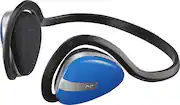
Insignia™ - Wireless On-Ear Headphones - Blue

Model: NS-CAHBT02-BL
SKU: 5150801
This item is no longer available in new condition. See similar items below
  • Key Specs
    • Sound Mode: Stereo
    • Connection Type: Wireless
    • Wireless Connectivity: Bluetooth (The manner in which a device sends data to another device over a short distance without the use of wires or cables.)
    • True Wireless: false (These headphones not only lack wires between the device and headphones, they also lack wires between the headphones themselves. (true wireless is really only possible with in-ear headphones))
    • Maximum Wireless Range: 32.8 feet
    • Built-In Microphone: true
    • Headphone Fit: On-Ear
    • Adjustable Headband: false
  • General
    • Brand: Insignia™
    • Model Number: NS-CAHBT02-BL
    • Product Name: Wireless On-Ear Headphones
    • Color: Blue
  • Audio
    • Sound Isolating: true
    • Sound Mode: Stereo
  • Connectivity
    • Connection Type: Wireless
    • Wireless Connectivity: Bluetooth (The manner in which a device sends data to another device over a short distance without the use of wires or cables.)
    • True Wireless: false (These headphones not only lack wires between the device and headphones, they also lack wires between the headphones themselves. (true wireless is really only possible with in-ear headphones))
    • Maximum Wireless Range: 32.8 feet
  • Features
    • Built-In Microphone: true
    • Body Metrics Measured: Not Applicable
  • Design
    • Headphone Fit: On-Ear
    • Style: Sports and Exercise
    • Adjustable Headband: false
    • Foldable Design: false
  • Material
    • Ear Cushion Material: None
  • Dimensions
    • Product Height: 6.3 inches (The out of box height of the item. Height is measured as the vertical distance from the bottom of the item to the top as it would be primarily used or placed.)
    • Product Width: 2.9 inches (The out of box width of the item. Width is measured as the horizontal distance from one side of the item to the other as it would be primarily used or placed.)
    • Product Length: 4.9 inches (The out of box length of the item. Length is measured as the longest dimension of the item.)
    • Product Weight: 1.43 pounds (The out of box weight of the item.)
  • Warranty
    • Warranty - Parts: 1 year
    • Warranty - Labor: 1 year
  • Other
    • UPC: 600603199349

Listen to your favorite workout mix without being tethered to your music player with these Insignia Bluetooth headphones. The over-the-ear design fits snugly in place as you run or work out, and the sweat-proof ear pads provide added comfort. Featuring 10 hours of continuous playback, these Insignia Bluetooth headphones keep the tunes coming throughout your toughest training sessions.

Headphone Buying Guide

  • On-ear design: For comfort during extended listening sessions.
  • Bluetooth 4.1 interface: Enables simple wireless pairing with your Bluetooth-enabled device. Supports HFP, HSP, A2DP and AVRCP Bluetooth profiles.
  • Noise isolation: Helps minimize background sounds.
  • Rechargeable battery: Offers up to 10 hours of use and lasts up to 250 hours on standby mode.
  • Built-in microphone: Enables simple hands-free chatting via a compatible device.
  • Sweat-resistant: Provides protection from sweat, so you can easily wear the headset while working out.
  • Stereo design: Delivers crisp tones.
  • On-ear design: For comfort during extended listening sessions.
  • Bluetooth 4.1 interface: Enables simple wireless pairing with your Bluetooth-enabled device. Supports HFP, HSP, A2DP and AVRCP Bluetooth profiles.
  • Noise isolation: Helps minimize background sounds.
  • Rechargeable battery: Offers up to 10 hours of use and lasts up to 250 hours on standby mode.
  • Built-in microphone: Enables simple hands-free chatting via a compatible device.
  • Sweat-resistant: Provides protection from sweat, so you can easily wear the headset while working out.
  • Stereo design: Delivers crisp tones.
Whats Included
  • Insignia Wireless On-Ear Headphones
  • Insignia Wireless On-Ear Headphones

Q: My headphone won't recharge. Per the instructions, which is very little, it says to plug into my computer. I have done this several times and the headphones don't recharge. What do I do?

A: Ensure you use the charging cable that came with the headphones. I've learned the hard way that different charging cables output different amperages, which means some won't charge the headphones or can overcharge them.

Q: How do they feel when actually worn? Are they comfortable and conveineint

A: I have worn these for hours at a time and I love them. I have ran a few miles while wearing a pair of these and they are just awesome and they don't move around much.

Q: How can I order replacement foam ear-pads for the NS-CAHBT02-BK Bluetooth headphones

A: When the headphones were made by Model, before Insignia, I called the company. They said they don't do replacement pads.

Q: Can't find my booklet to connect my headphones to My phone what can I do

A: On your phone go to set up. Make sure your Bluetooth is on. Press the on button on the headphones. Hold it down until it starts blinking red and blue. On your phone, in Bluetooth setting you should see the insignia name appear. Tap it. It should say connected next to it. Also the blinking light on the headphones should turn blue. Or simply google directions for Insignia wireless on ear headphones and download directions.

Q: Are there different sizes? My NS-CANBT02 DOESN'T SEEM TO FIT? Is there a photo showing how to wear them?

A: The "headband" goes BEHIND your head. The part of the headband that goes around the earpieces gets tucked over your ears to hold it on your ears. 1. Hold the headband horizontally with the earpieces in front of you and the headband above the earpieces. 2. Continuing to hold the headphones in this same direction, bring the headphone over your head and behind your neck. 3. Bring the headphones forward to your ears and tuck the parts of the headband that's above each of the earpieces over each ear so that the earpieces are held snugly and comfortably against each ear. 4. Hold in the button on the middle outside of the left earpiece to turn it on. 5. Follow the instructions for bluetooth pairing with your bluetooth audio device. 6. Use the volume control and on the upper edge of the left earpiece to adjust the volume. 7. Use the track forward or back control on the lower edge of the left earpiece to skip or backtrack tracks. 8. Enjoy!

Q: Do these vibrate and ring?

A: No, this headphone does not vibrate and ring.

Q: Can these headphones be used with a TV and how do I pair it.

A: Yes, you can connect them to Bluetooth headphone capable TVs. Your remaining question cannot be answered at this time.