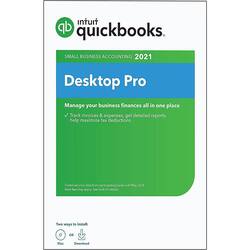
Intuit - QuickBooks Desktop Pro 2021 - Windows
- Key Specs
- Number of Licenses: 1
- Operating System Compatibility: Windows
- Software Format: Physical (Physical software requires a disc, cartridge, etc. be inserted into the gaming console or computer to download and/or operate the software. Digital software allows for downloading and/or playing the software on the gaming console or computer without a physical disc, cartridge, etc. Physical (Download Code Only) software is purchased in physical form with a code that allows for downloading and/or playing the software on the gaming console or computer without a physical disc, cartridge, etc.)
- General
- Brand: Intuit
- Model Number: INT940800F092
- Product Name: QuickBooks Desktop Pro 2021
- Publisher: Intuit
- Features
- Included Mobile App(s): false
- Designated Use: Business
- Purchase Rights
- Number of Licenses: 1
- Compatibility
- Operating System Compatibility: Windows
- Software Format: Physical (Physical software requires a disc, cartridge, etc. be inserted into the gaming console or computer to download and/or operate the software. Digital software allows for downloading and/or playing the software on the gaming console or computer without a physical disc, cartridge, etc. Physical (Download Code Only) software is purchased in physical form with a code that allows for downloading and/or playing the software on the gaming console or computer without a physical disc, cartridge, etc.)
- Format: DVD, Digital Download
- Requirements
- System Requirements: 2.4 GHz CPU, 4GB RAM (8GB recommended), 4x DVD-ROM drive, 1280x1024 screen resolution (The software that a product must have for it to be able to integrate with another product.)
- Download Requirements: Internet connection
- Hard Drive Space Required: 2.5 gigabytes
- Other
- UPC: 028287561113
QuickBooks Desktop Pro helps organize your business finances in one place, so you can be more productive. It is simple to set up and use with the available step-by-step tutorials. Stay on top of invoices, manage expenses, get reliable reports for tax time, and import data from a spreadsheet.
Q: Can I download this on my desktop and on my laptop?
A: Teresa I have the disc so I placed the program on my desktop. I have not tried to use the disk again to add it to my laptop.
Q: Does this version still have the vendor center with the set up for the 1099s?
A: Yes, it has all the features for preparing 1099's and W2's. It is a better version for many small business owners because you do not pay an annual fee. You only have to buy a new upgrade every three years, and only then if you prepare payroll using it. You can download on multiple computers if they are not networked. For example your desktop in the office, and your laptop to use away from the office. This version has all the features needed for most small business. Most of my client's have never used a version where they had to pay an annual fee. Intuit makes changes each year, but not enough to buy an upgrade every year. You still get UPDATES in both versions when needed.
Q: Is there an annual subscription fee for this product?
A: No, this version does not have an annual fee. The less expensive versions are an annual subscription and that is stated in the description.
A: I had QB 2016 and migrated to 2021 with no glitches. I didn’t lose any data but backed up everything just in case. Doing this is beyond my skill set so computer pro did it for me. Suggest geek squad if you are concerned—they know their stuff
Q: How does this version of QB Pro 2021 install
A: Using a disk drive, or if you don't have one, you can download from Intuit and just enter the numbers from the package.
A: Not sure. I switched from Premier to Pro this year. Not familiar enough with it. My payroll is working fine,
Today's top picks
 Black Friday in July Deal$749.99The price was $1,199.99
 Black Friday in July Deal$199.99The price was $399.99
 Black Friday in July Deal$499.99The price was $999.99
 Black Friday in July Deal$199.00The price was $419.00
 $249.99The price was $399.99
 Black Friday in July Deal$199.99The price was $249.99
 Black Friday in July Deal$399.99The price was $899.99