Rating 4.1 out of 5 stars with 209 reviews
4.1- Ease of use (80)
- Image Quality (42)
- Speed (19)
- SD Card (13)
- Price (6)
- Slide Feeder (12)
Customer Images
The vast majority of our reviews come from verified purchases. Reviews from customers may include My Best Buy members, employees, and Tech Insider Network members (as tagged). Select reviewers may receive discounted products, promotional considerations or entries into drawings for honest, helpful reviews.
- Rated 4 out of 5 stars
Gets it Done.
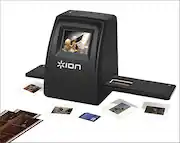
This will do a good job transferring slides to digital. Just make sure you clean the slide viewer very often. I didn't load the software into my windows 10 system. I transferred the slides to the SD card and then loaded the card into my laptop. When I opened the file there was some editing software ready to work for me. Worked very good actually. So I was hesitant to load the software because of the windows 10 platform but it worked out very well. It does take some time but now they are saved I don't know if this product is great or not but I am happy.
Posted by Lucky
- Rated 4 out of 5 stars
Works Great
I was surprised at how quickly it scanned the slides. My slides were old and a little warped, so occasionally they got stuck, but that is not the products fault. It is great to have the flexibility to scan slides and put them on a SD card (and not have to be hooked up to the computer). Quality of scanned picture was better than expected especially since slides were so old.
Posted by Travel
- Rated 5 out of 5 stars
Super easy, super fast, great results
I bought this device for a 1,000 slide conversion project. The slides were from the 60's and came in all shapes and sizes. It was easy to use, fast and a lot simpler that I thought. The challenge were the slides themselves because the thickness varied which caused some to slide in together, however this was easily remedied by taking them out and inserting them in a different order. Thicker slides with the same thick slides. The device accommodates various thicknesses but FUJI did not alway match KODAK. The one thing I would recommend is to make sure you brush off your slides (with the enclosed brush) before converting. A piece of dirt from one will stick to the glass and next thing you know, same dirt will be on all the conversions. You can't brush the glass but a little air spray can will clean the glass out. DO NOT USE the compressed air cans on the slides because it will freeze the film and you get nothing. All in all, great device I now use these slides as screen savers on my Mac so I actually get to see these pictures all the time instead of pulling out photo albums that no one looks at, including me.
Posted by inanewyorkminute
- Rated 5 out of 5 stars
Problem solved
Have an old slide scanner that previewed and scanned only two slides at a time. Scans went directly to computer. Of course current operating systems no longer support it. Was elated when I found the Ion-Film to SD Scanner. As a stand alone scanner, you can use it with any device that accepts the SD card. I scanned literally hundreds of slides in a short time. The only problem I had was with older slides from the 40"s. They were mounted in a thicker cardboard, some were even in a glass and metal mounting, so I couldn't stack these. I had to load one at a time, but all were in perfect focus, and it was worth the extra time to save them. The ominous task of digitizing slides has been solved. I have already recommended to others.
Posted by harbinger
- Rated 4 out of 5 stars
Scanned a ton of slides in a very short time.
Bought this cool little machine to scan my old film slides. These are some of my favorite pictures and are beginning to fade. The scan quality is good but getting the slides through the feeder was sometimes a challenge. The slides jam every now and then due to varying cardboard frame thickness. There is an adjustment mechanism that seems to help. Also, one slide is usually left behind and pops out when you start to put the next stack through. Looking forward to trying the negative scanner. I'll let everyone know how that works out! -Oh, -unrelated to the machine itself, clean the slides well before you scan them. Dust motes look like boulders on the digitalized scans.
Posted by gloorr