Rating 4 out of 5 stars with 517 reviews
4.0- Bluetooth (98)
- Sound Quality (94)
- Ease of use (75)
- Installation (10)
- Price (10)
- Wires (32)
- Static (9)
- Volume (6)
Customer Images
The vast majority of our reviews come from verified purchases. Reviews from customers may include My Best Buy members, employees, and Tech Insider Network members (as tagged). Select reviewers may receive discounted products, promotional considerations or entries into drawings for honest, helpful reviews.
- Rated 4 out of 5 stars
decent bluetooth device for a cheap price
I bought this bluetooth device for myself and loved how it worked. After buying a car for my wife, since she did not want to spend extra to get a bluetooth enabled stereo, i went to buy her the same Isimple device for her car and she has loved it since.
Posted by drek43
- Rated 4 out of 5 stars
Easy Bluetooth
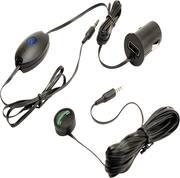
I purchased my iSimple Bluestream Bluetooth device in frustration with my aftermarket in-dash Bluetooth stereo not providing satisfactory sound reproduction at the other end of my calls; the folks I was calling were complaining they just couldn't hear me. Rather than spend another $300-$500 to replace the stereo, I decided to look around. First, I picked up a common BT earpiece - we all know how terrible those are, and I hated having the thing stuck on my ear all the time while I was driving. I next chose an in-ear stereo BT ear bud device. This worked better (provided better sound), but it, too, had to stay stuck now in both ears while I drove. I started looking for other solutions. I came across the Bluestream while browsing my local Best Buy; the sales associate had previously purchased the same product, and highly recommended it. Minutes later I was in my car, plugging the device into the aux power port and the aux jack on my radio. Wow! I finally had something that worked exactly the way I wanted it to - with excellent sound reproduction on both ends of my calls. I was very pleased with my purchase. Of course, once you buy something like this - and live with if for a while - one learns the drawbacks of it; and this device does have drawbacks. First, with the length of the cabling, there appears on your dash a lot of wire. It just falls all over everywhere. I finally decided to dedicate some time to re-routing the wire, and hiding it behind my dash bezel (2002 Tahoe). After about 30 minutes I was able to get all the wires discretely hidden, and was happy again. Second, and this is the biggest problem I've discovered; the device is incredibly sensitive to interference from the vehicle's engine and it's electrical system. This appears in the presence of static - but only when the device is not actually handling a call; it's only annoying when it's idle. I was able to reduce this effect somewhat by going to Radio Shack and purchasing a pair of radio interference filters that snap around the cable from the aux plug to the microphone/controller. These didn't completely remove the static, however, they did significantly reduce it. I'm not sure I can make it all go away without making serious modification to my vehicle's ignition system. Finally, and this is just a function of how this device works, the stereo must be set to the aux function to operate. This makes it difficult to switch from radio or cd - or for that matter XM, USB, or other aux input devices, back to the Bluestream. These drawbacks are minimal, considering the utility and performance the Bluestream device provides. It works perfectly, every time I use it; that is so much more than I ever had with any of the other options I tried. Simply because of this, I am very satisfied. Some other reviews I've read have indicated difficulty with the device automatically pairing to the host cell phone when the user gets in the car. I have found that it will not pair automatically, however, all I have to do is touch the button on the mic/controller once, and it pairs within five seconds. I find that to be a simple inconvenience. Especially since I would need to touch that button to make a call anyway. Even other reviews have voiced complaints that it is difficult to make a call by voice through the device. I have an iPhone, and all I have to do - once the phone is paired - is to touch the button and wait for the Siri sound to come through the vehicle speakers. Once that tone sounds, the mic will pick up the "call . . . ." instruction and the call is placed. I've not had any difficulty with this function. Do I recommend this device? Yes, unreservedly!
Posted by Chevymac
- Rated 5 out of 5 stars
Almost as good as from a dealership
We sold our 2011 Jeep Wrangler for a 2012 but the 2012 didn't have hands free Bluetooth, which made my wife not want it. I talked her into it on the condition that we would get her Bluetooth. I found this and she is satisfied. Super easy to install, sounds great and a good price. Because of this we have a much nicer jeep!! If you have an aux port, you can have Bluetooth. Get it.
Posted by Kevin
- Rated 4 out of 5 stars
Works Great... But too many wires
This was a great purchase for me considering that my factory radio had no Bluetooth connections. The only downside was that it has too many wires that are too long to be of any real convenience or necessity, it would've been a lot better had the connections been better placed for a compact cockpit
Posted by Scorpio782610
- Rated 5 out of 5 stars
Blue stream bluetooth
Since the law passed in ga requiring cell phones to be hands free I needed this for my older car that didn’t have Bluetooth . I have an audio in port so this plugs into the port and one end in the power outlet. Mounted the button on my console. Just turn the phone on , push the Bluetooth button and it connects and plays thru the car speakers. Was very easy to setup and connect. Works perfectly . Love it!
Posted by Flaca