iVANKY - 12-in-2 FusionDock 1 Dual 4K@120Hz Display for M5 MacBook Pro Docking Station with 150W Power Adapter
Reviews coming soon
About this product
iVANKY FusionDock 1 M5 MacBook Pro Docking Station with 150W Power Adapter, 12-in-2 Dual 4K@120Hz Monitor Dock for MacBook M1/M2/M3 Pro/Max/M4/M5 Display Dock 2HDMI 2.0, 96W PD, 6 USB, Ethernet SD/TF Audio(Incompatible with Windows)
M1/M2/M3 CHIP NOTE
Due to inherent limitations in the M1/ M2 /M3 base chip, MacBook models featuring these chips are not capable of supporting dual displays. Macbook Neo ONLY SINGLE DISPLAY.
Dual 4K@120Hz Displays
Only M4/M5 base and M1/M2/M3/M4/M5 Pro/Max MacBooks support up to dual 4K@120Hz display. M1/M2/M3 base MacBooks only support up to single 4K@120Hz display. MacBook Intel Series(2016-2020) support up to dual 4K@60Hz displays.
Full Speed Charging
This dock features a 150W power adapter, enabling it to efficiently charge laptops up to 96W and PD USB-C devices up to 18W
5Gbps Data Transfer
Equipped with 4*USB 3.0 ports, which can support up to 5Gbps data transfer and allow you connect enough external equipment. The SD/TF card slot can support up to 104Mb/s and the RJ45 Gigabit Ethernet port can keep 1000Mb/s Ethernet smoothly and stably.
Product Guarantee
You can get an iVANKY FusionDock 1 MacBook Docking Station(12-in-2, Dual 4K@120Hz displays ) with a 24-month warranty and responsive customer service. If you meet any problems with the dock, we will be glad to replace you with a new one.
- Maximum Number of Displays Supported2Maximum Supported Resolution4K (2160p)Number of DisplayPort Outputs (Total)2
Reviews
This product doesn't have any reviews yet.
Compare similar products
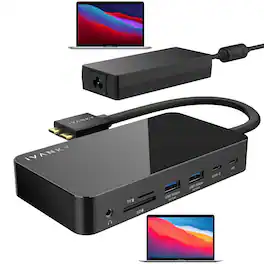
iVANKY FusionDock 1 M5 MacBook Pro Docking Station with 150W Power Adapter, 12-in-2 Dual 4K@120Hz Monitor Dock for MacBook M1/M2/M3 Pro/Max/M4/M5 Display Dock 2HDMI 2.0, 96W PD, 6 USB, Ethernet SD/TF Audio(Incompatible with Windows)
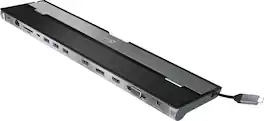
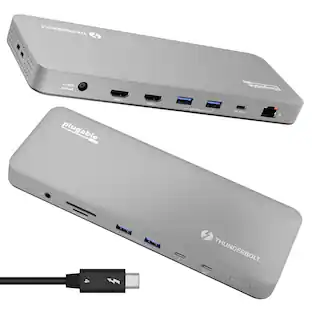
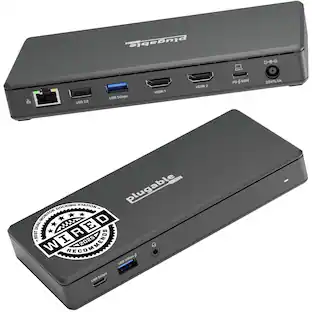
This triple display docking station turns your Mac or Windows laptop into a full workstation with a DisplayPort output, two HDMI outputs, and a VGA output, with resolution support up to 4K (3840 x 2160) on two displays and 1080p on the other one. You can also use your laptop screen for four displays in total, making it easy to access multiple applications at once. With 100W Power Delivery, three USB 3.0 ports, and a USB-C port, this docking station is perfect for your MacBook, Dell XPS, or other USB-C laptop requiring additional ports. This USB 3.0 docking station is also equipped with a RJ45 Gigabit Ethernet port, memory card reader/writer, and combo audio jack for maximum productivity. The elevated design assists with heat dissipation and, with its double-sided cable storage compartment, ensures an easy connection regardless of your USB-C port’s location. All 13 ports are combined into one slim docking station, so you’ll have all the connections you need to stay productive!

iVANKY 12-in-2 FusionDock 2 Vertical Docking Station Stand for MacBook Pro with 150W Power Adapter, Dual 4K@60Hz Monitor Dock for Mac M3/M4 Pro/Max Display 2x HDMI, 96W PD, 6 USB, Ethernet SD/TF Audio

Expand your M2 MacBook Air's capabilities with the Satechi Pro Hub Slim, featuring a full function USB4 port, 4K HDMI, USB-C data, two USB-A data, and SD & microSD card readers. With a multitude of options for fast data transfer and its modern aluminum design, the Pro Hub Slim packs all your essential ports in one sleek, user-friendly hub.
| Pros for iVANKY - 12-in-2 FusionDock 1 Dual 4K@120Hz Display for M5 MacBook Pro Docking Station with 150W Power Adapter | |||
|---|---|---|---|
| There were no pros for this product— | Ease of use, Overall Performance, Connectivity, USB-C, Ports | There were no pros for this product— | Overall Performance, Ease of use, Connectivity, HDMI, Design |
| Cons for iVANKY - 12-in-2 FusionDock 1 Dual 4K@120Hz Display for M5 MacBook Pro Docking Station with 150W Power Adapter | |||
| There were no cons for this product— | Compatibility, Power Supply | There were no cons for this product— | Compatibility |
Specs
Be the first to ask a question.
We’ll try to get your question answered within 24 hours by a Best Buy customer or brand representative.
Customers often buy these together
 $126.99The price was $169.99
 $42.32The price was $44.71
 $51.99The price was $129.99
 Clearance$71.99The price was $179.95
 $99.99The price was $109.99








Customers ultimately bought
Explore tech essentials Sponsored







Discover related products
 $39.99The price was $53.99
 $12.99The price was $13.99
 $143.99The price was $144.99
 $239.00The price was $275.00
 $30.99The price was $32.99








Keep exploring
 $34.99The price was $49.99
 $38.99The price was $45.99
 $17.99The price was $21.99