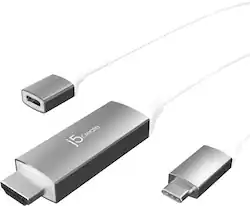
j5create - USB-C to 4K HDMI Cable With PD100W Pass-Through - Gray & White
- Key Specs
- Cable Length: 6 feet
- Connector Type (End 1): USB Type C
- Gender (End 1): Male
- Connector Type (End 2): HDMI Type A
- Gender (End 2): Male
- General
- Brand: j5create
- Model Number: JCC155G
- Product Name: USB-C to 4K HDMI Cable With PD100W Pass-Through
- Color: Gray & White
- Compatibility: Available USB-C port that supports DisplayPort Alt Mode and USB Power Delivery 2.0 or 3.0.
- Connectivity
- Cable Type: USB, Analog audio
- Cable Length: 6 feet
- Product Type: Cable
- Connector Type (End 1): USB Type C
- Gender (End 1): Male
- Connector Type (End 2): HDMI Type A
- Gender (End 2): Male
- Other
- UPC: 847626005138
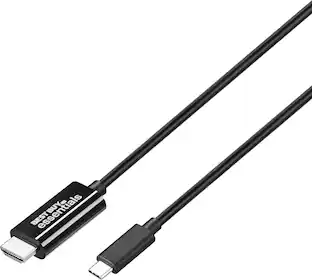
The USB-C to 4K HDMI Cable With PD100W Pass-Through enables you to output high-definition HDMI 4K video through a USB-C port that supports DisplayPort Alternate Mode. The USB-C display cable gives you the ability to quickly and easily connect your USB-C device to an HDMI TV or display. The additional USB-C female port makes it possible to charge your device and still be able to connect to a display.
- True 4K with HDR Support: HDR-compatible HDMI port is compliant with your HDMI 2.0 equipment, supporting resolutions up to 4K at 60 Hz and bandwidths up to 18 Gbps.
- 100W USB-C Power Delivery: Additional USB-C port to connect a USB-C PD charger giving you up to 100W of charging power.
- USB-C & Thunderbolt 3 Compatible: Works with macOS, Windows, Chrome OS, Android, and Thunderbolt 3 devices. Simply connect and share your content to an HDMI display.
Whats Included
- 1 - JCC155G USB-C to 4K HDMI Cable with PD 100W Pass-Through
- 1 - Quick Installation Guide
Product Manuals
A: it connects to a device with USB Type-C (in) and HDMI to a display (out).
Q: Connected J5create from MacBook pro to external monitor. Monitor does not display image from laptop.
A: Open System Preferences > Security & Privacy, select the Privacy tab. Along the left-pane, locate and select the Screen Recording option There should be an extension called "DJTVirtualDisplayAgent". Uncheck and re-check the box beside it and then disconnect and reconnect your j5create device from your computer. ** If you require further assistance; please contact the j5create Technical Support team and we will be glad to further assist if necessary. Thank you.
A: The JCC155G supports 3840 x 2160 @ 60 Hz.
A: No, the USB-C to 4K HDMI Cable With PD100W Pass-Through is intended to use with a computer, tablet or mobile phone that supports DisplayPort Alt Mode and Power Delivery 2.0 or 3.0. The additional USB-C female port provides charge to your device when it's connected to a USB-C power-brick and still be able to connect to a display.
Q: Is this compatible with a Galaxy S22 cell phone?
A: Yes. Any USB-C capable phone should work.
Q: will a iphone cord work with this
A: Not unless you have an adapter that connects to a USB-C. This is for USB-C only.
People also viewed
 $50.99The price was $60.80








Today's top picks
 $199.99The price was $249.99
 $789.99The price was $1,049.99












