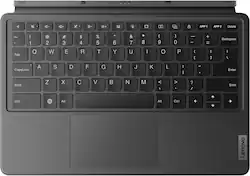
The ultimate combo for entertainment and productivity, the Tab P12 Keyboard functions as both a keyboard and a hands-free stand. Browse the web, finish your research paper, then take a break from obligations and prop up your tablet for some guilt-free streaming.
Q: What is the purpose of the hotkeys on the Lenovo Keyboard Pack?
A: The 16 hotkeys on the Lenovo Keyboard Pack enable quick access to functions like screen lock, split-size/full-size windows, and screen printing, boosting productivity.
Q: Does the Lenovo Keyboard Pack provide protection for the tablet?
A: The Lenovo Keyboard Pack functions as a 2-in-1 keyboard and protective cover, offering all-around protection for your tablet.
Q: Does the Lenovo Keyboard Pack offer any ergonomic features for typing?
A: Yes, the Lenovo Keyboard Pack prioritizes ergonomics with features like a 1.5mm key travel distance, 19mm pitch, and 0.2mm concavity on each key for comfortable typing.
Q: How does the Lenovo Keyboard Pack connect to the tablet?
A: The Lenovo Keyboard Pack easily connects to your tablet with a simple snap, using its 3-point pogo-pin connectors.
Q: Can the viewing angle be adjusted when using the Lenovo Keyboard Pack?
A: Yes, the stand cover on the Lenovo Keyboard Pack has a free-stop hinge that allows you to adjust the viewing angle from 0 to 165 degrees.
Q: what mean open box on the foto
A: undefined
Q: Is this for the 2023 model P12? Thank you!
A: Hi, Jawata. Yes, this keyboard back was made for the Tab P12.
A: Hello, thank you for your question. No, the P12 Keyboard Pack does not feature keyboard backlighting.