Rating 4 out of 5 stars with 82 reviews
4.0- Sound Quality (14)
- Display (8)
- Ease of use (7)
- Alarm (5)
- Size (5)
- Alexa (3)
Customer Images
The vast majority of our reviews come from verified purchases. Reviews from customers may include My Best Buy members, employees, and Tech Insider Network members (as tagged). Select reviewers may receive discounted products, promotional considerations or entries into drawings for honest, helpful reviews.
- Rated 4 out of 5 stars
8 year old’s review
Works really well but some room to improve. The built in Alexa works great. Might be better if it showed full date.
This review is from Lenovo - Smart Clock Essential 4" Smart Display with Alexa - Clay Red
Posted by DomP
- Rated 4 out of 5 stars
Decent product
Pleased with the clock overall however the speaker on this product is not the greatest if you want to listen to music from this device. I mainly wanted this for the clock and not to listen to music overall. Price was right when I purchased it so no complaints.
This review is from Lenovo - Smart Clock Essential 4" Smart Display with Alexa - Clay Red
Posted by 1meankd
- Rated 5 out of 5 stars
Always Know Where My Amazon Orders Are!
I love that this is integrated with Alexa, it notifies me of any updates with my Amazon purchases, I don’t even have to look at my account cause my alarm clock keeps me updated!
Posted by BbGirl87
- Rated 5 out of 5 stars
An Effective Little Alexa Alarm Clock
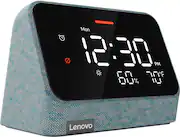
I should say upfront that I received the The Lenovo - Smart Clock Essential 4" Smart Display with Alexa for the purposes of providing fair and honest feedback. And, on the whole, I like it. The screen features an auto dim feature. Alexa integration works well. The built-in speakers won't blow anyone away, but they sound good for a device this side and sound good for music or alexa alerts. Setup could be a bit simpler, but as an alarm clock with Alexa built-in, the Lenovo - Smart Clock Essential has met my expectations and I'm liking it. Setup - I thought the set up was a bit more difficult than I expected it to be. Part of the problem is the reliance on the Alexa app which may make things a bit confusing. You will need to download the Alexa app from either the Apple or Google Play app store. The Alexa app detected my Smart Clock right away, connected the clock to my home wifi, and downloaded an update. But I was confused after that as to how to change the display. By default the Smart Clock Essential shows sound decibel levels instead of the weather. To change that to the weather, you have to open the Alexa app, click on the devices icon in the bottom right, then click on "all devices", then you're looking for the icon for your Lenovo Smart Clock. But, you are looking for the Lenovo Smart Clock device with the wifi signal in what appears to be a house. You aren't looking for the Lenovo Smart Clock with headphones / speakers next to it. Yeah, I made that mistake a few times. It all felt too confusing. Then, some of the adjustments in the App don't seem to stick. At night, the screen automatically adjusts to nearly totally dim. A lot of people will probably like that setting. I wanted the screen to stay a bit brighter at night. So, from the Alexa app, I adjusted the screen brightness. And the screen brightness stuck, for about five minutes until it reverted to the previous setting. Why let me make that adjustment if it isn't going to stick? Experience - Using the clock with Alexa is simple. You just say "Alexa, set an alarm for ......" Which is good, because setting an alarm with the buttons on the clock is a bit more tedious. You use the alarm clock symbol to start the process and progress through steps, but if you want to actually save your alarm, you have to press the up button to confirm at the end. That process felt a bit unintuitive. I really like the size of the device. It fits well in small spaces. The screen looks nice and the entire device has a very modern feel to it. There is no USB port for charging your phone. There are docks you can get that customize your experience a bit. For instance, Lenovo has an octopus dock that lights up and changes the "eyes" on the screen when you talk to Alexa. At this time, I'm not sure if the Smart Clock Essential is compatible with an other Lenovo Smart Clock dock. There is a MIC toggle on the back of the clock. If you don't want Alexa listening in, you can manually turn the microphone off. Conclusion - On the whole, I like it. It's an effective alarm clock and the weather indicators are a nice touch. Despite some app struggles, Alexa integration works well. I hope a software update corrects the nighttime auto dimming issues I described above. I think software setup and use could be a bit simpler, but if you use Alexa for your other devices, you're probably familiar with the Alexa app at this point.
This review is from Lenovo - Smart Clock Essential 4" Smart Display with Alexa - Clay Red
Posted by RedScorpion
- Rated 3 out of 5 stars
Smart Clock That Requires Effort
--- SETUP --- The setup is quick but requires a few more steps than a normal clock. First, download the Alexa app if you don’t already have it. Make sure the app is up to date. Once updated, open the app. If the clock is plugged in, then the app will find the clock. If it isn’t plugged in, you can manually add the clock. --- FEATURES --- The key feature this clock is that it has integrated Alexa. This means that you can use your voice to ask it to check the weather, set an alarm, control other Alexa devices (like smart lights), and generally, do other things your Alexa Echo Dot can do. --- PERFORMANCE --- The performance of the clock works, in a sense. The clock display is bright and the brightness can be adjusted in the Alexa app. You can manually set alarms using the buttons on the device, though that is not user-friendly at all. The best way to set alarms is to say, “Alexa, set an alarm…” to whatever day and time you want. I use it daily to ask for the weather so I know what to expect before I leave home. One of the features I liked most was being able to stream my audiobooks. Since the alarm clock is in my bedroom, a little book-listening before bed is nice. Early in the morning, the display is large enough for me to see the time at a glance. I also liked setting reminders, such as reminding me to stop watching a TV show because I needed to refocus on work. --- EXPECTATIONS --- The one thing I don’t like is that most settings need to be changed through the Amazon Alexa app. The settings are very limited. By default, the clock is set up to show a meter for how much sound is in the room. That’s a neat feature, but mostly useless information for me. I changed that information to that of the humidity and weather instead. Additionally, this clock couldn’t recognize my WiFi 5G or 6G. It could only pick up my 2.4G. However, what I couldn’t change was the time. Being a smart clock, it should display the time from my phone, as it is using bluetooth and my home wifi network to display the time. However, the clock set itself up as one hour ahead. I was trying to see if there was a way to change the daylight savings time settings, but neither through the voice nor through the app settings was that possible. Hopefully, the clock situation will change. Additionally, saying “Alexa” to get it to do things with the voice was more a miss than a hit. I felt as if I needed to raise my voice more than usual or get closer to the device before it recognized the “Alexa” prompt. I’m used to other smart devices with voice prompts and I use them daily, but none require as much effort as this clock does for me. --- APPROVAL --- As it is, I can only recommend this product if you don’t plan on using the smart features too often. Having to change everything on the app is not a friendly experience and the voice prompt doesn’t work as well as other Alexa-friendly devices.
This review is from Lenovo - Smart Clock Essential 4" Smart Display with Alexa - Clay Red
Posted by Trobadour