Rating 4.7 out of 5 stars with 388 reviews
4.7- Ease of use (67)
- Speed (60)
- Coverage (51)
- Range (48)
- Setup (32)
- Lag (7)
Customer Images
The vast majority of our reviews come from verified purchases. Reviews from customers may include My Best Buy members, employees, and Tech Insider Network members (as tagged). Select reviewers may receive discounted products, promotional considerations or entries into drawings for honest, helpful reviews.
- Rated 5 out of 5 stars
10/10
I tried the fancy routers but this surpassed my expectations. Super fast internet and easy connectivity and setup.
Posted by EroQ
- Rated 5 out of 5 stars
Easy setup, good app, fast, not an alien life form
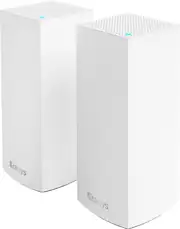
I was replacing a worry-free 9-year-old Apple AirPort Extreme router, wanting newer security & faster wifi standard. So many mesh system reviews bemoan finicky child nodes, problems with activation and unreliable operation. Media reviews pointed out privacy concerns of some brands. AX3000 was not the fastest rated or highest rated by the leading Consumer reporting magazine, but the rating is still very close to the top and ease of installation was at the top. The magazine was right. It seems like the standards that are just a couple years old are the most stable. This 2-node mesh installed easily with the phone app. Of course, it is far faster than my old system. Plus, an eBay seller had wall shelves specifically for these units, just what I needed! My spouse (who hates ANY technology visible on the wall) appreciates that they do not look like some science-fiction menacing super spider life form invading our house. (We had electric outlets installed when remodeling in anticipation of a mesh system.) Color me happy!
Posted by MarkB
- Rated 5 out of 5 stars
Great Upgrade to old router
So far this has been a great upgrade from my old Linksys router. The setup wasn’t as easy as my old router was. The instructions basically said to follow the app instructions and that didn’t work so I ended up having to call Linksys to get it setup. The customer service was excellent and the guy I spoke with very nice and knowledgeable and most importantly, I could understand what he was saying. But it was a long process. Other than that, once they were setup, I was able to get coverage throughout my house on all 3 levels with no dead zones anywhere, which is a first! This is also the first mesh router I’ve had though and I should’ve gone this route long before to cover the dead zones, instead of buying extenders and boosters. Would definitely recommend.
This review is from Linksys - Atlas 6 WiFi 6 Router AX3000 Dual-Band WiFi Mesh Wireless Router (3-pack) - White
Posted by JohnH
- Rated 5 out of 5 stars
Best value. Easiest setup.
Love Linksys networking devices. They are so reliable and the Linksys app is easy to use. Setup was simple and there are no more dead spots anywhere.
This review is from Linksys - Atlas 6 WiFi 6 Router AX3000 Dual-Band WiFi Mesh Wireless Router (3-pack) - White
Posted by KPrz
- Rated 5 out of 5 stars
Immediately Faster Internet & Better Range
After installing this Linksys mesh system with only 1 router and 1 node, I saw a 50% increase in the range and speed compared to the provided router and node from my ISP. I work from home in a home office at the far end of the house away from the main router, and with the ISP equipment, my meetings were being dropped and my work was severely hindered by the lack in speed. I was thrilled to see the boost in speed and range once the Linksys mesh system was setup. The app gives a lot of control and I was also able to configure and fine tune the router settings for optimal performance. Now I'm seeing 50%+ better performance than what I had before.
Posted by Brandon