Rating 4.5 out of 5 stars with 458 reviews
4.5- Speed (103)
- Ease of use (70)
- Range (70)
- Performance (61)
- Setup (39)
- Size (13)
- Price (8)
- Lag (7)
- Connection (5)
- Parental Controls (3)
Customer Images
The vast majority of our reviews come from verified purchases. Reviews from customers may include My Best Buy members, employees, and Tech Insider Network members (as tagged). Select reviewers may receive discounted products, promotional considerations or entries into drawings for honest, helpful reviews.
- Rated 4 out of 5 stars
EA9500's Mini-Me
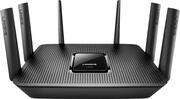
I was impressed with the features and performance of Linksys' EA9500, so when I saw they released the EA9500's little brother in the EA9300, I thought I'd give it a try. I'll be comparing the two routers together and pointing out the pros/cons between the two. For starters, the EA9300 is a bit smaller than the 9500 - but it's still a big router. The 9300 sports 5 gigabit ethernet ports, 2 USB 3.0 ports and 6 adjustable antennas. The 9500 sports 10 gigabit ports and 9 antennas. So it's a little smaller, but it's still about the same size as a dinner plate in terms of diameter. Where ever you put this router, make sure you have plenty of space. From a setup stance, the Linksys mobile app is a bit messed up. I found that setting it up using my laptop was a much more straightforward process. I was a bit bummed to that there was a firmware update for a new router right out of the box. So I had to download the update and apply it first before I could actually finish setting up the router. Once I finished the setup on my laptop, I was up and running using the Linksys app. The app is nice because, using a Linksys account, you can monitor and control all functions of your router even if you're at work or anywhere - you don't have to be on the wifi network. So who's this router for? If you're someone who has a lot of wireless devices, streams video and has a larger house with more rooms, this router is perfect for you. Linksys bills this as one of their routers that's perfect for streaming 4K content - but that's only if you have internet coming into your house at a bandwidth that supports 4K streaming from a 4K source. I don't, but I love that no matter where I am in my house, I can walk all over and there's no dead spots. With a 2.4GHz and dual-band 5GHz bands, MU-MIMO AC, and BeamForming - with a router like this, you won't have a need for a wireless extender or repeater. The biggest con in the 9300 versus the 9500 is the 9500 has 10 gigabit ethernet ports. I prefer having my A/V and gaming equipment to have hardline connections to reduce lag and buffering. So with the 9500, I can have my 4KTV, UHD Player, Apple TV, PS4, PS3, X-Box One S, Arlo Camera Base and AirPort Extreme (For wireless TimeMachine support) all connected and leave the wifi for laptops, iPads, iPhones and other devices that are geared more towards wifi. With the 9300, I don't have enough ports to have everything physically connected - but you'll have to decide if that's worth the extra $100 between the 9300 and 9500. If you're in the market for a new router and you have multiple wireless devices, stream content from Hulu, Netlix, HBO, iTunes, etc, then you owe it to yourself to check out the 9300. It carries a hefty price tag at $300, but with it's specs, it's also a significant upgrade from any wireless network setup most internet providers will give you. Pros: * 5 gigabit ports * Tri-band (1-2.4GHz and 2-5GHz) * Mobile App support Cons: * Setup with app is cumbersome * Fewer ports than the 9500
Posted by cjviscito
- Rated 5 out of 5 stars
Best Linksys EA router yet
I have reviewed the EA9500 and EA7500 before and this router is the best so far. Connection with an AC device produced the speed shown in the picture. The range was better for me than the EA9500 or EA7500. I had better connections and speeds throughout my house with the EA9300. You can read the specs on the product page. The router is smaller than the EA9500 and has six antennas. Setup was easy, and the manual setup option was easy to find. I went to the manual setup right away. The interface is presented well. It was easy to get around and intuitive to find settings. All of the radios and a guest network are just simple clicks to change. The router already had a firmware update ready, it downloaded, installed, and rebooted with no problems. You can set the lights on or off, but they aren't too bright. It's still a nice option to have. Two USB 3 ports make it easy to use for music or file distribution. The unit connected to my network with no problems and picked up my wired and wireless devices. It has everything you would expect for this class of router with more power. QoS, Network diagrams etc are all there. The only issue the router had was the speed test still wants to use Adobe Flash. Luckily, you can speed test from any browser without Flash. The highest wireless connection speed for me was 866 on the 5GHz channels. File transfers worked with no drops. I transferred some 4GB+ files and they came through fine. Pretty good for a wireless connection. I never got below 3 bars around my house, better than the EA9500 for me. Instructions are in the router help menus and provide any additional information you might need. It’s a straight forward setup tough. The EA9500 provides 4 more ethernet ports, and only one of its USB ports is 3.0, but you can always get a switch if you need more ports. Maybe it’s the fact the EA9300 has quad core processor instead of a dual core, but bang for the buck, I’d take the EA9300 over the EA9500 and other routers in its price range. This is a really good router that should meet your home network needs.
Posted by grimmace
- Rated 5 out of 5 stars
Great Router, Awesome options
Linksys AE9300 Tri Band Router Packaging and protection are very good for the unit. The AE9300 Is very well put together, it includes 2 USB3.0 for external storage that is accessible for all on your network to access. The unit also has 4 ports for wired connection, 6 antennas to ensure all areas of your home/office get the maximum of coverage. Setup was a snap, after using the quick start guide and webbing in to the unit (198.168.1.1) on your browser. The GUI interface is very user friendly. (NOTE out of the box I would use the automatic set up, so it will guide you to log in to your ISP and make setting up faster, otherwise if you do not know what you are doing you may not get it set up right, you can always go back and tweak it)The novice user can just look around at the all of settings without making any changes and it good to go out of the box. (I would change the admin password though and write it down or someone may be able to infiltrate your system and make changes unbeknownst to you) For the Advanced user there are a multitude of options you can configure which include the following: Configure the amount of guest you will allow or shut off, Parental control of each device that you can set times and sites for access or denial of sites, See a net map of all connected devices (possibly seeing if others are leeching off your network)Prioritize devices to make sure you have the best streaming speeds (like a TV, or Console gaming), Add external storage for access to all on your network, which you can set up permissions to for access certain folders or make it an FTP server, make a media server and allow certain devices access, Assign static IPs or turn on/off the internal DHCP server, Enable Nat or Dynamic routing or even static routing, Set up a VLAN, Trouble shoot individual devices that are having connection issues, Configure and allow DMZ servers, has a built in Firewall, Set up to allow only certain devices access by using selective access (only allow specified users who have their Mac address in a list access), Wireless Scheduler (turn wireless router off per a set schedule to deny all access) This unit uses a new technology called Smart Connect which switches you from lower bands (2.4ghz) to higher bands (5ghz) depending on what you are doing like just surfing to streaming to ensure you get the best possible signal. On my previous router, I ran Speed tests in multiple locations around my house and even outside. My speeds ranged from 25mbps to 30mbps. With this Router, I retested in the same areas and got an average of 30mbps for about same bandwidth speed. Coverage was great for the is unit no matter where I was in my house. I also had 4 different devices streaming 2 Netflix, one YouTube, one Amazon and a Hulu connection. All streamed without any lag or interruptions, Quality of all the movies was still topnotch. I ran a speed test during this streaming test and it came back with 20 out of 30 mbps. Which was outstanding to me with the amount for HIDEF streaming that was going on. I would not hesitate to refer this unit to my friends and family, for some this all these options would be overkill but is sure is nice to know if the need would ever arise for tweaking more security it is here in this unit. Five stars!!
Posted by Fordman9870
- Rated 5 out of 5 stars
One of the best non-mesh routers I've tried.
I received this item on Monday, 5/8/2017. I like to get my reviews in ASAP, however, due to my schedule last week, I wasn't able to hook it up and test it until later in the week. Then, as with any new router, I always like to give it 2-3 days or so to stabilize so I can test to see how it does after being up and running for consecutive days. The packaging itself is pretty nice. It's a sturdy box with the black foam on the inside, giving it that "premium" feel of getting your money's worth. This is pretty standard fare, I've found, with most modern top-tier routers. Packaging was minimal, only a few loose folded leaflets, the necessary power cable and brick and ethernet cable. I did like that the antennas were already attached to the router and didn't have to be screwed on. The router is very slick, very modern, but doesn't look "overdone" like some others I've seen that look like a dead bug, upside down. LOL. It has 6 antennas total, 4 on the sides and two in the back. Each antenna can be rotated and then tilted "outwards" into 3 different notches. Very adjustable and they feel very sturdy, not flimsy at all. Setup had a few hitches. With this being a brand new router, I assumed that like the Velop that came before it, that Linksys was requiring the app for all new routers to be set up. That is actually not the case. I tried using the app to set it up, but to no avail. Then, after rebooting the modem because I didn't have internet, the Linksys screen finally popped up on my computer. From there, I was able to set up the SSID broadcast name, combine the 2.4 and 5 GHz bands into one SSID name, create the usual 32-character password for WiFi and sign into the Linksys account. Nothing too complicated, it's very step-by-step that should fair pretty easy, even for someone without a lot of home network knowledge. Also, it did automatically update the firmware on-the-spot and without fail. The firmware updates are set for automatic and this really does work. You do NOT have to worry about manually updating the firmware on these new routers from my experiences. It gets uploaded/updated to the router within 24 hours of being posted on their website. As for performance, given that this is a single router system and not a fancy "mesh" network system like the Velop that Linksys released back during CES 2017 in January, I have to say, it has great coverage. After setting up and adjusting the antennas to the right pivot, I was able to eek out about 1,750 - 2,000 sq. ft. before hitting a dead zone. The ENTIRE house is covered, as well as about 90% of the yard. Checking speeds, even when about 25+ft from the router, we capped out on the internet speed (60MB where I live). All devices were wireless, except for the home PC, which consistently capped out at 66MB. For WiFi devices, we tried an iPhone 7 Plus, an older Galaxy S4, another Android phone from Straight Talk, and a Windows laptop. Given some of these devices used the 5GHz band and the older ones, the 2.4 GHz band, I was able to test the speed on a variety of older and newer devices, which all performed well. The 2.4 GHz devices did seem to taper off more at the same range as the 5GHz ones, which makes me believe that the 2.4 band doesn't reach as far as I'm used too, but that's OK. I'd much prefer having a really quality 5GHz band at the expense of the 2.4GHz range/quality...the older devices I have will eventually (and sooner, rather than later) phase themselves out of the household. :-) After the "setup day" and leaving the router to fend for itself for a few days after, I've not had any issues with buffering on the PS3 device I tested (2.4 GHz band), the steaming stick or any other device. Performance thus far has been rock solid. The only time I rebooted the router was after the initial setup (which is usually a general rule of thumb to do, anyway). I would definitely recommend this router to anyone, even for someone whom has never set up a router before. For the retail price, it's a worthy competitor to some other brands that I've owned before. I used to really dislike Linksys. After Belkin bought them out, I was even more leary of the brand. The first few routers they cranked out after the acquisition did leave some to be desired, but now, they are really rolling out the punches. I just really hope that Linksys continues with the firmware updates and doesn't abandon any of their newer (2017) routers soon, as I've seen this happen quite often in the past. They release a new product, support it for about 6 months or so, then abandon it.
Posted by Namdnas
- Rated 5 out of 5 stars
Easy breezy setup, blazing speeds
When it comes to routers, Linksys has it figured out. Long gone are the days where you would have to plug an ethernet cord into your computer and manually adjust the settings. You plug this in, you download the app, and the setup is just fantastically simple. The router had to download a firmware update (which during the setup, is set to do automatically, which is nice) which took the bulk of the setup time (about 5 minutes) but then once that's done, I name the network and password and then voila! I have about 25 smart devices in my home, from tablets, computers, game consoles, TVs, Chromecasts, lights, smoke detectors, etc. so I need a router that can handle a lot of devices. Given the number of devices I also run into issues where older devices run off 2.4Ghz bands, while my newer devices can take advantage of the speeds that come with 5 Ghz bands. This can be a pain for a router with multiple bands, as it makes it confusing and requires several networks in your house. The nice thing about thsi router (and maybe yo can do this with others, I don't know) is that there's an option during setup to name the three bands the same. So that way, you have one network when looking at any of your devices. This made it so much easier when I had to go through the arduous process of resetting my network settings for all of my devices. I'm no router guru, but I pay for 100MBs of internet speed and this router allows me to actually get over that (about 105 MBs) according to Speedtest. Not sure about the accuracy, but I can say that I have yet to run into ANY buffering or lag on any devices. And we are a household where we can be downloading movies on a computer, streaming shows to two different TVs and someone is playing Xbox Live. Honestly, the speeds are worth it. I don't have a big house so I never really had any issues with coverage, but I did walk down my street and I was able to get my WiFi on my phone (I don't need it, I was just checking) a few houses down. (which also makes me realize how important network security is. In conclusion, if you're looking for a great router, simple setup and the foot print of the router itself isn't too big, this is a great option. Last side note, I want to give Linksys props for getting rid of the big power brick plug. There's still a power brick, but at least it has a small AC plug running from it. Anyone who's ever had to manage a surge protector with a lot of devices knows what kind of convenience that is.
Posted by callmeageeth