Rating 4 out of 5 stars with 1803 reviews
4.0- Sound Quality (560)
- Ease of use (185)
- Battery Life (167)
- Wireless (74)
- Price (57)
- Range (122)
- Volume (22)
- Connection (18)
Customer Images
The vast majority of our reviews come from verified purchases. Reviews from customers may include My Best Buy members, employees, and Tech Insider Network members (as tagged). Select reviewers may receive discounted products, promotional considerations or entries into drawings for honest, helpful reviews.
- Rated 5 out of 5 stars
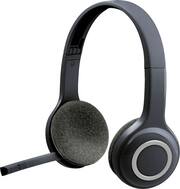
Logitech - H600 RF Wireless
The Logitech H600 RF Wireless On-Ear Headset in Black has transformed my audio experience, offering exceptional sound quality and wireless convenience. Its comfortable on-ear design and adjustable headband provide a perfect fit, allowing for extended periods of use without discomfort. The wireless feature gives me the freedom to move around without being tethered to my device, making it ideal for both work and leisure activities. With its reliable connectivity and impressive battery life, this headset has become my go-to choice for immersive audio and seamless communication.
Posted by Hassan
- Rated 5 out of 5 stars
Comfortable and works great!
I’ve had a few different headsets and this is one of the most comfortable headsets I’ve used that still allows you to hear everything going on around you! It’s not specifically meant for gaming although I do use it for such because I have pets and I need to hear what they’re doing around me when I’m playing a game so if they asked to go out I can hear it still unlike the headsets go all the way around your ears and block out all noise! They also have great sound and the mic works fantastic everybody I play with always asks me which heads that I use because they hear me so well unlike some people that I play with who I keep having to turn their sound up so I can hear them! It’s also plug and play on most computers which is very convenient I don’t have to figure out all kinds of complicated set ups Just to be able to use them! This is actually my second set of these my first sit last me about five years when finally the Mike went out and instead of buying the upgraded version this time I bought the exact same one because of how well they work for so long! Also it’s got a volume control and a mute button right on the year so if my dogs start barking I can quickly muted so everybody doesn’t have to hear the dogs and I can turn it up and down depending on the sound of the particular game I am playing!
Posted by Tami
- Rated 5 out of 5 stars
Good headphones
These headphones have worked really well for the past 2 years. I use them when I have work meetings with my coworkers and bosses. I also use them to make Loom videos. They’re easy to connect to the computer and they hold a charge pretty well. They also fold up to make storing them much more convenient. I would recommend them for minimal-average use and if you’re on a tight budget.
Posted by ChelseaR
- Rated 5 out of 5 stars
Great for the Elderly!
Wonderful help for the elderly to be able to hear the TV and block out other noises. My 95 year old Mom uses these everytime she watches tv . Great for listening to music on the TV too!
Posted by KarenW
- Rated 5 out of 5 stars
Great device to communicate
The device offers great connectivity and good sound. The rage to connect is clear in a short distance ideal for the computer office area. The earpiece has a good sound and I did not experience any distortion of sound. Great for applications like Skype.
Posted by Eagle